
Copilot Studio Custom Plugins and Data Connectors: Building Autonomous Business Agents with Real-Time Contextual Data

Your finance team has spent three weeks training a customer service agent in Copilot Studio. The agent understands policies, escalation rules, and even recognizes when a refund needs approval. But when a customer asks “what’s my account balance,” the agent returns nothing. It can talk about balance policies but has no access to customer data. The agent is conversationally complete but operationally useless.

This is the gap between conversational AI and autonomous business agents. Copilot Studio’s out-of-the-box connectors handle common scenarios: sending emails, posting to Teams, querying your knowledge base. For production agents that need to access real-time business data, resolve customer records in your ERP, or trigger workflows across your business systems, those built-in connectors become constraints. Custom plugins and data connectors transform Copilot Studio from a chatbot framework into a true autonomous agent platform, but building them requires understanding how agent context flows, how your agent manages token budgets, and where to capture data errors before they undermine agent decisions.

The Context Problem: Why Standard Connectors Fail at Scale

Most first-generation Copilot Studio implementations treat the agent as stateless. A customer asks a question, the agent formats a response, and the interaction ends. This works for FAQ-style use cases. But autonomous agents operate differently: they maintain context across multiple turns, make decisions based on customer data, and sometimes initiate actions without explicit user prompts.

Standard connectors (email, Teams, SharePoint) assume a request-response pattern. An agent sends a message, the connector executes, and returns a simple success/failure result. Real business data is rarely that clean. A customer might have multiple open orders, pending payments, or conflicting account statuses. Your agent needs to surface relevant context, reason about it, and sometimes ask clarifying questions before taking action.

This is where custom plugins become essential. Instead of the agent making separate connector calls for customer name, then order status, then payment history, a custom plugin can accept the customer ID and return a structured data object containing relevant account context. That single call reduces latency, keeps the agent’s reasoning clear, and prevents token bloat from multiple sequential API calls.

Designing Custom Plugins for Agent Reasoning

A custom plugin is an HTTP endpoint that your agent can call just like a built-in connector. The key difference is control: you define what data the agent receives, what context it needs to reason about, and how errors are handled.

Start by identifying the discrete business questions your agent needs to answer. Not “get all customer data,” but specific queries: Is this customer eligible for a refund? What is their current account balance? Are there open support tickets that might conflict with this request? Each question becomes a separate plugin endpoint, not because complexity is bad, but because focused endpoints make agent behavior predictable and testable.

The plugin endpoint should return structured JSON with fields relevant to the agent’s reasoning. If your agent is deciding whether to approve a refund, the response should include refund policy eligibility (yes/no), the customer’s refund history, any pending disputes, and the maximum allowable amount. Don’t include fields the agent doesn’t need to reason about. Noise in the response increases token consumption and can confuse the agent’s decision-making.

Error handling inside your plugin matters more in an agent context than in traditional API design. If a query times out or returns unexpected data, the agent should receive a structured error response that explains what went wrong and suggests recovery options. For example, if your ERP system is temporarily unavailable, don’t return a 500 error that breaks the agent flow. Return a structured JSON response indicating the system is unavailable and suggesting the agent offer to escalate or retry in a moment. The agent can then reason about recovery.

Integration Patterns: Real-Time Data Without Token Bloat

Once you have custom plugins defined, the architectural pattern determines whether your agent scales or bogs down. The worst pattern is sequential data fetching: the agent calls a plugin to fetch the customer record, then parses the response to extract the customer ID, then calls another plugin to fetch order status, then calls a third plugin to fetch payment information. Each call requires network latency, adds to the agent’s conversation history, and consumes tokens.

Instead, design plugin endpoints that return compound data structures. A single “Get Customer Context” endpoint returns customer basics, their recent orders, their payment status, and their support ticket count in one call. The agent makes one request, receives contextual depth, and proceeds with reasoning. This pattern is faster, cleaner, and uses far fewer tokens.

Pagination and large result sets present a different challenge. If your agent is querying a list of orders, you don’t want to return the last five years of transaction history. Use query parameters to scope the data: return only orders from the last 30 days, or only orders with a status of “pending” or “shipped.” Let your plugin do the filtering, not the agent.

Authentication between Copilot Studio and your custom plugins should use standard methods. API keys work but require secure storage. OAuth2 with service principals is stronger for production scenarios; the agent’s host application authenticates on behalf of the agent, and your plugin validates that token. This prevents agents from accidentally exposing customer data to unauthorized callers.

Managing Agent State and Conversation Context

Custom plugins change how you think about agent state. In stateless chatbot scenarios, the agent has no memory between conversations. But autonomous agents often need to carry information across multiple turns within a single conversation: the customer’s account status, the decision the agent made earlier, the action it’s waiting for approval to execute.

Copilot Studio stores conversation history in its context, and that history is sent to your agent (and to your custom plugins) with each call. This is powerful, but it has cost: longer conversations mean larger context payloads, which consume tokens faster and can hit context window limits on the underlying model. You need to design your plugins to be efficient with the conversation state.

One pattern is to have your plugin accept the conversation ID or session ID as a parameter. Your plugin stores intermediate agent reasoning (what decision it reached, what additional data it needs) in a database keyed by that session. On the next turn, when the agent calls the plugin again, it can retrieve what it learned earlier without re-transmitting that entire history through the conversation context. This pattern keeps conversation history lean while letting your agent maintain reasoning across multiple turns.

Common Implementation Mistakes

The most frequent mistake is over-fetching data. An agent asking “should I approve this refund” doesn’t need the customer’s entire account history for the past five years. It needs refund policy eligibility, recent return patterns, and any pending disputes. Plugins that return too much data waste tokens and sometimes confuse the agent’s reasoning by introducing irrelevant information.

The second mistake is poor error handling. If a custom plugin is down or returns a 500 error, and your agent doesn’t have instructions for handling that failure, the entire agent flow breaks. Every plugin call should have defined error responses and recovery instructions. Your agent should be able to handle temporary unavailability gracefully.

The third mistake is designing plugins without testing agent behavior. A plugin might work perfectly when called directly via an HTTP client, but behave unexpectedly when an agent calls it. Test your plugins with actual agent conversations, not just REST clients. The agent’s phrasing, context window, and token constraints create scenarios your unit tests won’t catch.

Building Toward Production Readiness

Autonomous agents succeed when they combine narrow, focused capabilities with reliable data access. Start by building one custom plugin that answers a specific business question well. Test it in a real agent conversation. Monitor the plugin’s response times, error rates, and whether the agent’s decisions improved compared to built-in connectors.

From there, add plugins incrementally. Each one should serve a specific function and integrate with your agent’s existing conversational flow. Design them for both speed and clarity, so your agent can reason about the data quickly without getting lost in irrelevant context.

The difference between a chatbot and an autonomous agent is data access and decision-making. Custom plugins provide the data; your agent design determines whether it reasons about that data effectively. Getting the plugin architecture right early saves months of iteration later.

Routeget Technologies has implemented custom Copilot Studio agents for finance teams, customer service operations, and supply chain coordination, each with specialized plugins connecting to ERP, CRM, and custom business systems. We work through the architectural decisions and integration patterns that let your agents scale to real production workloads.


#CopilotStudioPlugins #AIAgentArchitecture #DataConnectors #CustomIntegrations #AutonomousAgents #PowerPlatform #EnterpriseAI #AgentDesignPatterns

Building Autonomous Agents with Copilot Studio: Moving Beyond Chatbots

# Building Autonomous Agents with Copilot Studio: Moving Beyond Chatbots

Most organizations implementing Copilot Studio treat it as an intelligent chatbot that responds to user queries. That’s a missed opportunity. The platform’s real power lies in building autonomous agents that can make decisions, trigger downstream processes, and handle multi-step workflows without human intervention at each stage. Finance teams processing invoice exceptions, HR departments handling onboarding, and supply chain teams managing vendor communications all stand to benefit.

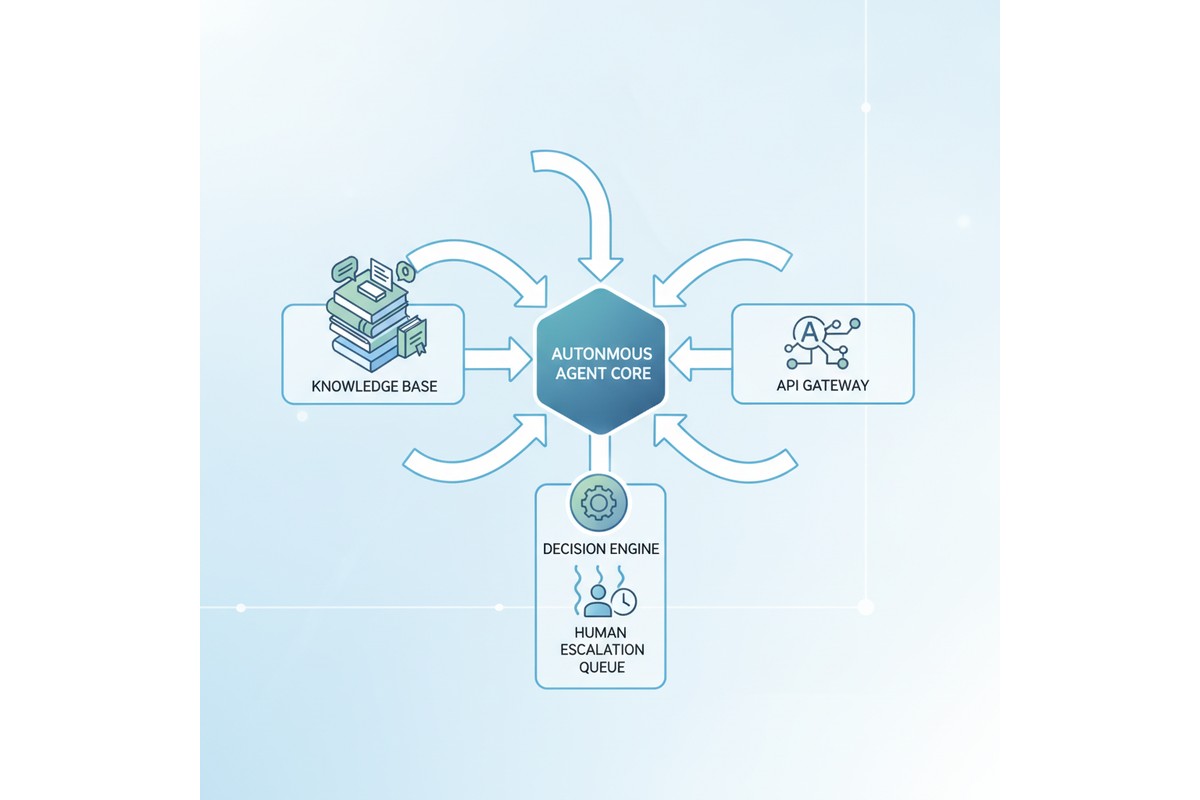
Copilot Studio autonomous agent system architecture

The gap between a chatbot and an autonomous agent comes down to three capabilities: the ability to invoke external systems without manual triggers, the capacity to make contextual decisions based on structured data, and the skill to maintain state across actions without restarting. Most Copilot Studio implementations lack these, which means their agents remain reactive and conversation-driven rather than autonomous and process-driven.

Building such an agent requires careful attention to custom actions, knowledge base integration, prompt engineering, and error handling. It’s not enough to wire up an API connection. You need to architect the agent so it knows when to act independently, how to handle failures gracefully, and when to escalate decisions to human reviewers.

Autonomous Agents vs. Interactive Chatbots

An interactive chatbot waits for user input at every step. The user submits a question, the chatbot responds, and the conversation ends until the next message arrives. Autonomous agents complete tasks without requiring user input at each decision point.

Consider a claims-processing agent. An interactive version might ask, “Does this claim qualify for expedited review?” and wait. An autonomous agent evaluates the claim against configured rules, makes the decision independently, updates the backend system, and notifies stakeholders automatically. The user’s role shifts from guiding each step to reviewing high-risk exceptions.

This design shift affects multiple aspects. First, the agent must understand when to act without prompts, requiring condition evaluation and decision trees beyond natural language understanding. Second, the agent must have authority to modify downstream data, introducing governance questions about which decisions need audit trails, human review, or policy-based automation.

Third, autonomous agents must recover from failure states gracefully. If an API call fails, an interactive chatbot tells the user it didn’t work. An autonomous agent must retry, escalate, or follow a fallback path based on business logic. Building robust error handling into the agent’s design from day one is essential.

Custom Actions and API Integration

Copilot Studio’s custom actions allow you to connect to external APIs and invoke them as part of the agent’s workflow. This is where many implementations falter. Teams configure basic actions without thinking through how the agent should behave when an API call fails, how long it should wait, or whether it should retry.

For a typical autonomous agent, you’ll define custom actions for the key external systems your agent needs to access. In a finance context, this might mean actions that query an ERP system to check if a purchase order exists, retrieve the purchasing history for a vendor, or post a transaction to the general ledger. In an HR context, you might define actions to look up employee records, check manager approval status, or send notifications through Teams or email.

Each action should include error handling at the definition level. Define which HTTP status codes are retryable (typically 502, 503, 504 and timeout errors), which represent permanent failures (400, 401, 403), and which might represent missing data (404). Configure exponential backoff for retries to avoid overwhelming the downstream API.

The other critical design choice is authentication. Copilot Studio supports connection references, which allow you to authenticate to external APIs securely. For a finance agent, you might use a service account that has specific permissions (read-only access to check PO status, but write access only to specific GL accounts). Never give your agent more permissions than it needs. If an agent is compromised, narrow permissions limit the damage.

Knowledge Base Integration

Most Copilot Studio agents include at least one knowledge base: a collection of documents or FAQs that the agent can reference when answering questions. For autonomous agents, knowledge bases serve a different purpose. Rather than storing answers to user questions, you use them to store decision logic, business rules, and process documentation that the agent uses to make autonomous decisions.

Consider a vendor onboarding agent. Instead of storing a knowledge base full of “How do I become a vendor?” FAQs, you store the actual business rules: vendors in certain geographic regions require additional tax documentation, vendors spending over a certain threshold need credit checks, and vendors in specific industries need compliance certifications. The agent retrieves these rules from the knowledge base, evaluates them against the vendor’s profile, and determines which documents need to be collected before onboarding can proceed.

This approach works because Copilot Studio’s retrieval-augmented generation (RAG) allows the agent to fetch relevant information from the knowledge base and incorporate it into its reasoning. The agent doesn’t just repeat back what’s in the knowledge base; it uses the information to make decisions.

For this to work reliably, your knowledge base content needs to be structured and current. Avoid storing conflicting information. If rule A says “credit checks are required for vendors over $100K” but another document says “credit checks are needed for vendors over $50K,” the agent’s behavior becomes unpredictable. Centralize your business rules in a single source of truth, and refresh the knowledge base whenever rules change.

Prompt Engineering for Autonomous Decision-Making

The system prompt enables autonomous action. A poorly written prompt produces an agent that refuses decisions or decides carelessly. A strong system prompt includes four elements: clear boundaries on what decisions it can make versus escalate, step-by-step decision logic (“Check vendor history using the vendor-lookup action. If they have 50 successful transactions in the past 12 months and average payment time under 30 days, they qualify for expedited payment”), guardrails for when to escalate (“If you cannot retrieve the vendor record after two retries, escalate with a detailed explanation”), and instructions for maintaining context (“Remember the vendor ID throughout. Do not make redundant lookup calls”). Specificity separates reliable agents from unreliable ones.

Error Handling and Escalation Workflows

Every autonomous agent will encounter situations where it can’t proceed. An API call fails. Required data is missing. A decision requires human judgment because it involves an exception to the normal rules. How the agent handles these situations determines whether it’s actually useful.

Design your escalation workflow first. Identify three or four common failure scenarios for your agent. For a claims processor, these might be: missing medical documentation, conflicting diagnoses from different providers, and claims that exceed specific dollar thresholds. For each scenario, define who reviews it, what information they need to see, and how they communicate their decision back to the agent (if it needs to resume).

In Copilot Studio, escalations typically flow through Power Automate. When your agent encounters a situation that requires human review, it creates a ticket or sends a notification through Teams, Power Automate, or a ticketing system. That ticket should include all the context the reviewer needs: the data the agent gathered, the decision it tried to make, and why it couldn’t proceed.

When the human reviewer makes a decision, it needs to flow back to the agent. This might happen through manual input in Teams, through an approval flow in Power Automate, or through a custom action that queries decisions from a database. The agent needs to know what the reviewer decided and continue processing if appropriate.

Test your error handling paths before going live. Don’t assume the happy path works and hope the error handling magically works when things go wrong. Deliberately trigger failures: kill an API connection, send bad data, create scenarios where required fields are missing. Observe how your agent behaves and refine the escalation logic.

Testing Autonomous Agents

Testing an autonomous agent is more complex than testing a chatbot because behavior depends on data state, API responses, and decision logic. Test at three levels: individual actions in isolation using Copilot Studio’s built-in testing, decision paths using test data with known outcomes, and escalation and error handling by simulating API failures and missing data. For each scenario, document expected behavior and verify the agent performs as designed.

Governance and Monitoring

Autonomous agents that make decisions without human review carry risk. Build governance into your design by logging every decision with the context that informed it. Set up monitoring dashboards that track autonomous decisions, escalations, errors, and human overrides. If humans override agent decisions more than 20 percent of the time, the agent’s logic needs refinement. Schedule periodic audits to verify correctness and identify patterns in mistakes, then update the system prompt or decision logic to correct them.

Conclusion

Building a true autonomous agent in Copilot Studio requires more up-front design work than building a chatbot, but the payoff is significant. Autonomous agents reduce manual work, ensure consistent decision-making, and allow organizations to scale processes without proportional increases in headcount. The key is treating autonomy as a design requirement from day one: architect your custom actions, knowledge base, prompts, and error handling specifically to support autonomous decisions, and build governance and monitoring to ensure those decisions stay accurate over time.

—

**About Routeget Technologies:** Routeget specializes in designing and implementing autonomous agents across the Microsoft cloud platform, helping organizations move beyond chatbots to truly autonomous processes. Our team brings hands-on experience building agents for finance operations, supply chain, HR, and customer service use cases, with a focus on robust error handling, governance, and measurable business outcomes.

#CopilotStudioAgents #AutonomousAgents #PowerPlatform #AIDecisionMaking #ProcessAutomation #Microsoft365AI #AgentDesign

#CopilotStudioAgents #AutonomousAgents #PowerPlatform #AIDecisionMaking #ProcessAutomation #Microsoft365AI #AgentDesign