

Data Loss Prevention Policy Implementation in the Microsoft Cloud: Balancing Security and Business Agility
Most IT leaders inherit DLP implementations that operate as expensive friction generators—slow approval workflows, frustrated business units, widespread policy exceptions—rather than effective data protection. The challenge isn’t building DLP capability; it’s building DLP that actually works in practice without crippling business operations.
Dynamics 365, Power Platform, and the broader Microsoft cloud stack move data at volume and velocity that traditional perimeter security cannot monitor. Spreadsheets with customer data flow through Power Automate workflows. Finance teams share GL account details via Teams. Sales consultants upload competitor files to Power Apps. Without intentional DLP governance, sensitive information leaks become statistical inevitability. Yet overly rigid DLP policies drive shadow IT and workarounds that are far less controlled.
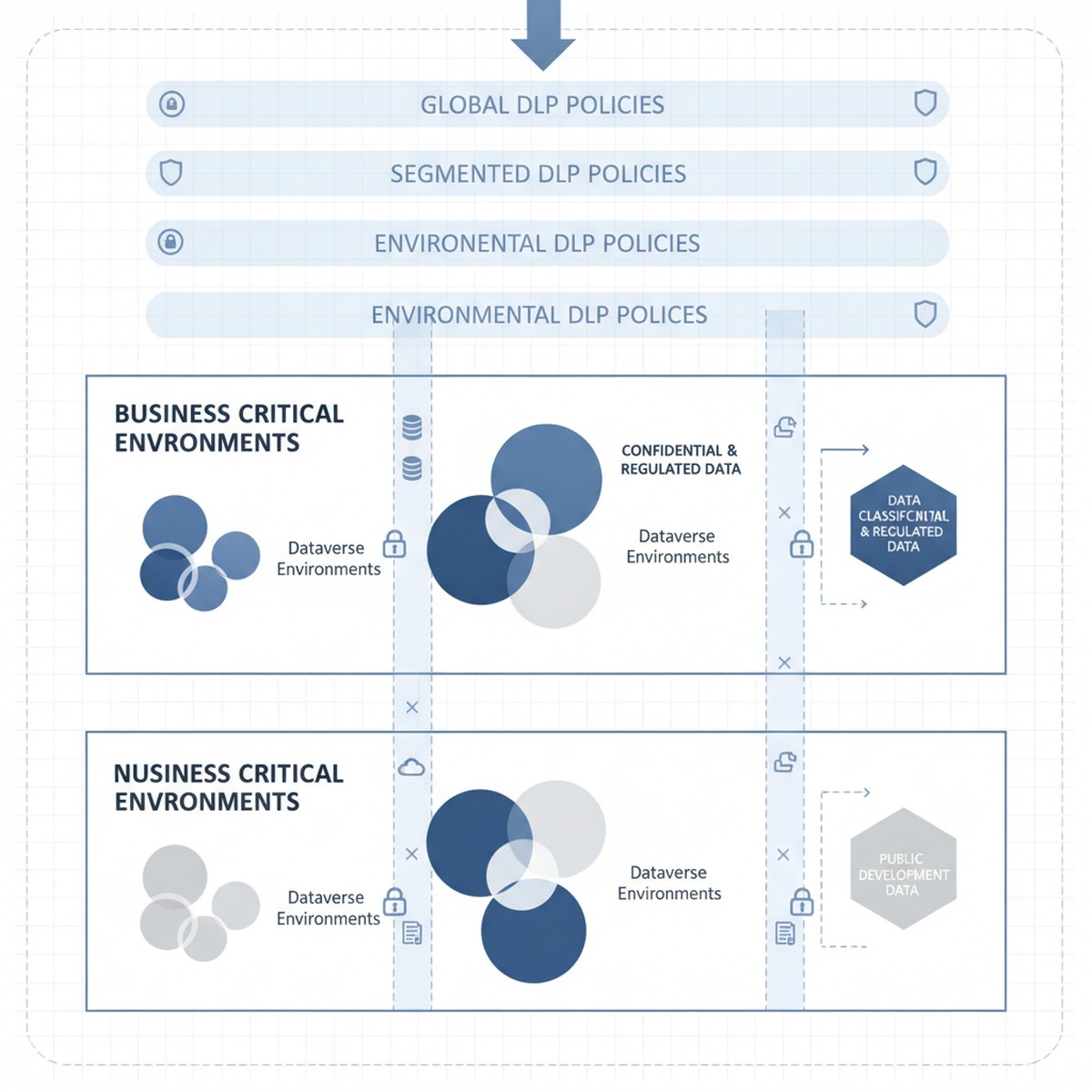
The tension is real: organizations need DLP policies that reduce breach risk and meet compliance requirements without triggering business user revolt. That balance comes from a three-layer approach starting with clear data classification, moving to segmented policy enforcement by workload, and ending with monitoring and exception workflows that catch real breaches without generating approval fatigue.
Understanding Microsoft Dataverse and Power Platform Data Classification
DLP in Microsoft Power Platform starts with a deceptively simple question: what data sensitivity level is stored in this Dataverse environment, and what external services should or should not have access to it?
Every Dataverse environment has an assigned DLP classification set by administrators. Out of the box, the options are “Business” (default), “Non-Business,” and “Unclassified,” each restricting which connectors can be used. An environment marked “Business” cannot call consumer-grade cloud services or public APIs by default. This classification system is the foundation of Power Platform DLP, and many organizations accept it unchanged. That is a mistake.
The actual tension surfaces immediately: a “Business” environment using default DLP classification prevents organizations from using essential connectors. A finance team might need to integrate Power Apps with Stripe for payment processing. A supply chain team needs logistics APIs to track shipments. A sales team needs to send customer records to third-party analytics services. These connectors fall outside default Business classification rules, but blocking them outright prevents legitimate business operations. Conversely, loosening policies to allow these services introduces real data exposure risk—customer payment details flowing to external processors without oversight.
Solving this tension requires abandoning the one-size-fits-all “Business” classification and instead segmenting Dataverse environments by actual data sensitivity and connector requirements. This segmentation becomes the policy framework that supports DLP without strangling innovation.
Segmenting Dataverse Environments by Sensitivity and Connector Requirement
Organizations that manage DLP effectively typically operate multiple Dataverse environments, each with a distinct DLP classification matched to the data sensitivity and connector requirements it actually holds.
Consider a typical enterprise structure: one environment holds Dynamics 365 Finance and Operations data (accounting records, GL accounts, intercompany transactions, supplier information). This is genuinely sensitive data subject to audit requirements and regulatory controls. This environment should be classified as “Business” under a restrictive DLP policy that prevents connectors to external consumer services, cloud file storage, or public APIs. Finance teams access this data through specifically designed Power Apps and Power Automate workflows within DLP constraints.
A second environment holds Power Apps and Power Automate flows that integrate Power Platform with external partner systems—logistics APIs, payment processors, analytics services, and public cloud connectors. This environment accepts connectors to these external services because data sensitivity and use case require it. However, no direct connection to the sensitive Finance and Operations environment is allowed. This environment operates under less restrictive DLP classification because data flowing through it is either lower sensitivity (customer feedback, survey responses, transaction history) or appropriately scoped to external partners.
A third environment is explicitly designated for proof-of-concept work and rapid prototyping. DLP is minimal here because solutions graduate to production environments with full governance only after validation and security review.
This segmentation approach solves the core tension: business users get connector freedom they need, but that freedom is appropriately scoped to environments holding data at the sensitivity level those connectors can safely access. A payment processor connector in the production environment holding Finance data would be irresponsible. The same connector in an e-commerce environment is reasonable.
Implementing Segmented DLP Without Over-provisioning
Segmentation only works when combined with clear governance over which data moves between environments and under what conditions. An organization running multiple Dataverse environments without data movement controls creates the worst outcome: complex DLP policies that block internal workflows and fail to prevent the very data exposure they were meant to restrict.
Governance begins with explicit data classification at the Dataverse table level. Every table in Finance and Operations environments should be tagged as “Highly Sensitive” (GL accounts, supplier data, payroll), “Internal” (historical transactions, internal metadata), or “Public” (product catalogs, customer-facing data). That classification becomes enforceable through data loss prevention rules: a table tagged “Highly Sensitive” cannot be queried by Power Automate flows in non-Business environments. This discipline prevents accidental sensitive data exposure through incorrectly scoped flows.
Second, organizations need exception workflows that actually work. Some business processes require sensitive data to flow to external systems. A customer requesting data export needs records to move outside the enterprise. A third-party audit requires financial table access. Building manual exception workflows—where business stakeholders request exceptions and security reviews them—turns DLP into a shared responsibility. Exception tracking also provides visibility into actual risk: organizations seeing hundreds of requests for sensitive data access learn something valuable about their risk profile.
Monitoring, Alerts, and Real-Time Response
DLP policy design matters, but enforcement and monitoring matter more. An organization with well-designed DLP policies but no monitoring ends up with policies that are either unenforced or inconsistently applied.
Microsoft Dataverse and Power Platform generate audit logs of DLP violations, but by default those logs are difficult to access in real time. Organizations that manage DLP effectively set up automated monitoring through Azure Monitor or Microsoft Sentinel, translating Dataverse audit logs into actionable alerts. A spike in violations from a specific user, a flow attempting repeated queries of sensitive tables, or patterns suggesting data exfiltration should generate alerts that security teams investigate within hours.
Real-time response capability is the difference between DLP as theoretical control and actual protection. When monitoring detects suspicious patterns, the ability to immediately disable Power Automate flows, revoke access to specific environments, or restrict Dataverse tables can interrupt a breach in progress. Without response capability, DLP monitoring is largely forensic—useful for understanding what happened after detection, not for preventing breaches.
Moving Forward: From DLP Compliance Theater to Actual Data Protection
DLP policy implementation is not a one-time project. Organizations that maintain effective data protection continuously adjust policies based on new business processes, security incidents that expose gaps, and platform evolution.
The organizations that manage this effectively treat DLP policy design as a shared responsibility across security, compliance, and business leadership. Policies are transparent—business stakeholders understand constraints and when exceptions can be requested. Exceptions are tracked regularly, signaling whether policies are appropriately calibrated. Monitoring is continuous and actionable, giving security teams real-time visibility into whether DLP policies actually protect data or just generate friction.
When these elements align, DLP stops being a security checkbox and becomes a capability that genuinely reduces sensitive data exposure risk without strangling business operations that depend on data movement and integration.
At Routeget Technologies, we have implemented data loss prevention governance across Dynamics 365 and Power Platform deployments in organizations ranging from mid-market to enterprise. Our approach begins with your current data sensitivity landscape and connector requirements, then builds segmented DLP policies and monitoring infrastructure that protect what matters most while enabling the business agility your teams need.
#DLPGovernance #DataLossPrevention #CloudSecurity #DynamicsCloudArchitecture #PowerPlatformGovernance #DataProtection #ComplianceAutomation #Dynamics365Security #MicrosoftDataverse #EnterpriseCloudGovernance