$ARTICLE
Securing Power Pages External Portals: Row-Level Security, Custom Authentication, and Data Protection in Customer-Facing Applications
$ARTICLE

$ARTICLE
Organizations managing sensitive customer and operational data in Microsoft Dynamics 365 and Dataverse face an increasingly complex landscape of regulatory requirements, internal audit obligations, and stakeholder governance expectations. Compliance frameworks such as GDPR, HIPAA, SOX, and industry-specific standards place explicit demands on how data is accessed, modified, and retained. Yet many enterprise Dataverse deployments treat data governance as an afterthought, layered on top of an already-live system rather than architected from the start. This creates risk exposure and operational friction that audit teams and compliance officers spend months trying to remediate.
A deliberate data governance framework in Dataverse addresses this directly by establishing clear ownership, access control, and audit visibility before deployment rather than retrofitting governance months after go-live. The framework does three things well: it ensures that only authorized users can access or modify specific data sets, it creates a durable audit trail of who accessed what data and when, and it establishes accountability structures so that business leaders can quickly answer regulatory or audit inquiries about data handling practices.
Building this framework requires decisions across three dimensions: access architecture (who can see what data, and under what business conditions), audit and logging (what changes are tracked and who can access the audit trail), and data lifecycle management (how long data is retained and under what conditions it is purged). These are not purely technical decisions; they emerge from business governance policy and compliance requirements that should be clearly articulated by compliance, legal, and audit teams before implementation begins.
Dataverse’s access control model starts with role-based security, where security roles define capabilities at a feature level (can a user create, read, update, or delete records of a given entity type) and share permissions (can a user see records owned by others). However, role-based control alone is coarse-grained: it does not distinguish between records within an entity type based on data sensitivity, business unit, or customer segment. Two users with the same security role can see all records in an entity, even if one should only see records for their own geographic region or customer vertical.
Dataverse adds two layers to refine access further: organization-owned versus user-owned record ownership, and team ownership structures that allow a set of records to be owned by a team rather than an individual. These features help, but they require discipline during implementation to be effective. A common mistake is to grant broad organization-level access to an entity because it feels simpler than setting up team-based ownership, then later realizing that users can see sensitive data they should not have access to.
A governance framework addresses this by establishing a clear access matrix during design: for each entity (or entity family such as customer records, financial transactions, or employee data), the framework defines which security roles can perform which operations, which records are owned by individuals versus teams, and whether sensitive fields within an entity require additional field-level access restrictions. Field-level security in Dataverse allows you to hide or restrict modification of specific fields to certain security roles, which is powerful for protecting sensitive columns like salary, medical information, or SSN without resorting to separate entities.
This mapping should be documented in a way that business stakeholders understand: a simple table showing entity type, record ownership model, security roles with access, and any field-level restrictions answers the question “who can see what” in business language rather than technical jargon. Once documented, this matrix becomes part of your governance baseline and a reference for onboarding new users or reviewing access during audit cycles.
Regulatory compliance often requires proof that sensitive data changes were made by authorized users and can be traced back to a business justification. Dataverse’s audit feature logs create, update, and delete operations on specified entities, recording the user who made the change, the timestamp, and the old and new field values. However, audit logs are only valuable if you know which entities to monitor and if you actively use the audit data to investigate access patterns or unusual changes.
A governance framework defines a “audit perimeter”: which entities are subject to audit logging, which fields within those entities are critical enough to track for compliance purposes, and how long audit logs are retained. For example, if you are handling customer payment information subject to PCI compliance, you would want to audit all access to payment card entities, even read-only access, and retain those logs for a defined period (often several years). In contrast, audit logging for a reference data entity such as product definitions might be less stringent.
The second component is audit access control: who is allowed to view audit logs, and can they be relied on as evidence of compliance? If system administrators can create, view, and delete audit logs at will, the audit trail loses credibility as a compliance artifact. A governance framework should separate the role that creates audit data (system operations, powered by Dataverse’s audit configuration) from the roles that access audit data for review (compliance, audit, and security teams). Ideally, audit logs are exported to a separate system (such as Azure Synapse, a data lake, or a SIEM) where they cannot be modified or deleted by user actions in Dataverse itself.
Audit Dataverse also provides change tracking, which is a lighter alternative to full audit logging: it records that a field changed but not the old value. Change tracking is useful for detecting unauthorized modifications to master data or configuration, even if you do not need the full audit trail for compliance purposes. Including change tracking in your governance framework for non-sensitive entities can help catch data quality issues or accidental overwrites without the overhead of full audit logging.
A complete data governance framework includes decisions about how long data is retained, what happens to data at end of life, and who is responsible for data purging. Many organizations default to infinite retention because deletion feels risky, but indefinite data retention creates compliance risk: GDPR’s right to be forgotten, for example, requires that personal data be deleted upon request unless there is a specific legal basis to retain it. Retaining data longer than necessary also increases the attack surface and creates unnecessary storage costs.
Establishing a retention policy within your governance framework requires collaboration between business (which teams use the data and for how long), legal and compliance (what regulations require), and IT operations (how to efficiently delete or archive data at scale). A retention policy might specify that customer contact records are retained for seven years after the last transaction, that employee data is retained for three years after termination, or that transactional logs are retained for five years. Each entity or data family should have a defined retention period and a corresponding deletion procedure.
Dataverse does not have automatic data purging built in, so a retention policy requires an operational process: either a scheduled flow that identifies records past their retention date and deletes them, or a manual review process where designated users approve deletion in batches. For sensitive data categories such as health information or financial records, requiring explicit approval before deletion adds an extra control layer. For high-volume, less-sensitive data such as transactional logs, automated purging based on the retention policy is more practical.
Building a governance framework in practice means translating policy into configuration. Start with an access matrix workshop bringing together business owners, security leads, and compliance representatives to define who needs access to which data and under what business conditions. Document the decisions in a shared reference (ideally a wiki or shared document that evolves as policy changes).
Then configure Dataverse to enforce the policy: set up security roles matching the matrix, assign users to roles, configure team ownership for records requiring shared access, enable field-level security for sensitive columns, and enable audit logging for entities and fields subject to compliance requirements. Finally, establish operational procedures: a regular access review process (quarterly or annually, depending on risk tolerance), audit log review cadence, and a data purging schedule aligned with retention policies.
The configuration itself is less complex than the governance discipline: determining who should have access to what requires honest conversation between business and security teams about acceptable risk, and committing to a data lifecycle policy requires agreement on trade-offs between data utility and data minimization.
A well-designed data governance framework in Dataverse reduces compliance risk, strengthens audit readiness, and provides business leaders with confidence that data access and handling are under control. The framework is not a one-time deployment task; it is an ongoing practice of documenting policy, enforcing policy through configuration, and monitoring policy adherence through access reviews and audit trails. Organizations that treat governance as foundational from the start avoid the costly and painful remediations required when governance is bolted on after deployment.
Routeget Technologies’ consulting and implementation practice brings experience in designing and implementing governance frameworks across hundreds of Dynamics 365 and Dataverse deployments. Our approach combines regulatory expertise with hands-on Dataverse configuration to build governance models that are both compliant and operationally practical for your organization’s specific risk profile and business requirements.
#DynamicsDataverse #DataGovernance #ComplianceFramework #MicrosoftDataverse #EnterpriseGovernance #SecurityControls #DataPrivacy #ERPGovernance
—
#DynamicsDataverse #DataGovernance #ComplianceFramework #MicrosoftDataverse #EnterpriseGovernance #SecurityControls #DataPrivacy #ERPGovernance
Your analytics pipeline breaks at midnight on the first of every month. A scheduled data sync from Dynamics 365 and Dataverse into your data lake times out after two hours. By the time it completes, your Power BI refresh cycle has already failed. Morning comes, and finance teams still don’t have yesterday’s actuals. You’re running parallel jobs, increasing compute resources, and the cost keeps climbing. Yet latency doesn’t improve. The bottleneck isn’t bandwidth anymore. It’s the batch-oriented ETL model itself.
Azure Synapse Link for Dataverse changes this equation. Rather than extracting data on a fixed schedule, Synapse Link captures changes in real time. It lands them continuously in your Azure Data Lake Gen2 storage. Your analytics pipeline consumes fresh data minutes after it’s entered, not hours later. For organizations running Dynamics 365 Finance and Operations, Business Central, or any Power Platform solution backed by Dataverse, this represents a fundamental shift in how quickly business intelligence responds to operational change.
This guide addresses the architecture patterns, configuration decisions, and optimization strategies that make Synapse Link work reliably in production. When data volumes are large, table schemas change frequently, and analytics must stay current without creating unmanageable infrastructure debt, these patterns separate success from costly rework.
Synapse Link operates as a continuous export service. When you enable the link for a Dataverse table, Microsoft provisions a lake database (a logical container in your Synapse workspace) and begins writing all rows and changes to that database in delta format. Every create, update, and delete against the source table flows through automatically. There’s no polling, no batch cycles, no missed updates during downtime.
The architecture sits in three layers. The source layer is Dataverse itself, the single system of record. The transport layer is Synapse Link’s background sync service, running in Microsoft’s infrastructure. This service watches for changes and writes them to your data lake. The consumption layer is your Synapse analytics workspace. SQL, Spark, or Power BI queries run against the lake databases created by Synapse Link, consuming data that’s typically fresher than five minutes old.
The critical architectural advantage is that your data lake becomes a near-real-time reflection of Dataverse state. There’s no need for custom connectors, scheduled pipeline dependencies, or manual trigger management. Synapse Link handles the mechanics, so your architecture can focus on analytics, not plumbing. For organizations with tens or hundreds of tables across Finance, Operations, Sales, and Service modules, that simplification is substantial.
Not every table needs Synapse Link enabled. Organizations often enable the link for high-priority tables that drive analytics. Examples include general ledger transactions, customer orders, inventory movements, and service cases. Meanwhile, they leave audit tables and transaction logs in traditional export pipelines. This stratified approach balances real-time freshness where it matters with infrastructure cost where it doesn’t.
When enabling Synapse Link, you’ll encounter three key decisions. First, lake database naming. Synapse Link automatically creates a lake database with a naming convention, but you can customize the name to align with your data lake governance. Choose a naming scheme that integrates with existing bronze/silver/gold layer conventions. This helps downstream consumers and builders understand the data’s origin and processing stage.
Second, table filtering. You can export specific columns rather than entire tables. For compliance or performance reasons, excluding sensitive columns, system-generated audit columns, or rarely-used fields reduces storage footprint and simplifies schema. However, be deliberate about this. Once you exclude a column, you’ll need to reconfigure if you later need historical data from before the exclusion date. Document every filter decision so future team members understand why certain fields don’t appear in the lake.
Third, delta table format. Synapse Link writes to delta tables by default, which is the right choice for Synapse analytics. Delta format provides ACID transactions, time-travel capabilities, and unified read/write paths across Spark and SQL. If your organization runs other tools against the data lake, confirm those tools can consume delta format natively or through delta shims. Many can, but older workflows sometimes assume Parquet only.
Dataverse table schemas change. A developer adds a new column to capture additional context. Someone renames a field for clarity. A business requirement leads to a new custom attribute. In the immediate aftermath of these changes, your Synapse Link export path will fail if the configuration hasn’t been updated.
The pattern to prevent outages is declarative schema management. When a Dataverse table schema changes, Synapse Link notifies you via Azure Event Grid. Event Grid triggers an Azure Function or Logic App that updates the table configuration in Synapse to include the new column, then resumes the export. This automation means schema changes propagate to analytics within minutes, without manual intervention.
Without this automation, your team discovers the problem when the scheduled Synapse Link export fails. This typically happens hours after the schema change occurred. By then, analytics queries have stalled, dashboards are broken, and you’re in firefighting mode. Build the event-driven schema sync as part of your initial deployment, not as a hotfix months later.
Synapse Link writes data to delta tables partitioned by change date. This partitioning scheme makes time-range queries efficient. Selecting all changes since yesterday will scan only yesterday’s partition, not the entire table. For tables with millions of rows added daily, this partition-pruning cuts query time and cost dramatically.
However, if your analytical queries filter by other columns, the partition structure doesn’t help. Selecting all customers in a region, or all orders for a specific product, requires secondary partitioning strategies. Create Spark jobs that reorganize Synapse Link data into silver-layer tables partitioned by business-relevant columns. Alternatively, use Synapse SQL serverless pools to create external tables with clustering hints.
The pattern is to treat Synapse Link output as a bronze layer. The raw lake data is correct and complete but not optimized for end-user queries. A scheduled Spark or Data Factory pipeline runs against the bronze Synapse Link tables, applies business logic, aggregates, and writes to a silver layer organized by business domain. This silver layer has the partitioning, indexing, and schema structure that makes operational and analytical queries fast.
Synapse Link pricing depends on the volume of changes exported. A table with millions of static rows but only thousands of daily updates costs far less than a high-churn table with constant inserts and updates. For large Dynamics 365 Finance implementations, tables like GeneralJournalEntry or SalesOrderLine can generate significant export volume.
To manage costs, export only the tables and columns you actually analyze. Use Synapse Link’s built-in filtering to exclude audit columns, system columns, and deprecated fields. Monitor your lake storage growth over the first month and adjust the table set if export volume exceeds budget.
Also monitor Synapse capacity. A Synapse workspace provisioned for light analytics may hit query limit constraints when hundreds of users begin running reports against real-time Synapse Link data. Plan capacity headroom as more teams adopt the analytics platform, especially for organizations moving from monthly batch reporting to daily or real-time dashboards. Real-time analytics consumption patterns differ significantly from batch. Queries run continuously rather than on a schedule, so workspace capacity must account for concurrency, not just peak load.
Real-time data makes bad data move faster. If a calculation error slips into an operational system, Synapse Link exports that error immediately to analytics. Your analytics don’t catch it until someone notices the number is wrong.
Build data quality checks into your silver-layer pipeline. After Synapse Link data lands in the bronze lake, a Spark or Data Factory pipeline validates totals, checks for orphaned records, and confirms business rule compliance before writing to silver. These checks prevent corrupted data from reaching dashboards and reports.
Also implement data lineage tracking. Record which Dataverse records contributed to each analytical result, so if an error is discovered, you can trace it back to the source transaction and correct it. This traceability is essential in regulated industries and for audit trails.
Synapse Link runs in the background, so visibility into its operation is easy to miss. Set up alerts for three failure modes. First, if the link falls behind (if the delta between current Dataverse records and exported records exceeds your SLA window), an alert should fire. Second, if a schema change causes an export failure, you want to know immediately, not when a dashboard goes blank. Third, if Synapse workspace query performance degrades, an alert helps you diagnose whether the issue is Synapse Link volume, query design, or workspace sizing.
Azure Monitor and Log Analytics integrate with Synapse Link, so you can query export history, track latency, and set up alerting without custom instrumentation. Invest time early in configuring these dashboards. The investment pays off when you need to troubleshoot issues at 2 AM.
Azure Synapse Link for Dataverse shifts data analytics from a scheduled batch process to a continuously-updated system of record. For Dynamics 365 organizations running complex financial, operational, and sales analytics, this shift unlocks near-real-time decision-making without the infrastructure complexity of custom APIs or scheduled ETL jobs.
The implementation steps are straightforward: enable the link for priority tables, automate schema management through event-driven updates, build a bronze-to-silver pipeline that optimizes for end-user query patterns, monitor cost and workspace capacity, implement data quality validation, and configure alerting for failure scenarios.
The competitive advantage isn’t in the technology itself. Synapse Link is a managed service. The advantage is in architecting analytics to exploit real-time data. Organizations that move quickly from batch reporting to real-time analytics gain information advantage. They see problems before they become crises and opportunities before competitors catch on.
Routeget Technologies has helped dozens of Dynamics 365 Finance and Dataverse implementations deploy real-time analytics strategies that cut financial close cycles by weeks and unlock daily operational visibility where monthly batch reporting once stood in the way. If your organization is building a modern analytics platform, Synapse Link deserves a central place in that architecture.
#SynapseLink #DataverseLakeDatabase #RealTimeAnalytics #AzureDataArchitecture #DataQuality

Data Loss Prevention Policy Implementation in the Microsoft Cloud: Balancing Security and Business Agility
Most IT leaders inherit DLP implementations that operate as expensive friction generators—slow approval workflows, frustrated business units, widespread policy exceptions—rather than effective data protection. The challenge isn’t building DLP capability; it’s building DLP that actually works in practice without crippling business operations.
Dynamics 365, Power Platform, and the broader Microsoft cloud stack move data at volume and velocity that traditional perimeter security cannot monitor. Spreadsheets with customer data flow through Power Automate workflows. Finance teams share GL account details via Teams. Sales consultants upload competitor files to Power Apps. Without intentional DLP governance, sensitive information leaks become statistical inevitability. Yet overly rigid DLP policies drive shadow IT and workarounds that are far less controlled.
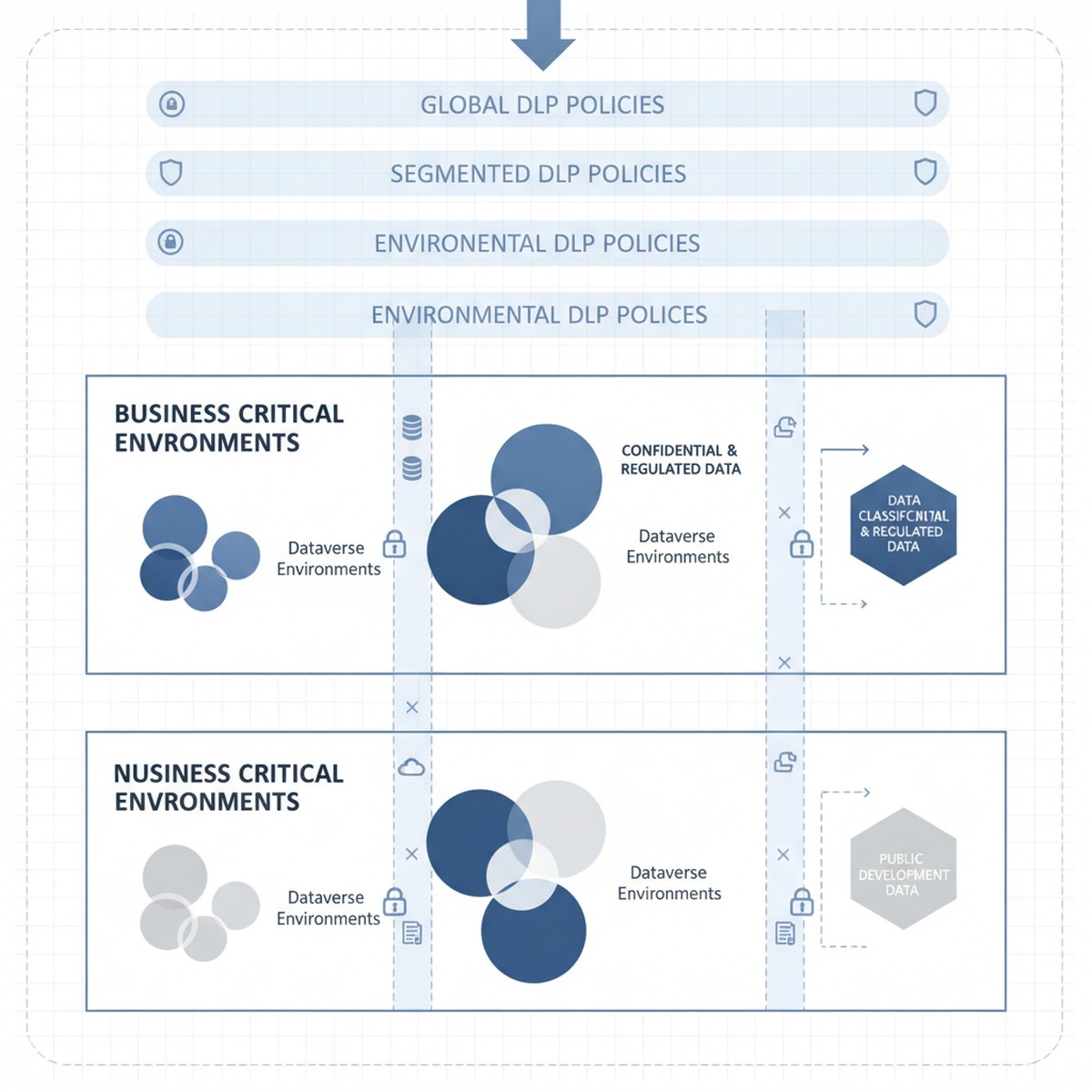
The tension is real: organizations need DLP policies that reduce breach risk and meet compliance requirements without triggering business user revolt. That balance comes from a three-layer approach starting with clear data classification, moving to segmented policy enforcement by workload, and ending with monitoring and exception workflows that catch real breaches without generating approval fatigue.
DLP in Microsoft Power Platform starts with a deceptively simple question: what data sensitivity level is stored in this Dataverse environment, and what external services should or should not have access to it?
Every Dataverse environment has an assigned DLP classification set by administrators. Out of the box, the options are “Business” (default), “Non-Business,” and “Unclassified,” each restricting which connectors can be used. An environment marked “Business” cannot call consumer-grade cloud services or public APIs by default. This classification system is the foundation of Power Platform DLP, and many organizations accept it unchanged. That is a mistake.
The actual tension surfaces immediately: a “Business” environment using default DLP classification prevents organizations from using essential connectors. A finance team might need to integrate Power Apps with Stripe for payment processing. A supply chain team needs logistics APIs to track shipments. A sales team needs to send customer records to third-party analytics services. These connectors fall outside default Business classification rules, but blocking them outright prevents legitimate business operations. Conversely, loosening policies to allow these services introduces real data exposure risk—customer payment details flowing to external processors without oversight.
Solving this tension requires abandoning the one-size-fits-all “Business” classification and instead segmenting Dataverse environments by actual data sensitivity and connector requirements. This segmentation becomes the policy framework that supports DLP without strangling innovation.
Organizations that manage DLP effectively typically operate multiple Dataverse environments, each with a distinct DLP classification matched to the data sensitivity and connector requirements it actually holds.
Consider a typical enterprise structure: one environment holds Dynamics 365 Finance and Operations data (accounting records, GL accounts, intercompany transactions, supplier information). This is genuinely sensitive data subject to audit requirements and regulatory controls. This environment should be classified as “Business” under a restrictive DLP policy that prevents connectors to external consumer services, cloud file storage, or public APIs. Finance teams access this data through specifically designed Power Apps and Power Automate workflows within DLP constraints.
A second environment holds Power Apps and Power Automate flows that integrate Power Platform with external partner systems—logistics APIs, payment processors, analytics services, and public cloud connectors. This environment accepts connectors to these external services because data sensitivity and use case require it. However, no direct connection to the sensitive Finance and Operations environment is allowed. This environment operates under less restrictive DLP classification because data flowing through it is either lower sensitivity (customer feedback, survey responses, transaction history) or appropriately scoped to external partners.
A third environment is explicitly designated for proof-of-concept work and rapid prototyping. DLP is minimal here because solutions graduate to production environments with full governance only after validation and security review.
This segmentation approach solves the core tension: business users get connector freedom they need, but that freedom is appropriately scoped to environments holding data at the sensitivity level those connectors can safely access. A payment processor connector in the production environment holding Finance data would be irresponsible. The same connector in an e-commerce environment is reasonable.
Segmentation only works when combined with clear governance over which data moves between environments and under what conditions. An organization running multiple Dataverse environments without data movement controls creates the worst outcome: complex DLP policies that block internal workflows and fail to prevent the very data exposure they were meant to restrict.
Governance begins with explicit data classification at the Dataverse table level. Every table in Finance and Operations environments should be tagged as “Highly Sensitive” (GL accounts, supplier data, payroll), “Internal” (historical transactions, internal metadata), or “Public” (product catalogs, customer-facing data). That classification becomes enforceable through data loss prevention rules: a table tagged “Highly Sensitive” cannot be queried by Power Automate flows in non-Business environments. This discipline prevents accidental sensitive data exposure through incorrectly scoped flows.
Second, organizations need exception workflows that actually work. Some business processes require sensitive data to flow to external systems. A customer requesting data export needs records to move outside the enterprise. A third-party audit requires financial table access. Building manual exception workflows—where business stakeholders request exceptions and security reviews them—turns DLP into a shared responsibility. Exception tracking also provides visibility into actual risk: organizations seeing hundreds of requests for sensitive data access learn something valuable about their risk profile.
DLP policy design matters, but enforcement and monitoring matter more. An organization with well-designed DLP policies but no monitoring ends up with policies that are either unenforced or inconsistently applied.
Microsoft Dataverse and Power Platform generate audit logs of DLP violations, but by default those logs are difficult to access in real time. Organizations that manage DLP effectively set up automated monitoring through Azure Monitor or Microsoft Sentinel, translating Dataverse audit logs into actionable alerts. A spike in violations from a specific user, a flow attempting repeated queries of sensitive tables, or patterns suggesting data exfiltration should generate alerts that security teams investigate within hours.
Real-time response capability is the difference between DLP as theoretical control and actual protection. When monitoring detects suspicious patterns, the ability to immediately disable Power Automate flows, revoke access to specific environments, or restrict Dataverse tables can interrupt a breach in progress. Without response capability, DLP monitoring is largely forensic—useful for understanding what happened after detection, not for preventing breaches.
DLP policy implementation is not a one-time project. Organizations that maintain effective data protection continuously adjust policies based on new business processes, security incidents that expose gaps, and platform evolution.
The organizations that manage this effectively treat DLP policy design as a shared responsibility across security, compliance, and business leadership. Policies are transparent—business stakeholders understand constraints and when exceptions can be requested. Exceptions are tracked regularly, signaling whether policies are appropriately calibrated. Monitoring is continuous and actionable, giving security teams real-time visibility into whether DLP policies actually protect data or just generate friction.
When these elements align, DLP stops being a security checkbox and becomes a capability that genuinely reduces sensitive data exposure risk without strangling business operations that depend on data movement and integration.
At Routeget Technologies, we have implemented data loss prevention governance across Dynamics 365 and Power Platform deployments in organizations ranging from mid-market to enterprise. Our approach begins with your current data sensitivity landscape and connector requirements, then builds segmented DLP policies and monitoring infrastructure that protect what matters most while enabling the business agility your teams need.
#DLPGovernance #DataLossPrevention #CloudSecurity #DynamicsCloudArchitecture #PowerPlatformGovernance #DataProtection #ComplianceAutomation #Dynamics365Security #MicrosoftDataverse #EnterpriseCloudGovernance

When you first deploy Dataverse, the storage bill arrives as a small surprise. When you deploy your tenth instance, it arrives as a budget problem. This escalation is not accidental. It reflects a choice you likely did not consciously make: the decision to separate Dataverse environments.
Most organizations start with a single development environment, then add a staging environment for UAT, then a production environment for the main line of business. Six months later, there’s a second production environment for a parallel business unit. A year in, IT has provisioned separate Dataverse instances for finance, operations, customer service, and a pilot project that “just needed a sandbox space.” Each instance accrues storage costs, backup overhead, governance complexity, and security review burden. The organization paid for all of it. Few asked whether they needed to.
The question “Should we consolidate or segregate?” never came up because it felt obvious: production should be separate from development. But that clarity evaporates once you have multiple business units, overlapping data needs, and genuine compliance constraints. Consolidation looks cost-efficient until you calculate the management burden. Segregation looks secure until you realize your core customer data lives in four places and nobody knows which is authoritative.
The answer is neither pure consolidation nor pure segregation. It is strategy.
Dataverse pricing ties directly to storage consumption and the number of instances you maintain. A 10 GB storage license costs roughly 100 USD per year. An organization with ten segregated Dataverse environments, even with light usage, pays backup, redundancy, and management overhead across each one. The cloud infrastructure beneath Dataverse (Azure) charges for compute, storage durability, and replication regardless of how full your instance is. A mostly empty Dataverse environment costs nearly as much as a full one.
Segregation creates what appears to be security clarity: production data stays in production, development in development, finance data in finance. This isolation has genuine value. A misconfigured Power Automate flow in a development sandbox cannot accidentally update live customer records. A security breach affecting one environment need not compromise all of them. But segregation imposes a hidden cost: data synchronization, duplicate records, inconsistent customer views, and reconciliation overhead. If customer records live in both a finance Dataverse and an operations Dataverse, which is the source of truth when they conflict? Who owns the resolution process?
Consolidation eliminates that duplication. A single Dataverse instance holding all enterprise data means one source of truth for customer records, one master file for products, one system of record for financial transactions. You skip the synchronization overhead, the reconciliation disputes, and the headache of knowing which Dataverse has the current information. The cost per record drops. But the security model becomes more complex. Consolidation means granting broader data access to more users and applications, requiring tighter role-based access control, field-level security rules, and auditing to prevent accidental or malicious data leakage. A single misconfigured permission model puts more data at risk than a segregated approach would.

Segregation is the right strategy when regulatory compliance or data residency mandates isolation. A healthcare organization subject to HIPAA cannot store patient records alongside non-protected business data in the same system without additional access controls that approach the complexity of separate systems anyway. A financial services firm with customer data subject to SOX or PCI compliance, or an organization operating in multiple countries with GDPR or localization requirements, often finds segregation is mandated by policy rather than chosen for efficiency.
Segregation also makes sense when a subsidiary or business unit operates as a distinct legal entity with its own data ownership and governance. If your organization acquired a company and that company operates with its own finance department, separate Dataverse instances may be required during the integration phase and might remain appropriate long term to respect the subsidiary’s operational autonomy, even if they cost more.
Segregation further proves necessary when the organization lacks the governance maturity to enforce consistent security policies across shared data. If your Power Platform practice is young, permissioning discipline is inconsistent, and no one has ownership over a unified data governance framework, adding data to a consolidated Dataverse risks creating visibility into sensitive information that should remain restricted. In that case, segregation by business unit or application buys time for your governance practice to mature.
Consolidation is strategically sound when you have multiple business units sharing core data, such as customers, products, and suppliers. The finance department’s customer master should be the same record your sales team references. The supply chain’s product master should be the source of truth for the pricing your finance team uses in invoicing. Consolidation eliminates the cost and risk of maintaining parallel records and reconciling discrepancies when they diverge.
Consolidation also makes sense when your organization has established governance discipline and a clear data stewardship model. If you have defined data ownership (finance owns the general ledger, supply chain owns inventory, sales owns opportunities), have role-based security groups mapped to those functional areas, and have audit mechanisms in place to catch permission violations, a consolidated Dataverse becomes a platform strength rather than a security risk. Your cost per record drops, your data consistency improves, and you simplify the user experience by giving people access to the unified information they need rather than requiring them to navigate to separate systems.
Consolidation further makes sense for organizations with mature ALM (application lifecycle management) practices. Consolidated Dataverse allows you to deploy solutions and flows to shared data layers without the release complexity of managing separate instances. Your development, staging, and production environments can all point to logically separated Dataverse spaces within a single instance, reducing provisioning overhead and backup complexity.
Many organizations land on a hybrid approach: one or two consolidated production Dataverse instances for the main business, with a separate development/test environment reserved for experimental solutions and non-production use.
This model recognizes that some segregation is necessary (development must be isolated from production), while consolidation of core business logic and shared data eliminates duplication and cost. Within a single Dataverse production instance, you use solution layers and environment variables to manage configuration differences for different business units or applications, avoiding the need for separate instances.
Many organizations underestimate the operational cost of managing multiple Dataverse instances. Each instance requires backup policies, disaster recovery testing, access control reviews, security patching coordination, and licensing reconciliation. Each instance needs monitoring for performance issues. Each introduces a potential point of data quality failure. If you have ten Dataverse environments with inconsistent master data definitions, ten different backup schedules, and ten separate access reviews, you have essentially maintained ten times the governance surface area compared to one consolidated instance.
Before you provision another Dataverse instance, ask whether the request stems from genuine compliance isolation or from organizational convenience. If it is convenience, consider whether investing in your governance model (clearer role definitions, field-level security policies, auditing) would be more cost-effective than the ongoing operational overhead of maintaining a separate instance.
If you already have multiple instances, analyze the actual data sharing patterns. Do core business entities (customers, products, suppliers) need to be synchronized across instances? If so, you are paying the cost of segregation while accepting the complexity of consolidation. A strategic consolidation project to merge those shared entities might cost less over three years than the recurring duplication and reconciliation overhead.
Document your environment strategy explicitly. Do not let instances accumulate by default. Routeget Technologies works with organizations to audit their existing Dataverse footprint, quantify the cost-benefit of consolidation versus continued segregation, and design transition plans that respect compliance constraints while reducing total cost of ownership. The difference between a well-planned environment architecture and an ad-hoc collection of instances often runs to hundreds of thousands of dollars annually for larger deployments.
Hashtags: #DataverseArchitecture #EnvironmentStrategy #PowerPlatformGovernance #EnterpriseDataManagement #DataverseCostOptimization #CloudGovernance #MicrosoftDataverse