Building a Data Governance Framework for Dataverse: Compliance, Audit Trails, and Access Control in Enterprise Deployments

Organizations managing sensitive customer and operational data in Microsoft Dynamics 365 and Dataverse face an increasingly complex landscape of regulatory requirements, internal audit obligations, and stakeholder governance expectations. Compliance frameworks such as GDPR, HIPAA, SOX, and industry-specific standards place explicit demands on how data is accessed, modified, and retained. Yet many enterprise Dataverse deployments treat data governance as an afterthought, layered on top of an already-live system rather than architected from the start. This creates risk exposure and operational friction that audit teams and compliance officers spend months trying to remediate.

A deliberate data governance framework in Dataverse addresses this directly by establishing clear ownership, access control, and audit visibility before deployment rather than retrofitting governance months after go-live. The framework does three things well: it ensures that only authorized users can access or modify specific data sets, it creates a durable audit trail of who accessed what data and when, and it establishes accountability structures so that business leaders can quickly answer regulatory or audit inquiries about data handling practices.

Building this framework requires decisions across three dimensions: access architecture (who can see what data, and under what business conditions), audit and logging (what changes are tracked and who can access the audit trail), and data lifecycle management (how long data is retained and under what conditions it is purged). These are not purely technical decisions; they emerge from business governance policy and compliance requirements that should be clearly articulated by compliance, legal, and audit teams before implementation begins.

Access Control as the Foundation

Dataverse’s access control model starts with role-based security, where security roles define capabilities at a feature level (can a user create, read, update, or delete records of a given entity type) and share permissions (can a user see records owned by others). However, role-based control alone is coarse-grained: it does not distinguish between records within an entity type based on data sensitivity, business unit, or customer segment. Two users with the same security role can see all records in an entity, even if one should only see records for their own geographic region or customer vertical.

Dataverse adds two layers to refine access further: organization-owned versus user-owned record ownership, and team ownership structures that allow a set of records to be owned by a team rather than an individual. These features help, but they require discipline during implementation to be effective. A common mistake is to grant broad organization-level access to an entity because it feels simpler than setting up team-based ownership, then later realizing that users can see sensitive data they should not have access to.

A governance framework addresses this by establishing a clear access matrix during design: for each entity (or entity family such as customer records, financial transactions, or employee data), the framework defines which security roles can perform which operations, which records are owned by individuals versus teams, and whether sensitive fields within an entity require additional field-level access restrictions. Field-level security in Dataverse allows you to hide or restrict modification of specific fields to certain security roles, which is powerful for protecting sensitive columns like salary, medical information, or SSN without resorting to separate entities.

This mapping should be documented in a way that business stakeholders understand: a simple table showing entity type, record ownership model, security roles with access, and any field-level restrictions answers the question “who can see what” in business language rather than technical jargon. Once documented, this matrix becomes part of your governance baseline and a reference for onboarding new users or reviewing access during audit cycles.

Audit Trails and Change Tracking

Regulatory compliance often requires proof that sensitive data changes were made by authorized users and can be traced back to a business justification. Dataverse’s audit feature logs create, update, and delete operations on specified entities, recording the user who made the change, the timestamp, and the old and new field values. However, audit logs are only valuable if you know which entities to monitor and if you actively use the audit data to investigate access patterns or unusual changes.

A governance framework defines a “audit perimeter”: which entities are subject to audit logging, which fields within those entities are critical enough to track for compliance purposes, and how long audit logs are retained. For example, if you are handling customer payment information subject to PCI compliance, you would want to audit all access to payment card entities, even read-only access, and retain those logs for a defined period (often several years). In contrast, audit logging for a reference data entity such as product definitions might be less stringent.

The second component is audit access control: who is allowed to view audit logs, and can they be relied on as evidence of compliance? If system administrators can create, view, and delete audit logs at will, the audit trail loses credibility as a compliance artifact. A governance framework should separate the role that creates audit data (system operations, powered by Dataverse’s audit configuration) from the roles that access audit data for review (compliance, audit, and security teams). Ideally, audit logs are exported to a separate system (such as Azure Synapse, a data lake, or a SIEM) where they cannot be modified or deleted by user actions in Dataverse itself.

Audit Dataverse also provides change tracking, which is a lighter alternative to full audit logging: it records that a field changed but not the old value. Change tracking is useful for detecting unauthorized modifications to master data or configuration, even if you do not need the full audit trail for compliance purposes. Including change tracking in your governance framework for non-sensitive entities can help catch data quality issues or accidental overwrites without the overhead of full audit logging.

Data Lifecycle and Retention Policy

A complete data governance framework includes decisions about how long data is retained, what happens to data at end of life, and who is responsible for data purging. Many organizations default to infinite retention because deletion feels risky, but indefinite data retention creates compliance risk: GDPR’s right to be forgotten, for example, requires that personal data be deleted upon request unless there is a specific legal basis to retain it. Retaining data longer than necessary also increases the attack surface and creates unnecessary storage costs.

Establishing a retention policy within your governance framework requires collaboration between business (which teams use the data and for how long), legal and compliance (what regulations require), and IT operations (how to efficiently delete or archive data at scale). A retention policy might specify that customer contact records are retained for seven years after the last transaction, that employee data is retained for three years after termination, or that transactional logs are retained for five years. Each entity or data family should have a defined retention period and a corresponding deletion procedure.

Dataverse does not have automatic data purging built in, so a retention policy requires an operational process: either a scheduled flow that identifies records past their retention date and deletes them, or a manual review process where designated users approve deletion in batches. For sensitive data categories such as health information or financial records, requiring explicit approval before deletion adds an extra control layer. For high-volume, less-sensitive data such as transactional logs, automated purging based on the retention policy is more practical.

Governance in Practice: Implementation Guidance

Building a governance framework in practice means translating policy into configuration. Start with an access matrix workshop bringing together business owners, security leads, and compliance representatives to define who needs access to which data and under what business conditions. Document the decisions in a shared reference (ideally a wiki or shared document that evolves as policy changes).

Then configure Dataverse to enforce the policy: set up security roles matching the matrix, assign users to roles, configure team ownership for records requiring shared access, enable field-level security for sensitive columns, and enable audit logging for entities and fields subject to compliance requirements. Finally, establish operational procedures: a regular access review process (quarterly or annually, depending on risk tolerance), audit log review cadence, and a data purging schedule aligned with retention policies.

The configuration itself is less complex than the governance discipline: determining who should have access to what requires honest conversation between business and security teams about acceptable risk, and committing to a data lifecycle policy requires agreement on trade-offs between data utility and data minimization.

Conclusion

A well-designed data governance framework in Dataverse reduces compliance risk, strengthens audit readiness, and provides business leaders with confidence that data access and handling are under control. The framework is not a one-time deployment task; it is an ongoing practice of documenting policy, enforcing policy through configuration, and monitoring policy adherence through access reviews and audit trails. Organizations that treat governance as foundational from the start avoid the costly and painful remediations required when governance is bolted on after deployment.

Routeget Technologies’ consulting and implementation practice brings experience in designing and implementing governance frameworks across hundreds of Dynamics 365 and Dataverse deployments. Our approach combines regulatory expertise with hands-on Dataverse configuration to build governance models that are both compliant and operationally practical for your organization’s specific risk profile and business requirements.

#DynamicsDataverse #DataGovernance #ComplianceFramework #MicrosoftDataverse #EnterpriseGovernance #SecurityControls #DataPrivacy #ERPGovernance

—

#DynamicsDataverse #DataGovernance #ComplianceFramework #MicrosoftDataverse #EnterpriseGovernance #SecurityControls #DataPrivacy #ERPGovernance
Securing Multi-Tenant Dataverse Deployments: Governance Models and Compliance Strategies for Enterprise Organizations

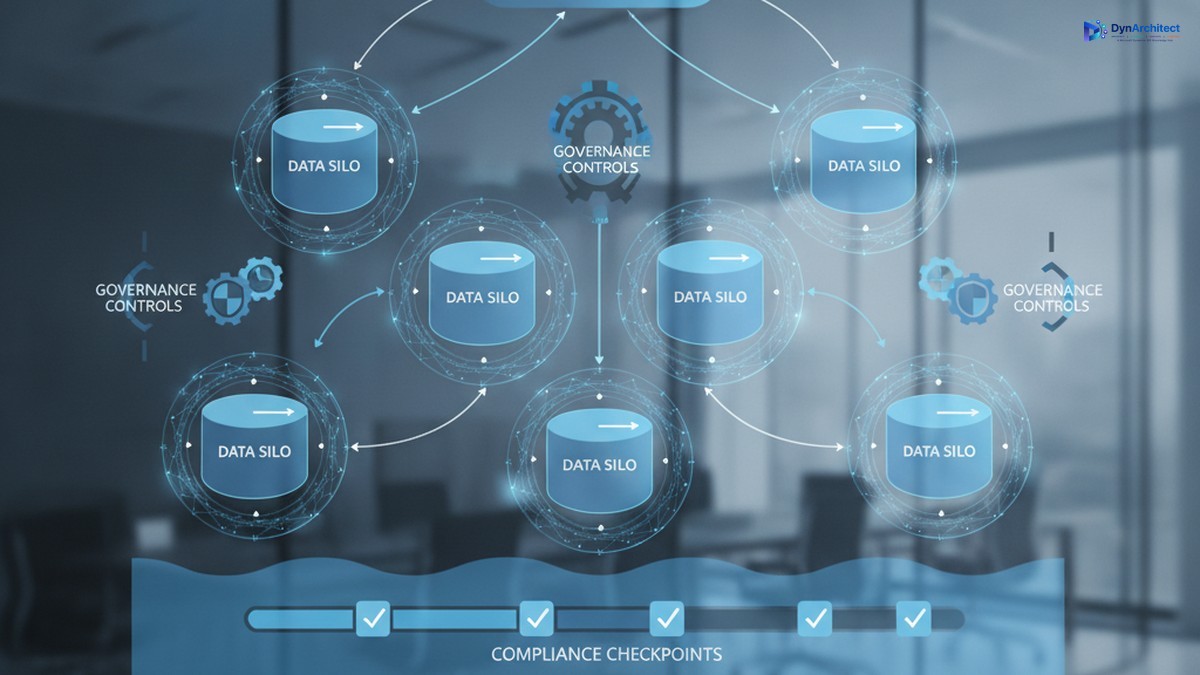
Enterprise data governance dashboard showing Dataverse multi-tenant architecture with secure data silos and compliance controls

When a large manufacturing conglomerate with seven regional subsidiaries decided to consolidate its Dynamics 365 deployments, the IT leadership faced a fundamental question: should each subsidiary run its own independent Dataverse environment, or could they share a single tenant with logical data separation? The answer shaped not just their technical architecture but their compliance posture, operational costs, security model, and ability to scale quickly. It took six months of planning to get it right.

This is the decision every large enterprise faces when moving Dynamics 365 to the cloud. Dataverse gives organizations flexibility in how they structure data and access, but that flexibility demands clear governance thinking. The wrong choice creates either unnecessary costs, security vulnerabilities, or both.

Dataverse Multi-Tenancy: Three Fundamental Models

Enterprise data governance dashboard showing Dataverse multi-tenant architecture with secure data silos and compliance controls

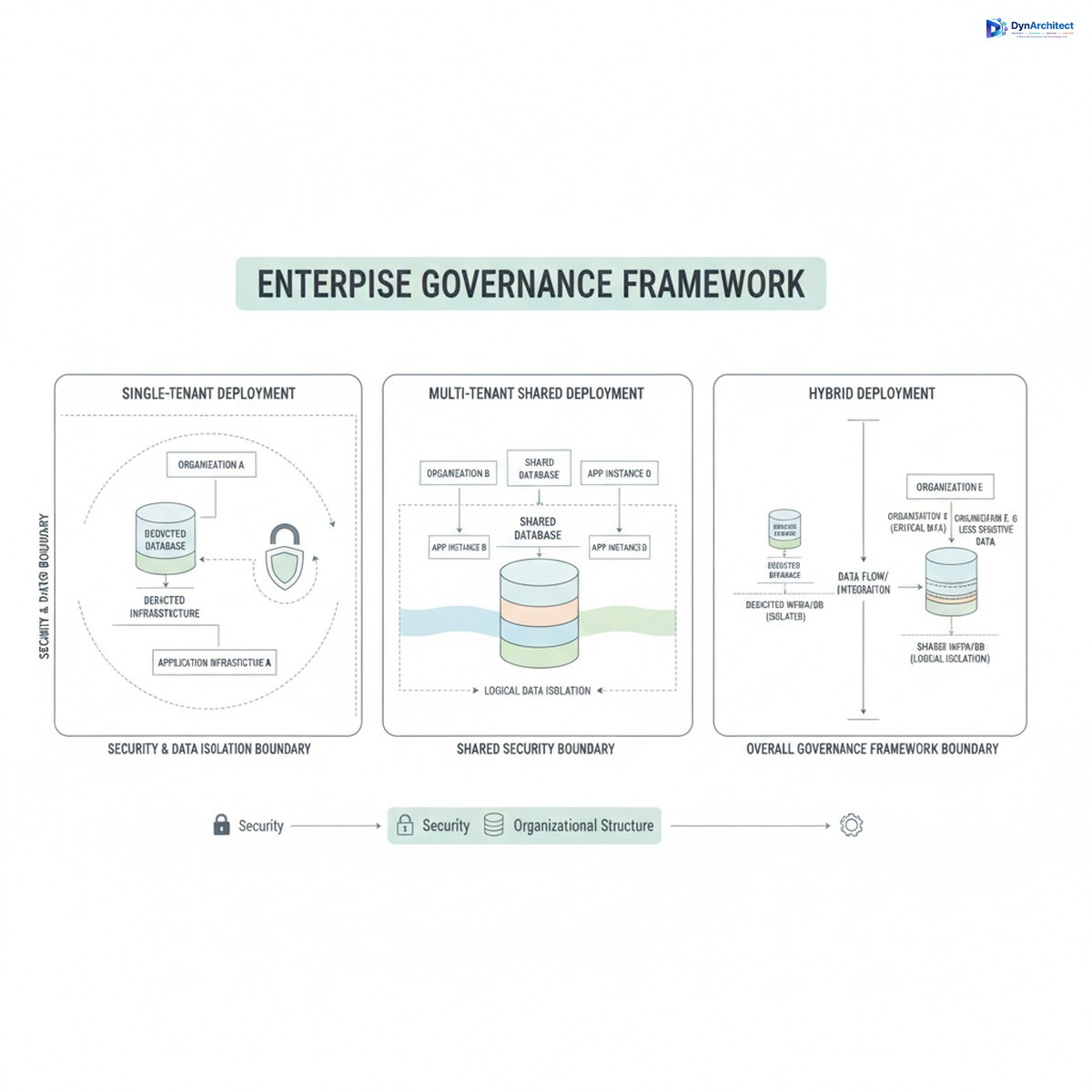
Enterprises typically evaluate three deployment patterns, each with distinct governance and operational implications.

Single-tenant deployment assigns a dedicated Dataverse environment to one business unit or subsidiary. This model simplifies tenant isolation since no shared infrastructure exists by definition. Security boundaries are cleaner. Compliance is straightforward if each tenant operates independently. However, fixed operational costs accrue per environment. Database administration, monitoring, backup, and disaster recovery all require separate infrastructure management. For smaller subsidiaries or regional offices, this overhead becomes difficult to justify financially.

Multi-tenant through shared services consolidates multiple business units into one Dataverse environment. A single application or shared platform manages data for many organizations. The platform itself enforces logical separation through row-level security rules, tenant-scoped data models, and access controls. This dramatically reduces infrastructure costs and operational complexity. A single database serves multiple customers or business units with one support team managing the system. The tradeoff is immediate: the governing application must understand which organization a request belongs to, and that context must remain consistent across every operation, from queries and reports to background jobs and integrations. A single tenant-context error can leak data across organizational boundaries. Compliance teams want evidence that this separation actually works in practice.

Hybrid deployment splits the difference. Some data, like shared employee records or common business reference tables, lives in a truly shared environment. Sensitive or regulated data, integrations requiring stronger isolation, or high-value processes get their own dedicated environments. This approach suits large enterprises with compliance mandates that prohibit certain data sharing while allowing others. It requires governance discipline to maintain two separate data environments and ensure they stay in sync where intended.

The Governance Foundation: Tenant Identity and Isolation

Three tenant deployment models for Dynamics 365 showing single-tenant, multi-tenant shared, and hybrid architectures

Successful multi-tenant deployments rest on one foundational principle: a stable, immutable tenant identifier that serves as the authoritative reference throughout the entire system. This is not the legal entity name, which can change. Not the region code, which can be reorganized. It is a stable, globally unique identifier assigned once to each tenant and never changed.

That identifier must flow consistently through every data operation. Row-level security rules check it to filter records. Integration service calls include it to route data to the correct tenant. Batch jobs and background processing reference it to ensure work stays within tenant boundaries. Logging systems tag every action with it. Reporting queries filter by it. Caching mechanisms key on it. If the tenant context becomes inconsistent anywhere in the system, separation breaks.

Compliance teams increasingly demand evidence that this separation actually works. That evidence includes tenant-attributed logging showing what data each tenant accessed and when, deletion verification confirming that removed records do not appear in other tenants’ data, and incident response procedures demonstrating how the organization would investigate suspected data leakage. Testing tenant isolation is no longer optional for regulated industries.

Governance Structures and Organizational Alignment

Multi-tenant governance requires clear organizational decision-making. Large enterprises typically establish a steering committee with representation from business unit leaders, compliance, information security, and IT operations. This committee makes decisions about which business units share a tenant, who has administrative access, approval processes for data access changes, and how compliance incidents are escalated.

Role-based access control becomes more complex in multi-tenant systems. A user working for Subsidiary A should never see Subsidiary B’s data, even if they have elevated system permissions. Dataverse security roles, business unit assignments, and column-level security all play a part. But the governing application layer above Dataverse must also respect these boundaries. A sales user from one region should not be able to see pipeline data from a different region through an analytics dashboard, even if the underlying queries are technically able to retrieve that data.

For organizations with strict regulatory requirements, the governance model may include physical separation of sensitive data. Regulated or restricted information remains in a dedicated, single-tenant environment with its own security posture, audit trail, and access controls. Non-sensitive shared data, like product catalogs or employee directories, lives in a shared tenant. This hybrid approach reduces operational costs for non-sensitive data while maintaining compliance for sensitive domains.

Compliance and Risk Management Implications

Multi-tenant Dataverse deployments touch several regulatory and risk areas that executives and compliance officers must address before deployment.

Data residency and sovereignty are the first consideration. Some regulations require data to remain in a specific country or region. A shared Dataverse environment across many business units may violate residency requirements if any tenants must store data outside their home region. The governance decision here may force certain subsidiaries into their own environments regardless of cost.

Data retention and deletion become more complex in multi-tenant systems. When a customer or business unit leaves your organization, their data must be removed completely, with no residual traces in shared systems. Testing this process and documenting it is essential for regulatory audits. Shared environments require proof that deletion actually worked and did not accidentally retain records in caches, backup systems, or logs.

User access and entitlements require clear governance. Who approves data access requests? How do you audit who has access to what? Multi-tenant systems need centralized entitlement management where access decisions can be reviewed, revoked, and traced back to business justifications. Integrating with Microsoft Entra ID and governance tools like privileged access management becomes necessary.

Building the Governance Framework

Successful enterprises start governance planning before they write code or configure Dataverse. The planning phase answers five key questions:

First, which data is truly shared, and which data must stay isolated? Not all data requires separation. Employee directories and organizational reference tables can be safely shared. Customer lists, financial records, and intellectual property need isolation.

Second, what tenant model fits the business? Single-tenant is simplest but most costly. Multi-tenant requires discipline but scales efficiently. Hybrid requires the most planning but may be necessary for compliance.

Third, how will you prove isolation works? Logging, testing, and incident response procedures should be planned upfront, not added later.

Fourth, who owns governance decisions? A clear organizational structure with decision rights prevents delays and conflicting policies.

Fifth, how will you monitor and enforce compliance? Automated controls, regular audits, and incident response playbooks should be part of the initial design, not afterthoughts.

Organizations that move Dataverse without this governance foundation often discover problems after deployment. Reorganizations reveal security gaps. Audits uncover poorly documented access controls. System failures expose incomplete backup strategies. The cost of retrofitting governance after deployment far exceeds the cost of planning correctly upfront.

The Path Forward

Dataverse multi-tenancy is not inherently risky, but it demands deliberate governance planning. Enterprises that treat this as a technical infrastructure decision alone will eventually face compliance violations, security incidents, or costly redesigns. Those that treat it as a governance and organizational design problem, with technical architecture supporting that design, build systems that are secure, compliant, and resilient. The most successful implementations started with governance, not with infrastructure.


About Routeget Technologies: Routeget assists enterprises with Dynamics 365 governance, architecture, and deployment strategy, helping organizations structure multi-tenant environments that balance operational efficiency with compliance requirements.

#DataverseGovernance #MultiTenantArchitecture #DynamicsCompliance #DataverseIsolation #EnterpriseDataStrategy #CloudArchitecture #DataGovernance

Building a Center of Excellence for Microsoft Cloud Governance: Establishing Control Without Stalling Innovation

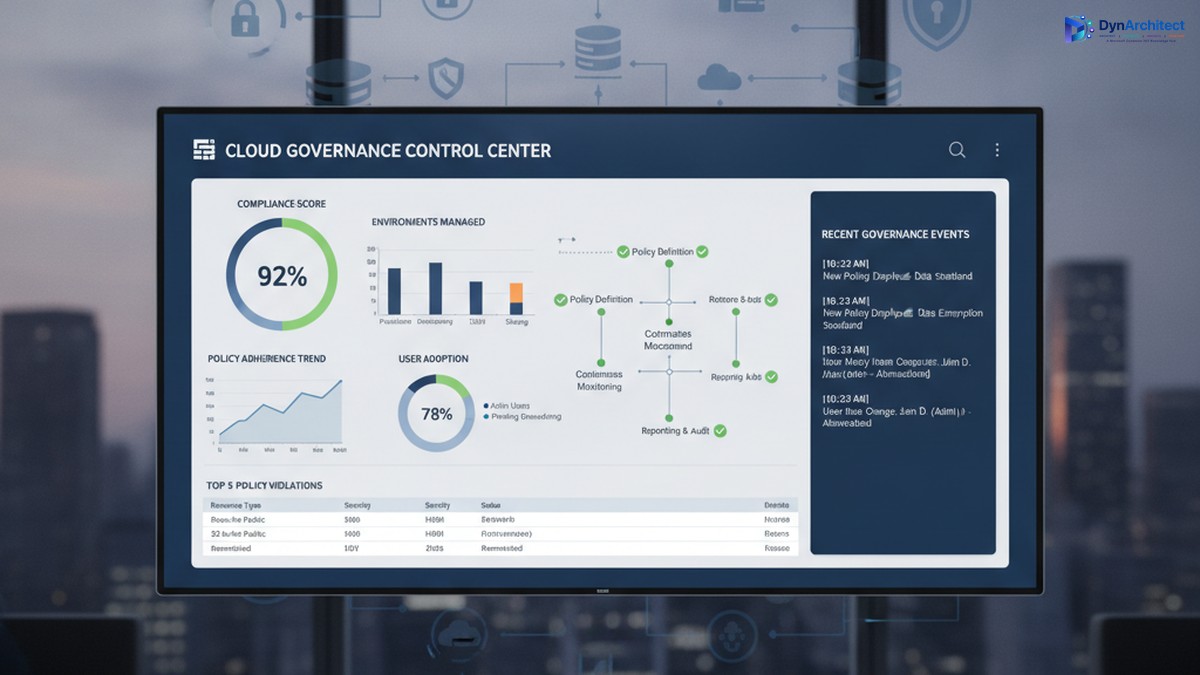
Enterprise cloud governance dashboard showing compliance metrics and governance control center

Building a Center of Excellence for Microsoft Cloud Governance: Establishing Control Without Stalling Innovation

The gap between Microsoft cloud adoption and cloud governance is widening. A CIO with three Power Platform environments deployed across finance, sales, and operations discovers, too late, that each environment has evolved its own authentication rules, data retention policies, and integration patterns. Consolidating them would disrupt active projects. Adding governance now feels like putting handcuffs on people who finally have the tools they need to move fast.

This tension is real, and it is solvable, but it requires a deliberate governance structure: a Center of Excellence (CoE). The purpose of a CoE is not to slow adoption or enforce rigid rules; it is to embed governance into the adoption process itself so that teams can move fast, safely, and with full visibility to leadership.

The Cost of Ungoverned Adoption

When organizations begin adopting Microsoft cloud services, Power Platform, Dynamics 365, Azure, Dataverse, adoption typically starts in one department or use case. A finance team builds a Power App to automate invoice processing. A field service team creates automations to dispatch technicians. Marketing builds a model-driven app to track campaigns. Each team solves a real problem immediately, with minimal delay.

Enterprise cloud governance dashboard showing compliance metrics and governance control center

The problem emerges months later, when three separate environments exist, each configured differently, each with its own data security settings, its own API connectors, and its own integration patterns. A security incident in one triggers questions about the others. A new compliance requirement (data residency, audit logging, export restrictions) means reconfiguring three environments instead of one. A developer leaves, and no one knows what custom logic lives inside automations in that environment. A connector expires, breaking integrations that no one is monitoring centrally.

The cost is not just technical debt. It includes regulatory risk (audit readiness, compliance violations), security risk (data exposure, unauthorized access), operational risk (outages affecting dependent business processes), and financial risk (unused licenses, redundant infrastructure, uncontrolled connector costs). For a mid-market organization, this hidden cost often runs to hundreds of thousands of dollars annually.

Governance after deployment is expensive and disruptive. Retrofitting compliance into three mature environments forces teams to rebuild their solutions or abandon them. Governance before deployment is far cheaper, but it requires structure and clarity on day one.

What a Center of Excellence Is (and Is Not)

A Center of Excellence is a team, function, or governance body responsible for establishing standards, providing guidance, and enforcing policies that keep cloud adoption secure, compliant, and architecturally sound. In the context of Microsoft cloud, a CoE typically has five core responsibilities:

IT leaders and cloud architects collaborating on governance and compliance framework planning

First, it establishes platform standards: which cloud services are approved for use, which are pilot-only, and which are off-limits; which authentication methods are mandatory; how data classification and sensitivity levels map to environments; where connectors can and cannot be used; which compliance frameworks apply (HIPAA, SOC2, PCI DSS, local data residency rules); and how disaster recovery and backup policies are configured.

Second, it onboards new teams and projects by providing reference architectures, reusable templates, and guidance so that new adopters do not have to invent their own governance solutions. A template might be a pre-configured Power Apps environment with the correct security role structure, DLP policies in place, and example connectors already approved and tested.

Third, it monitors ongoing usage and health. This includes license optimization (identifying unused environments and consolidating them), connector audits (catching deprecated or unapproved integrations), security scanning (checking for data exposure and overpermissioned roles), and performance monitoring (identifying resource-intensive automations that need optimization).

Fourth, it provides a feedback loop and governance review process. Teams that encounter a genuine need for a capability that current governance prohibits should be able to propose an exception, and the CoE should evaluate it against risk and organizational goals rather than simply saying no.

Fifth, it acts as an internal consulting function, helping teams plan migrations, optimize environments, troubleshoot problems, and adopt new capabilities safely.

What a CoE is not: it is not a gate that delays innovation. It is not a compliance police force that exists only to say no. It is not a one-person function managed as a side project by someone already stretched thin. These are common failure modes.

Establishing a Governance Foundation

A successful CoE begins with three foundational decisions.

First, secure executive sponsorship and clear governance scope. The CoE needs budget, staffing, and decision-making authority that comes from leadership. Without it, the CoE is a suggestion, not a standard. The scope should define: which Microsoft services the CoE governs (Power Platform, Dynamics 365, Dataverse, Azure, or all of the above); which organizational units must comply (divisions, departments, teams); and what governance decisions the CoE makes directly versus decisions it escalates.

Second, define governance principles that balance control with velocity. A principle might be: “Low-risk, read-only integrations can be self-service and pre-approved; integrations that modify business data require architecture review and security sign-off, but should be approved within two business days, not two weeks.” This principle gives teams clarity on what they can do immediately and what requires review, and it commits the CoE to a review timeline so governance does not become an indefinite bottleneck.

Third, build the governance infrastructure: identify which tools provide visibility and enforcement. This typically includes the Power Platform admin center (for environment management, DLP policies, and connector audits), Azure AD (for identity and access management), Microsoft Purview (for compliance and data governance), and possibly a custom CoE tracker (a Power Apps or Power BI dashboard that centralizes governance data across these tools and makes it visible to team leads and IT leadership).

Staffing and Operating a CoE

A CoE typically starts with a lead (dedicated, not a side project), supported by domain specialists: a Power Platform architect, a Dynamics 365 architect if applicable, a security engineer, and a compliance or risk specialist. For a mid-market organization, this might be three to five people. The CoE lead reports to the CIO or Chief Technology Officer and has direct access to business unit leaders.

The CoE should operate with a clear calendar: environment governance reviews happen monthly, new environment requests are triaged weekly, exception requests are evaluated within two business days, and a quarterly governance review presents data to leadership on usage, compliance status, security incidents, and license optimization opportunities.

Communication is essential. The CoE should publish governance policies in writing (not passed down verbally), maintain a knowledge base with FAQ and troubleshooting guidance, hold a monthly town hall for team leads to learn about new capabilities and governance changes, and send monthly status reports to IT leadership so adoption and governance metrics are visible.

Moving Forward: Quick Wins and Sustained Governance

A CoE need not be perfect from day one. An effective starting point is: document the current state of all cloud environments, establish a data classification standard and assign environments to classification levels, implement DLP policies in Power Platform to prevent data exfiltration, establish environment naming conventions and assign owners, and conduct a security audit to identify and remediate any immediate risks.

Longer-term, invest in automation: automated provisioning of new environments with governance policies pre-applied, automated security scanning and compliance audits, and automated license optimization recommendations. These investments pay off quickly through reduced manual work and faster compliance cycles.

The goal is not perfection. The goal is control: knowing what is deployed, who owns it, what data it contains, and whether it complies with organizational standards. Teams that have this clarity can innovate faster and with less risk, not slower.

Conclusion

A Center of Excellence is how organizations scale cloud adoption from experimental to strategic. It is not governance for governance’s sake; it is governance that removes risk so teams can move confidently. Building one requires executive commitment, clear principles, and sustained staffing, but the return comes quickly in reduced security incidents, faster compliance cycles, and more predictable project outcomes.

At Routeget Technologies, we have built and operated CoE functions for dozens of mid-market and enterprise organizations. We know what works: clear policies, strong automation, and leadership that understands that governance and innovation are not in conflict, they are prerequisites for each other.


#CenterOfExcellence #CloudGovernance #MicrosoftCloud #PowerPlatform #DLP #DataGovernance #ComplianceAutomation #CloudArchitecture #EnterpriseGovernance #DigitalTransformation

Hashtags: #CenterOfExcellence #CloudGovernance #MicrosoftCloud #PowerPlatform #DataGovernance #ComplianceAutomation #CloudArchitecture #EnterpriseGovernance #DigitalTransformation

Dataverse Data Residency and Compliance: The Multi-Region Strategy Most CIOs Miss

Enterprise multi-region Dataverse architecture across geographic zones

Your organization operates in three countries. Your finance team demands European data stays in Europe. Your CFO asks how much you’re paying for redundancy across regions. Your compliance officer flags that your current architecture doesn’t align with the new data sovereignty requirements coming in Q4. And meanwhile, everyone assumes Dataverse handles this automatically because it’s Microsoft cloud.

It doesn’t. And most CIOs don’t realize the gap until they’re months into a Power Platform rollout.

Microsoft Dataverse pricing, architecture, and residency behavior are frequently misunderstood, partly because the documentation focuses on technical capacity and partly because the commercial implications only become visible at scale. Understanding Dataverse data residency is not a technical detail for your architects to worry about. It’s a strategic decision that affects compliance posture, operational cost, licensing efficiency, and your ability to support global operations within existing governance frameworks. Getting it wrong creates cascading problems: expensive data migration projects, compliance violations, or multi-region deployment architectures that cost far more than a thoughtful early strategy would have.

Enterprise multi-region Dataverse architecture across geographic zones

What Dataverse Data Residency Actually Means

Dataverse databases reside in a specific geographic region determined at provisioning time. This region assignment is permanent and cannot be changed after a database is created. Once you provision a Dataverse environment in West Europe, your customer records, inventory ledgers, and sales transactions remain in that region’s data centers indefinitely. Moving data between regions requires export-and-reimport workflows, which means downtime, validation effort, and business disruption.

The region you select during environment provisioning is not the same as the region where your application servers run or where your users are located. A Power App built on a West Europe Dataverse instance can be accessed and used from any geography, and the performance impact of geographic distance is usually negligible for most business applications. But the data itself stays where you provisioned it.

This distinction matters because many organizations assume they can simply create a Dataverse environment and let Microsoft handle residency automatically. They cannot. Residency is a conscious architectural choice made at provisioning time. If you have subsidiary operations in Canada, Australia, and Japan, you need separate Dataverse environments for each, each provisioned in its corresponding region, unless you have an explicit business case for centralizing data in a single region and accepting the compliance and latency trade-offs.

The Multi-Region Strategy: Options and Trade-Offs

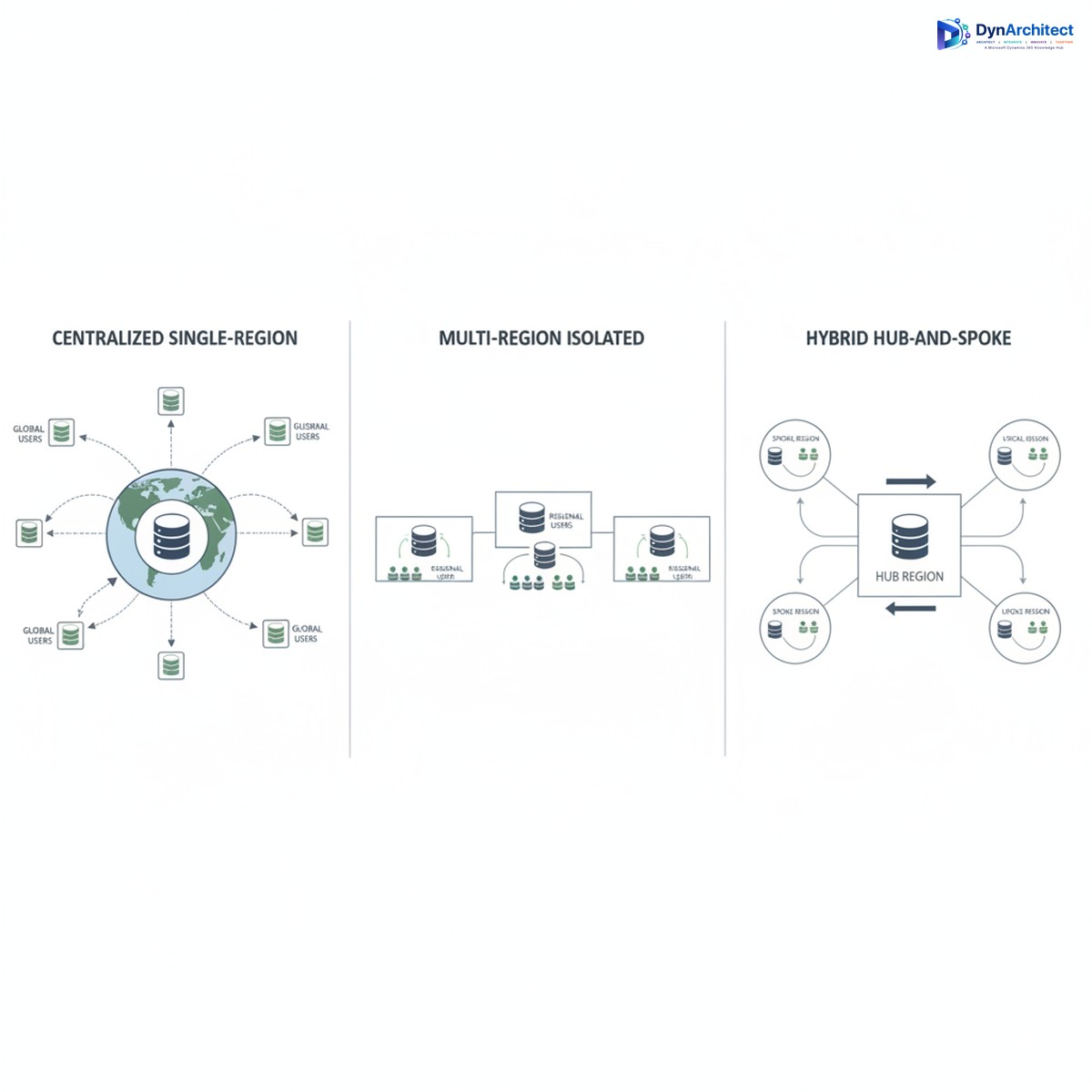
Most enterprises adopt one of three approaches to Dataverse deployments across multiple geographies.

Centralized Single-Region Strategy means all subsidiaries and operations worldwide connect to a single Dataverse environment, usually provisioned in your headquarters region or your primary cloud region. This is the simplest from an architectural standpoint: one environment, one set of security policies, one licensing footprint. All operations use the same datasets, which eliminates data synchronization challenges and keeps organizational data unified. The trade-off is data residency compliance. If you operate in the European Union, storing EU customer data in a US-provisioned Dataverse does not comply with GDPR data residency expectations. Similarly, operations in Australia, Canada, or other regulated jurisdictions may violate local data governance requirements. You also incur network latency for users accessing Dataverse from distant regions, though this is typically 50-200ms and is not a business-critical problem for most transactional applications.

Multi-Region Isolated Environments means provisioning separate Dataverse environments in each major geography, with each environment containing only the data relevant to that region. A subsidiary in Germany operates its own Dataverse instance in West Europe. The Australian operations run their own instance in Australia Southeast. This approach satisfies data residency requirements and places data geographically close to users. The cost and complexity trade-off is significant. You now maintain multiple Dataverse environments, each with its own licensing, security configurations, and data models. Data integration between regions becomes a managed-sync problem: changes to a customer record in the European environment must be synchronized or reconciled with the global master record in the headquarters system, creating operational overhead and potential data quality risks if synchronization logic is not carefully designed.

Hybrid Hub-and-Spoke Strategy means maintaining a primary Dataverse for strategic or shared data (customers, products, organizational hierarchies) in one central region, with subsidiary Dataverse instances handling transactional and regional data separately. Each subsidiary has its own Dataverse for local customer records and operational data, while a central hub maintains the master customer list and product catalogs. This is architecturally sophisticated and requires disciplined data governance, but it balances compliance requirements with operational simplicity. Regional teams operate within their own data residency boundaries, while strategic dashboards and reporting pull from the hub using Power BI or other integration layers.

Comparison of three Dataverse deployment strategies: centralized, isolated, and hub-and-spoke

Licensing and Cost Implications

Many CIOs approach Dataverse licensing by counting total users and calculating a single per-user cost. This misses the actual cost structure. Dataverse licensing includes both user licenses (which grant access rights) and database storage licensing (which charges for actual data volume and database capacity). If you deploy isolated environments per region, you pay licensing for each separate environment. Ten gigabytes of data in a West Europe Dataverse plus ten gigabytes in an Australia Southeast Dataverse means licensing costs for twenty gigabytes of Dataverse storage, not ten.

This becomes material at scale. An organization with one hundred thousand customer records currently stored in a single Dataverse may not realize that splitting this data across three regional environments triples the Dataverse storage licensing footprint if done naively. If that organization also stores copies of data in on-premises systems or other cloud platforms for compliance reasons, the total cost of multi-region strategy can surprise finance teams who expected cloud consolidation to reduce overall data infrastructure spending.

Cost optimization strategies include careful database maintenance (removing obsolete records, archiving historical data), tiered storage architecture (hot data in Dataverse for operational use, cold data in Azure Blob Storage for compliance retention), and thoughtful environment consolidation where data residency requirements genuinely allow it.

Common Implementation Mistakes

Organizations frequently begin Power Platform rollouts with a single Dataverse environment in their primary region, assuming they can add residency strategy later. Months into deployment, when subsidiary operations are using Power Apps tied to that central environment, adding a separate regional environment requires data extraction and rearchitecting application logic to route data to the correct environment. This is expensive and disruptive.

A second common mistake is underestimating data residency requirements. Executives believe “it’s in Azure, so it’s compliant” without investigating whether the specific Azure region and data residency configuration actually satisfy regulatory obligations. GDPR, CCPA, data sovereignty laws, and industry-specific regulations (financial services, healthcare) all have different residency expectations, and “cloud” is not a compliance checkbox.

A third mistake is failing to track data ownership and sovereignty boundaries within a single environment. If you keep all data in a central US region, you still need clear governance about which records belong to which region and why they’re retained in a non-resident location. This is an audit finding waiting to happen if it’s not explicitly documented and justified.

Getting Started with a Residency-First Architecture

Before provisioning your first Dataverse environment, map your organization’s regulatory footprint and data residency requirements by region. Consult legal and compliance teams to understand which data categories are subject to residency mandates and which are not. Typically, customer records and certain operational data carry residency requirements, while master data like product catalogs and organizational hierarchies may not.

Sketch an environment strategy that assigns regions to Dataverse provisioning regions. For most multinational enterprises, this means at least one environment per major regulated geography. Document the business rationale for any exceptions (data categories that deviate from residency boundaries) so you have a defensible compliance position.

Engage your Microsoft partner and licensing team early to calculate the full licensing footprint of multi-environment strategy, including user licenses, database storage, and any advanced feature licensing. Compare this to your centralized baseline so leadership understands the trade-off.

Design your integration layer upfront. If you adopt hub-and-spoke, clarify which systems own each data domain and how synchronization will work. If you use isolated environments, specify how regional teams will access strategic data. This architecture conversation now, before systems are live, prevents expensive rearchitecting later.

Routeget Technologies has guided dozens of organizations through this planning process, helping them balance residency compliance with cost and operational efficiency. What often emerged was that thoughtful architecture early prevented millions in remediation costs later.

Data residency and Dataverse multi-region strategy is fundamentally a business decision, not a technology implementation. The CIO who makes this choice deliberately, in consultation with compliance, finance, and operations leadership, sets up a Power Platform footprint that scales confidently across geographies. The CIO who defers the decision and hopes it works out on its own tends to discover the problem after systems are live and users expect them to keep working.


#DataverseMultiRegion #CloudArchitecture #DataResidency #ComplianceStrategy #CIOGuidance #MicrosoftCloud #DataGovernance

Sales Research Agent Fabric Lakehouse Connections Don’t Grant Access. They Borrow Yours.

Solution architect reviewing a cloud data security and permissions dashboard on a large monitor in a modern office

A VP of sales operations at a mid-size manufacturer asks the new Sales Research Agent a simple question: “Are we tracking to quota this quarter across the East region?” The lakehouse holding quota, backlog, and actuals data has been live for months, built by the FP&A team specifically so questions like this could be answered without another spreadsheet cycle. The agent comes back with nothing useful, a vague answer built entirely from Dataverse pipeline data with no mention of quota or backlog at all. IT checks the lakehouse. The tables are there. The data is current. Nobody on the support call can explain why the agent can’t see what is plainly sitting in front of it.

The explanation, once you find it, is almost always the same: the person asking the question doesn’t have permission to the lakehouse item itself, only to the workspace it lives in, and the agent will not go around that. This is the part of a Sales Research Agent Fabric Lakehouse setup that trips up architects who have configured plenty of Power BI reports and Dataverse connections but have not internalized that this feature behaves nothing like either of those.

What a Sales Research Agent Fabric Lakehouse connection actually is

Dynamics 365 Sales’ Sales Research Agent reached general availability on April 30, 2026, after a public preview that started in mid-February, and it does something genuinely useful: it lets sales and revenue operations teams ask natural-language questions that span CRM pipeline data, finance and quota data sitting in a Microsoft Fabric lakehouse, and ad hoc files like a CSV export or a PDF board deck, all from one research canvas instead of three separate tools. The predefined insights it ships with cover attainment against quota, pipeline coverage relative to revenue goals, and variance between forecast, actuals, and invoiced results, which is exactly the kind of cross-system reconciliation that used to require a dedicated analyst and a Tuesday afternoon.

The part worth slowing down on is how the lakehouse connection is architected. It is not a data integration in the ETL sense, where an admin authorizes a service principal once and everyone downstream inherits access to a curated dataset. It is closer to a live pass-through: the agent authenticates to Fabric using the requesting user’s own Entra ID identity, via the same credentials they already use to sign into Dynamics 365. Whatever that person can see in the lakehouse through normal Fabric permissions is what the agent can see on their behalf, and nothing more. The agent never elevates privileges, and it never caches a broader view of the data than the user asking the question is entitled to.

The permission layers people forget

That single-sign-on design means two separate permission checks have to pass before a query against Fabric data will return anything at all. First, the user needs at least Viewer access at the workspace level, since Contributor and Admin also satisfy this but nothing less does. Second, and this is the one that catches people, workspace access alone does not imply access to a specific lakehouse item inside that workspace. Fabric enforces item-level permissions independently, so a user can be a workspace Viewer and still be denied at the lakehouse itself if nobody has explicitly granted them access to that item. Most Dataverse-oriented admins are used to security roles being the single gate; Fabric’s layered model means there are effectively two gates, and skipping a check on the second one is the most common reason a rollout stalls in the first week.

Abstract illustration of a digital identity key passing through a security gate to access layered data lake tables

If the lakehouse data is organized through shortcuts pointing to another OneLake location or to Azure Data Lake Storage Gen2, there is a third layer: the user also needs read access on whatever the shortcut actually targets, since Fabric will not silently grant that just because the shortcut itself is visible. And if the organization has applied row-level or column-level security through a semantic model sitting in front of the lakehouse tables, that policy is enforced automatically for every query the agent runs. A regional sales director and a national VP asking the identical question through the agent can legitimately get different, both-correct answers, filtered by whatever RLS scope already applies to their account. That is a feature, not a bug, but it needs to be explained to end users before launch, or the first person who gets a narrower answer than a colleague will assume the tool is broken.

Getting the rollout right

The practical fix is to treat the Fabric connection as an access review project before it is a feature-enablement project. Before turning this on for a sales operations team or a broader analyst group, pull the actual list of who has workspace and item-level access to the relevant lakehouse, compare it against who is expected to use the agent, and close the gap deliberately rather than reactively. It is worth testing with a genuinely representative non-admin account rather than an admin’s own credentials, since an admin will almost always have blanket access that masks exactly the permission gaps a normal seller or ops analyst will hit.

Data quality inside the lakehouse matters just as much as access does, because the agent leans heavily on table names, column headers, and any descriptive metadata attached to them to figure out what a natural-language question is actually asking for. A table named tbl_fct_rev_q3 with undocumented columns will produce worse, less trustworthy answers than one named clearly with business-friendly column labels, even though the underlying numbers are identical. Where the schema can’t be renamed because other systems depend on it, the agent supports adding plain-language business context separately, and that extra half day of documentation work consistently pays for itself in answer quality once real users start asking open-ended questions instead of the handful you tested with.

One more subtlety worth building into a QA pass: currency handling is straightforward for native Dynamics 365 Sales data, since the agent uses the environment’s base currency automatically, but for lakehouse and uploaded-file data it has to infer currency from context. For a domestic single-currency organization this is a non-issue. For anyone with multi-entity or multi-currency operations feeding that lakehouse, it is worth deliberately testing a few currency-sensitive questions before general rollout rather than discovering the inference was wrong when a regional forecast number looks off by an exchange rate.

Budgeting for consumption, not just configuration

Access to the agent itself runs through a dedicated Sales Research Agent Reader security role, which is a clean, familiar Dataverse-style control and easy to scope correctly. What is less familiar is that every question run through the agent consumes Copilot Studio credits, so a rollout to an entire sales organization without any usage guardrails or monitoring can turn into a licensing conversation nobody budgeted for, especially once people realize they can ask it anything rather than just the handful of predefined insights it ships with. Treat the credit consumption model as part of the initial deployment plan, not an afterthought discovered on next quarter’s invoice.

None of this makes the Fabric integration a bad design. A pass-through model that never elevates permissions is the right security posture for a tool that reasons across finance and CRM data simultaneously, and the alternative, a broadly privileged service account with its own access to everything, would be a much worse outcome from a governance standpoint. But the security model only works as intended when the access review happens before launch. Organizations that have gone through this rollout carefully, treating the Fabric permission audit as a real workstream rather than a footnote, are the ones whose first week of feedback is about the quality of the answers rather than a flood of tickets asking why the agent can’t see obviously available data. That is the pattern we walk clients through at Routeget when a Sales Research Agent deployment is on the table: get the access model right first, and the rest of the rollout tends to go quietly.


#SalesResearchAgent #FabricLakehouse #Dynamics365Sales #DataGovernance #CopilotStudio #EnterpriseAI