Securing Multi-Tenant Dataverse Deployments: Governance Models and Compliance Strategies for Enterprise Organizations

Enterprise data governance dashboard showing Dataverse multi-tenant architecture with secure data silos and compliance controls

When a large manufacturing conglomerate with seven regional subsidiaries decided to consolidate its Dynamics 365 deployments, the IT leadership faced a fundamental question: should each subsidiary run its own independent Dataverse environment, or could they share a single tenant with logical data separation? The answer shaped not just their technical architecture but their compliance posture, operational costs, security model, and ability to scale quickly. It took six months of planning to get it right.

This is the decision every large enterprise faces when moving Dynamics 365 to the cloud. Dataverse gives organizations flexibility in how they structure data and access, but that flexibility demands clear governance thinking. The wrong choice creates either unnecessary costs, security vulnerabilities, or both.

Dataverse Multi-Tenancy: Three Fundamental Models
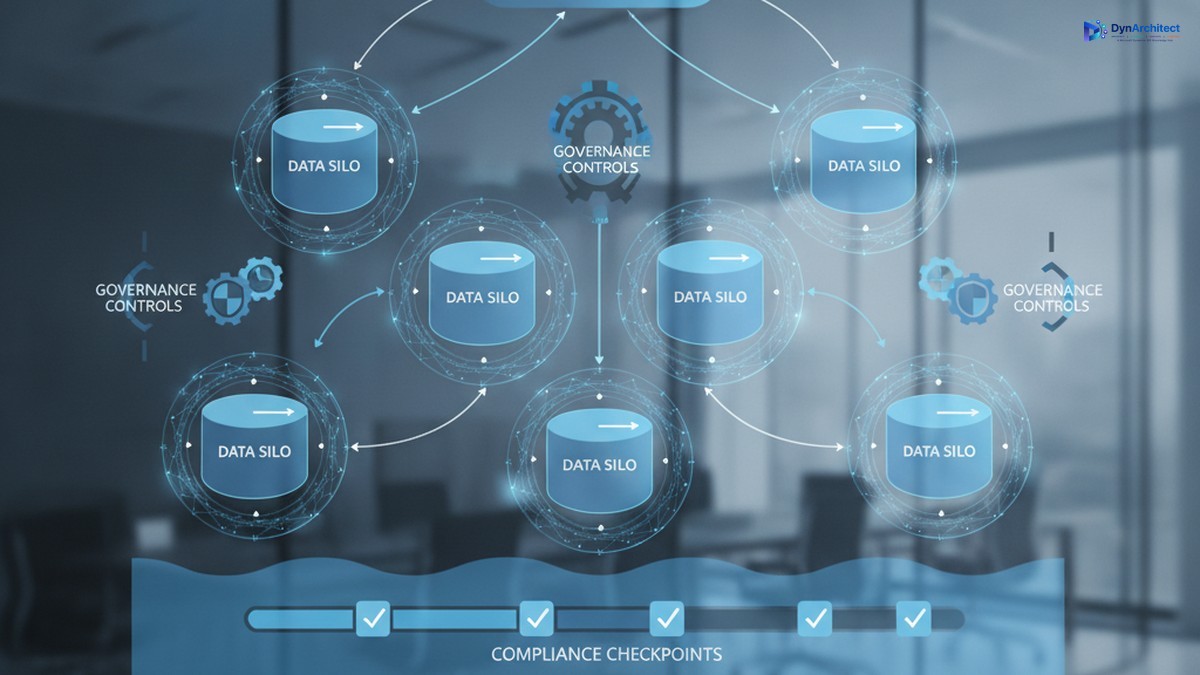
Enterprise data governance dashboard showing Dataverse multi-tenant architecture with secure data silos and compliance controls

Enterprises typically evaluate three deployment patterns, each with distinct governance and operational implications.

Single-tenant deployment assigns a dedicated Dataverse environment to one business unit or subsidiary. This model simplifies tenant isolation since no shared infrastructure exists by definition. Security boundaries are cleaner. Compliance is straightforward if each tenant operates independently. However, fixed operational costs accrue per environment. Database administration, monitoring, backup, and disaster recovery all require separate infrastructure management. For smaller subsidiaries or regional offices, this overhead becomes difficult to justify financially.

Multi-tenant through shared services consolidates multiple business units into one Dataverse environment. A single application or shared platform manages data for many organizations. The platform itself enforces logical separation through row-level security rules, tenant-scoped data models, and access controls. This dramatically reduces infrastructure costs and operational complexity. A single database serves multiple customers or business units with one support team managing the system. The tradeoff is immediate: the governing application must understand which organization a request belongs to, and that context must remain consistent across every operation, from queries and reports to background jobs and integrations. A single tenant-context error can leak data across organizational boundaries. Compliance teams want evidence that this separation actually works in practice.

Hybrid deployment splits the difference. Some data, like shared employee records or common business reference tables, lives in a truly shared environment. Sensitive or regulated data, integrations requiring stronger isolation, or high-value processes get their own dedicated environments. This approach suits large enterprises with compliance mandates that prohibit certain data sharing while allowing others. It requires governance discipline to maintain two separate data environments and ensure they stay in sync where intended.

The Governance Foundation: Tenant Identity and Isolation
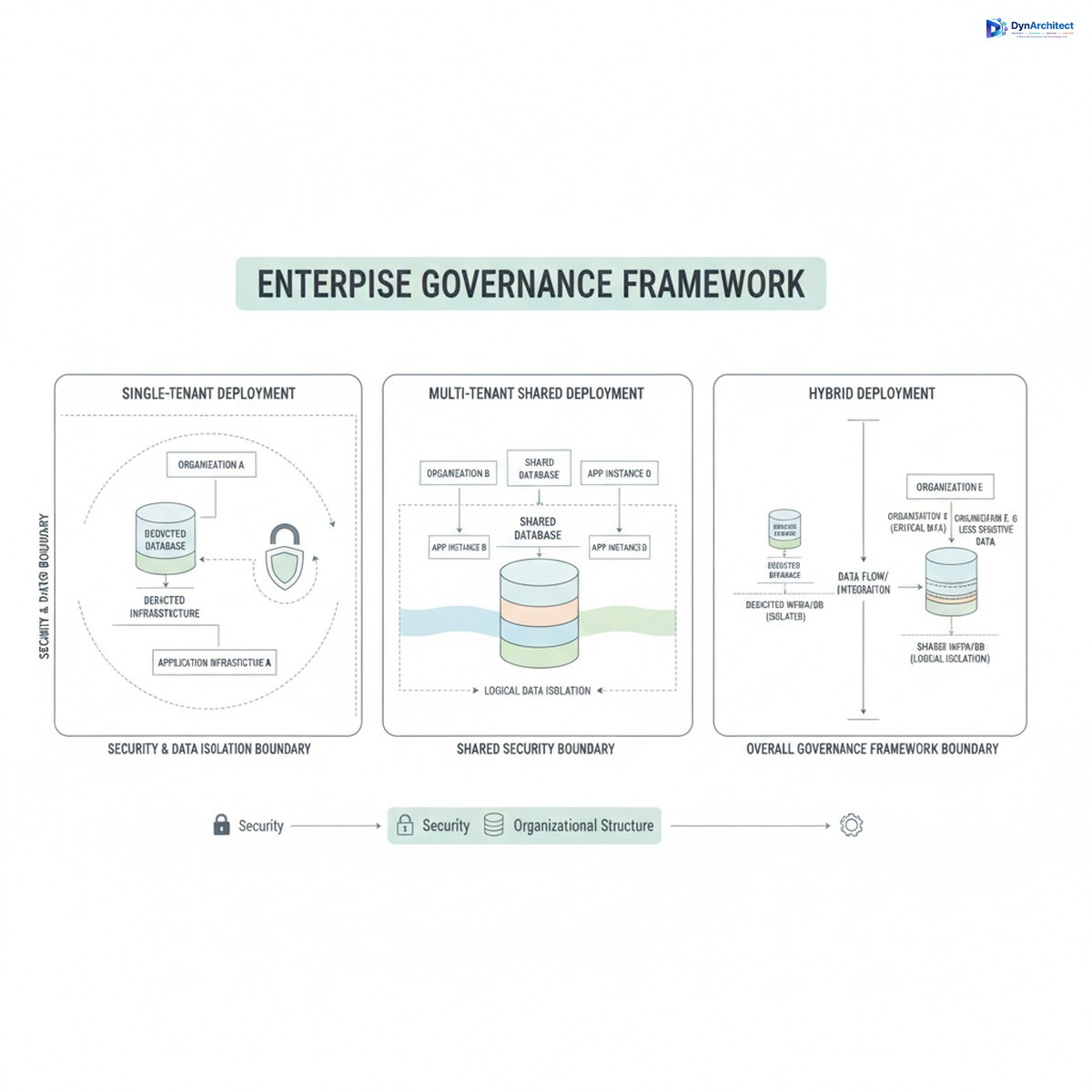
Three tenant deployment models for Dynamics 365 showing single-tenant, multi-tenant shared, and hybrid architectures

Successful multi-tenant deployments rest on one foundational principle: a stable, immutable tenant identifier that serves as the authoritative reference throughout the entire system. This is not the legal entity name, which can change. Not the region code, which can be reorganized. It is a stable, globally unique identifier assigned once to each tenant and never changed.

That identifier must flow consistently through every data operation. Row-level security rules check it to filter records. Integration service calls include it to route data to the correct tenant. Batch jobs and background processing reference it to ensure work stays within tenant boundaries. Logging systems tag every action with it. Reporting queries filter by it. Caching mechanisms key on it. If the tenant context becomes inconsistent anywhere in the system, separation breaks.

Compliance teams increasingly demand evidence that this separation actually works. That evidence includes tenant-attributed logging showing what data each tenant accessed and when, deletion verification confirming that removed records do not appear in other tenants’ data, and incident response procedures demonstrating how the organization would investigate suspected data leakage. Testing tenant isolation is no longer optional for regulated industries.

Governance Structures and Organizational Alignment

Multi-tenant governance requires clear organizational decision-making. Large enterprises typically establish a steering committee with representation from business unit leaders, compliance, information security, and IT operations. This committee makes decisions about which business units share a tenant, who has administrative access, approval processes for data access changes, and how compliance incidents are escalated.

Role-based access control becomes more complex in multi-tenant systems. A user working for Subsidiary A should never see Subsidiary B’s data, even if they have elevated system permissions. Dataverse security roles, business unit assignments, and column-level security all play a part. But the governing application layer above Dataverse must also respect these boundaries. A sales user from one region should not be able to see pipeline data from a different region through an analytics dashboard, even if the underlying queries are technically able to retrieve that data.

For organizations with strict regulatory requirements, the governance model may include physical separation of sensitive data. Regulated or restricted information remains in a dedicated, single-tenant environment with its own security posture, audit trail, and access controls. Non-sensitive shared data, like product catalogs or employee directories, lives in a shared tenant. This hybrid approach reduces operational costs for non-sensitive data while maintaining compliance for sensitive domains.

Compliance and Risk Management Implications

Multi-tenant Dataverse deployments touch several regulatory and risk areas that executives and compliance officers must address before deployment.

Data residency and sovereignty are the first consideration. Some regulations require data to remain in a specific country or region. A shared Dataverse environment across many business units may violate residency requirements if any tenants must store data outside their home region. The governance decision here may force certain subsidiaries into their own environments regardless of cost.

Data retention and deletion become more complex in multi-tenant systems. When a customer or business unit leaves your organization, their data must be removed completely, with no residual traces in shared systems. Testing this process and documenting it is essential for regulatory audits. Shared environments require proof that deletion actually worked and did not accidentally retain records in caches, backup systems, or logs.

User access and entitlements require clear governance. Who approves data access requests? How do you audit who has access to what? Multi-tenant systems need centralized entitlement management where access decisions can be reviewed, revoked, and traced back to business justifications. Integrating with Microsoft Entra ID and governance tools like privileged access management becomes necessary.

Building the Governance Framework

Successful enterprises start governance planning before they write code or configure Dataverse. The planning phase answers five key questions:

First, which data is truly shared, and which data must stay isolated? Not all data requires separation. Employee directories and organizational reference tables can be safely shared. Customer lists, financial records, and intellectual property need isolation.

Second, what tenant model fits the business? Single-tenant is simplest but most costly. Multi-tenant requires discipline but scales efficiently. Hybrid requires the most planning but may be necessary for compliance.

Third, how will you prove isolation works? Logging, testing, and incident response procedures should be planned upfront, not added later.

Fourth, who owns governance decisions? A clear organizational structure with decision rights prevents delays and conflicting policies.

Fifth, how will you monitor and enforce compliance? Automated controls, regular audits, and incident response playbooks should be part of the initial design, not afterthoughts.

Organizations that move Dataverse without this governance foundation often discover problems after deployment. Reorganizations reveal security gaps. Audits uncover poorly documented access controls. System failures expose incomplete backup strategies. The cost of retrofitting governance after deployment far exceeds the cost of planning correctly upfront.

The Path Forward

Dataverse multi-tenancy is not inherently risky, but it demands deliberate governance planning. Enterprises that treat this as a technical infrastructure decision alone will eventually face compliance violations, security incidents, or costly redesigns. Those that treat it as a governance and organizational design problem, with technical architecture supporting that design, build systems that are secure, compliant, and resilient. The most successful implementations started with governance, not with infrastructure.


About Routeget Technologies: Routeget assists enterprises with Dynamics 365 governance, architecture, and deployment strategy, helping organizations structure multi-tenant environments that balance operational efficiency with compliance requirements.

#DataverseGovernance #MultiTenantArchitecture #DynamicsCompliance #DataverseIsolation #EnterpriseDataStrategy #CloudArchitecture #DataGovernance


Power Apps Governance and Scaling: Building Enterprise Applications Without Creating Technical Debt

Enterprise Power Apps governance dashboard with application portfolio metrics and CoE framework

Problem Statement (Opening Hook)

Six months after launching your Power Apps initiative, you have 47 applications built across the organization. You’re congratulating yourself on driving digital velocity when IT discovers that 23 of those apps are querying the production Dataverse directly without connection audits, three apps are storing passwords in Power Automate flows, and nine apps were built with Dataverse tables that now conflict with the enterprise data model you’re implementing for Dynamics 365. You also cannot tell which apps are critical, which are experimental, and which are duplicates of work already done by other teams. This is not a Power Apps problem. This is a governance problem, and the cost of fixing it later vastly exceeds the cost of defining it now.

Why Power Apps Governance Matters at Scale

Power Apps succeeds because it is low-code. Business teams move faster. IT provisioning cycles shrink from months to days. Without governance, organizations end up managing application sprawl rather than portfolio. They face compliance risks when applications store regulated data without proper encryption. They accumulate technical debt through duplicate apps and integration spaghetti. Most critically, they lose the ability to retire old applications because no one remembers dependencies.

Governance does not mean blocking innovation. It means setting up boundaries so innovation happens inside a framework that scales. Done well, governance feels like enabling guardrails rather than restrictive rules.

The Three Pillars of Effective Power Apps Governance

Governance across Power Platform breaks into three interdependent areas: application lifecycle management (ALM), data governance, and access control. Each addresses a different aspect of operational risk, and each requires clarity before you have hundreds of applications in production.

ALM defines how applications move from development to test to production, who approves releases, and how rollback works. Without ALM discipline, applications get updated without testing and deployments happen without documentation. Microsoft Power Platform’s ALM tooling (solution containers, source control integration, deployment pipelines) is mature. Using it from the first application, rather than retrofitting later, saves significant effort.

Data governance specifies which Dataverse tables are available to which applications, which fields those applications can read and write, whether applications have direct table access or go through a custom API layer for auditing, and how data synchronization happens when multiple applications share tables. Organizations that skip data governance often discover halfway through Dynamics 365 F&O implementation that Power Apps developers were extending the General Ledger table directly, bypassing the compliance logic built into the F&O ledger posting engine. Starting with a canonical data model and enforcing read-write boundaries prevents those conflicts.

Access control governs who can create applications, what permissions they have, whether they can publish to production, and what user-level permissions applications inherit. Many organizations default to giving all users “create” permissions in Power Platform, then react with panic when app sprawl becomes visible. Instead, defining roles and mapping them to permission levels creates scalability. Skilled developers need broad creation rights. Business power users need constrained environments where they can build applications without affecting production infrastructure.

Enterprise Power Apps governance dashboard with application portfolio metrics and CoE framework

Common Governance Failures

Most organizations make one of three mistakes. The first is defining governance so rigorously it kills velocity. Requiring sign-off from multiple committees before publishing an app causes teams to work around the process in unsanctioned environments. The second mistake is defining no governance at all. Teams build freely until compliance audits arrive. Retrofitting governance then requires temporarily shutting down production applications to audit and repair them. The third mistake is defining governance on paper without technical enforcement. Policies exist but the actual permissions and Dataverse configurations never match. Effective enforcement requires embedding governance into administration, not just culture.

Effective governance finds the middle ground. It sets clear, enforceable boundaries while leaving room for teams to innovate within those boundaries. It is documented not in slides but in the actual configuration of your Dataverse, your solution containers, and your deployment pipelines.

Building a Practical Governance Framework

Start with application classification. Tier applications by criticality: mission-critical (runs the business and cannot fail), important (supports major business process and needs monitoring), and experimental (proof-of-concept or exploratory work). Mission-critical and important applications get the most scrutiny. Experimental applications get looser controls. This prevents governance overhead from killing innovation while ensuring critical work gets appropriate rigor.

Next, establish your Dataverse data architecture before widespread application development begins. Define which tables are canonical and which are read-only views or replicas. Specify who owns each table. Set up row-level security policies and field-level permissions. If applications bypass the model, audit logs show it. This enforces a single version of truth and prevents applications from accidentally conflicting.

Implement solution containers and source control integration. Every application goes into a solution container, not deployed loose to the environment. Solutions are version-controlled in Git. Deployments go through a clear pipeline: development environment, test environment, staging, production, with manual gates between stages. Automate testing at each stage where possible. This creates an audit trail of every change and makes rollback possible.

Enterprise development team collaborating with ALM workflows and CI/CD pipelines on display monitors

Set up a governance review board (often called a CoE governance committee) that meets monthly to review application portfolio health, approve new high-risk applications, and identify applications for retirement. The board includes IT architecture, security, compliance, and business process representatives. This is not a blocking committee. It is an enabling committee that helps teams navigate governance boundaries and flags risks early.

Finally, communicate governance as infrastructure, not as restriction. Frame governance conversations around what it enables: faster time to production for compliant applications, easier integration with enterprise systems, reduced security risk, and the ability to retire old applications without cascading failures. Teams that understand the rationale behind governance adopt it voluntarily.

Technical Debt and Long-Term Maintenance

Technical debt in Power Apps manifests quietly. An application built against a local Dataverse table works fine for six months until the enterprise decides to synchronize that table with Dynamics 365. The app breaks because its queries now hit a different data source. Another application stores customer IDs in a text field. When customer ID standards change, updating that field breaks any app that relied on the old format. A third application has hard-coded access credentials buried in flows. When those credentials rotate, the application goes dark.

These failures happen because applications were not architected for change. Avoiding technical debt requires discipline upfront: use API layers instead of direct table access, parameterize configuration values, separate data schemas from application logic, build retry logic into integrations, and document dependencies. It also requires governance processes that periodically review applications for architectural drift.

Balancing Speed and Control

The tension between moving fast and maintaining governance is real. The resolution is not to choose one or the other, but to acknowledge that different applications need different levels of control. A dashboard for business analytics needs different governance than an application that writes to the General Ledger. A proof-of-concept application needs different processes than a mission-critical customer portal. Tailoring governance to the application’s role allows you to move fast where speed matters and deliberate where risk is highest.

Organizations that execute this balance well report that governance, once established, does not slow velocity. If anything, it accelerates it. Teams know the boundaries. Deployments are predictable. Integration is straightforward. Failures do not cascade. Applications retire cleanly. The cost of operating the Power Platform ecosystem decreases even as the number of applications grows.

Building for Sustainable Scale

Power Apps’ promise is that business teams can build applications without IT intermediaries. Realizing that promise at scale requires intentional governance, not despite that governance, but because of it. The organizations building the most applications fastest are the ones with the clearest governance frameworks. They have defined what good looks like. They enforce it technically. They review it regularly. They adjust it based on what they learn.

If your organization is still in the early stages of Power Apps adoption, spending time now on governance infrastructure saves vastly more time later. If you are already in growth mode with sprawling applications, implementing governance means making deliberate choices about which applications to migrate to ALM pipelines first and which to retire. Either way, the question is not whether to govern Power Apps at scale. The question is how quickly you can build governance that enables scale rather than constrains it.

Routeget Technologies works with organizations across this journey, from establishing governance frameworks and Center of Excellence operations to implementing ALM pipelines and data architecture for large-scale Power Platform deployments. The difference between organizations that scale Power Apps sustainably and those that end up in technical debt rework usually comes down to governance discipline established early and reinforced consistently.

#PowerAppsGovernance #PowerPlatformCoE #ApplicationLifecycleManagement #LowCodeGovernance #EnterpriseArchitecture #DataverseGovernance #PowerAppsDevelopment #DigitalTransformation

Field-Level Security in Dataverse: Building Role-Based Permission Models That Scale

Dataverse field-level security and role-based access control dashboard

The Hidden Complexity of Dataverse Permission Models

Most Dataverse implementations begin with a straightforward role hierarchy: sales users get access to leads and opportunities, finance teams see accounts and invoices, support staff manage cases and contacts. But as your organization grows, the model breaks down. You accumulate teams with overlapping responsibilities, regions with different compliance requirements, and sensitive columns that only executives should see. The role count multiplies. Users end up in seven or eight roles just to get the right combination of privileges. Column-level security requests pile up with no clean way to grant access to one field without exposing others. This is where field-level security enters not as a bolt-on convenience, but as a structural necessity.

Understanding Dataverse Security Layers

Dataverse provides three distinct permission layers, and confusing their purposes is a common design mistake. Row-level security controls which records a user can view or modify. It operates at the record level and relies on ownership, team membership, or hierarchical queries over business unit relationships. Role-based privilege sets determine what actions a user can perform (create, read, update, delete, assign) and on which tables or attributes they can perform them. These are coarse-grained controls; a role grants update access to an entire table, not to specific columns within it. Field-level security fills the gap between these two layers. It restricts access to specific columns for users who hold particular security roles or field security profiles. A user might have full update access to an account record through their role privileges, but field-level security can prevent them from viewing or editing the account’s annual revenue or credit rating fields.

Understanding this hierarchy is crucial for design. Many organizations try to solve field-level problems by creating more roles or narrowing table privileges. The result is role bloat that becomes impossible to audit or maintain. Field-level security, by contrast, keeps the role structure lean while providing precise column-level control.

Designing Scalable Field-Level Security Profiles

The technical foundation of FLS in Dataverse is the field-level security profile. Each profile specifies which columns a user can read or write. Multiple profiles can be assigned to the same user, and they combine additively: if one profile grants read access to a column and another grants write access, the user can write. Profiles are assigned through user records, not through roles, which is a critical design distinction. A user’s role determines their overall table and action privileges. Their field-level security profiles refine that access to specific columns.

Effective field-level security design starts with an inventory of columns that require restricted access. Columns typically fall into tiers: public columns that everyone in the organization can see (account name, contact details), internal columns that only certain roles should access (cost structure, internal notes), and restricted columns that require executive-level or compliance-driven access (personal identifiers, audit flags, regulatory fields). Once you have this inventory, you design profiles that correspond to job functions or organizational units. Instead of a profile per user or role, create a smaller set of reusable profiles that can be applied broadly. For example, you might have a “Finance Manager” profile that grants access to cost and revenue columns, a “Support Specialist” profile that blocks access to pricing and margin data, and an “Executive” profile that includes all columns except those marked as not-for-distribution. Users then receive the profiles they need to do their jobs, often in combination.

Common Implementation Pitfalls and Performance Implications

Most field-level security failures stem from three mistakes. First, overpermissive profiles that grant access to columns without a clear business justification. A single broad profile defeats the purpose of FLS and creates audit risk. Second, inconsistently applied profiles: some users have field restrictions while others with similar roles do not, creating data access inconsistency that auditors and compliance teams discover during reviews. Third, forgetting that field-level security does not prevent access through APIs, mobile clients, or integrations. A user might be blocked from viewing a column in the web UI, but if your Power Automate flow or plug-in runs as that user, the flow can still read and modify the column. Restricting API-level access requires separate configuration in custom connectors and API permissions.

Performance implications are often overlooked. Field-level security adds overhead to queries, especially when many profiles are assigned to a user or when profiles access overlapping sets of columns on large tables. Microsoft’s telemetry shows measurable latency increases on tables with thousands of records and highly granular field-level security configurations. The impact is usually minor for interactive workloads but can become significant in batch operations or bulk imports. Test thoroughly with realistic data volumes before deploying complex FLS configurations to production.

Integration with Azure Active Directory and Role Mapping

In many organizations, field-level security profiles should map to Azure AD groups or job roles defined in your identity management system. If your organization maintains Azure AD groups for finance staff, support teams, and executives, you can automate field-level security profile assignment through Power Automate or Azure Logic Apps when users are provisioned or change roles. This prevents manual profile assignment from becoming a maintenance bottleneck. The automation also ensures that when a user moves to a different department, they gain access to the columns required for their new role and lose access to columns they no longer need.

Be cautious about assigning profiles in bulk based on role names. If an Azure AD group includes contractors or external partners in addition to full-time employees, those contractors inherit the field-level security profile along with everyone else. Audit your group memberships before automating profile assignment, and maintain a separate security group or naming convention for profiles that should apply only to internal staff.

Testing, Auditing, and Migration Strategies

Effective field-level security requires testing at both the feature level and the integration level. At the feature level, verify that users assigned to a profile cannot query, read, or update restricted columns, either through the UI or through API calls. Use test accounts assigned to each profile to validate access. At the integration level, test that your automated role mapping and profile assignment work correctly when users are added, removed, or moved between groups. A common failure point is assuming that removing a user from an Azure AD group automatically removes their field-level security profiles; depending on your automation, it may not. Build automated tests that validate both positive cases (users who should have access do) and negative cases (users who should not have access don’t).

Auditing field-level security requires capturing field access attempts, particularly for sensitive columns. Enable plug-in tracing for custom connectors and use built-in Power Platform security audit logs to review who accessed which columns and when. Tools like the Center of Excellence (CoE) starter kit include reports that surface inactive field-level security profiles, which can be candidates for removal.

If you are retrofitting field-level security into a mature system where users already have broad column access, plan a phased migration. Begin with read-only restrictions on the most sensitive columns: executives and finance staff can read certain fields, but no one can modify them outside of specific processes. Gradually restrict write access, and monitor user behavior to catch legitimate use cases that your initial FLS model did not account for. Communicate clearly with teams before restricting access so they understand the why and can flag business processes that would break under the new model.

Building for the Long Term

Field-level security in Dataverse is not a one-time implementation. As your organization evolves, columns that were once public may become sensitive, and sensitive columns may need broader access. Design your profiles to be maintainable: document which profiles are in use, which columns each profile restricts, and why those restrictions exist. Periodically review profiles against your current data governance policies and remove or consolidate profiles that have become redundant. Organizations that treat FLS as an afterthought find themselves managing dozens of overlapping profiles within a few years. Organizations that treat it as an intentional governance mechanism maintain clear, auditable permission models that survive organizational change.

DynArchitect helps organizations design and implement scalable enterprise technology solutions, including Dataverse governance, security architecture, and role-based access control strategies that grow with your business.

#DataverseSecurity #FieldLevelSecurity #DataverseGovernance #PowerPlatformSecurity #RoleBasedAccessControl #DataversePermissions #CloudArchitecture