Data Loss Prevention Policy Implementation in the Microsoft Cloud: Balancing Security and Business Agility

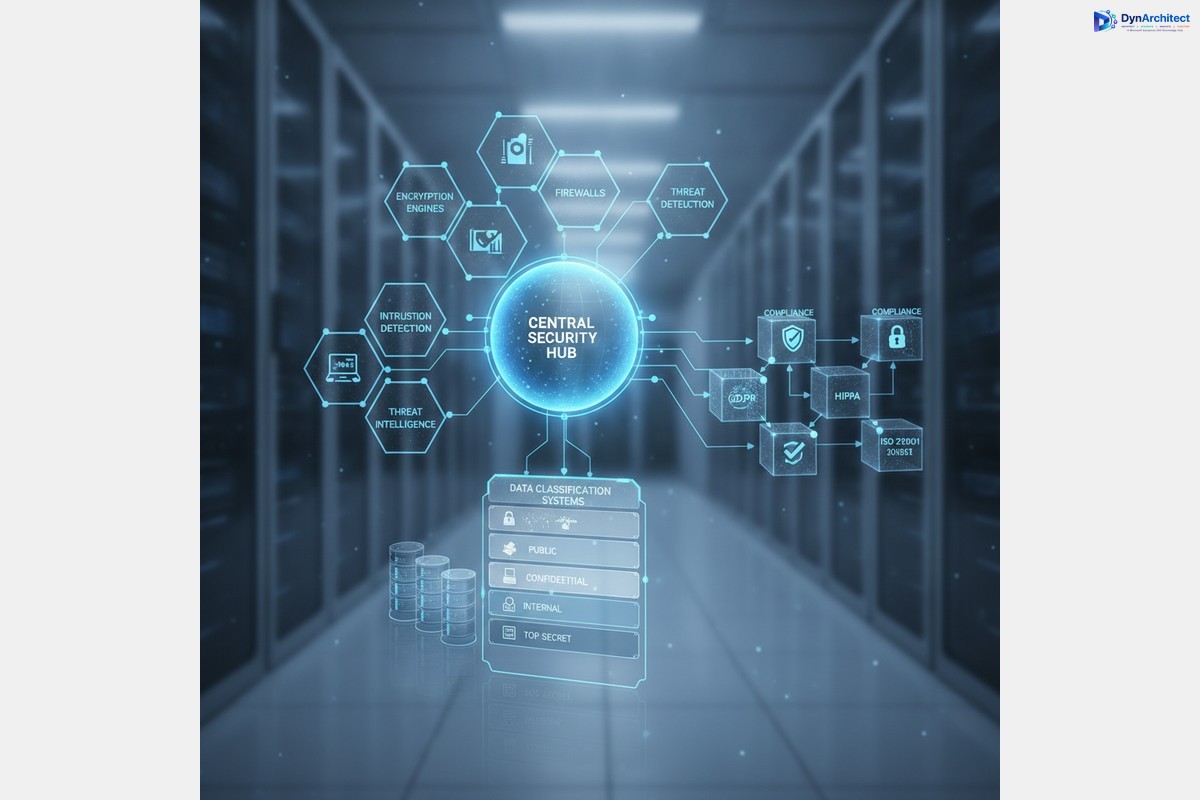
Enterprise data governance dashboard showing Data Loss Prevention policies and security classifications

Data Loss Prevention Policy Implementation in the Microsoft Cloud: Balancing Security and Business Agility

Most IT leaders inherit DLP implementations that operate as expensive friction generators—slow approval workflows, frustrated business units, widespread policy exceptions—rather than effective data protection. The challenge isn’t building DLP capability; it’s building DLP that actually works in practice without crippling business operations.

Dynamics 365, Power Platform, and the broader Microsoft cloud stack move data at volume and velocity that traditional perimeter security cannot monitor. Spreadsheets with customer data flow through Power Automate workflows. Finance teams share GL account details via Teams. Sales consultants upload competitor files to Power Apps. Without intentional DLP governance, sensitive information leaks become statistical inevitability. Yet overly rigid DLP policies drive shadow IT and workarounds that are far less controlled.
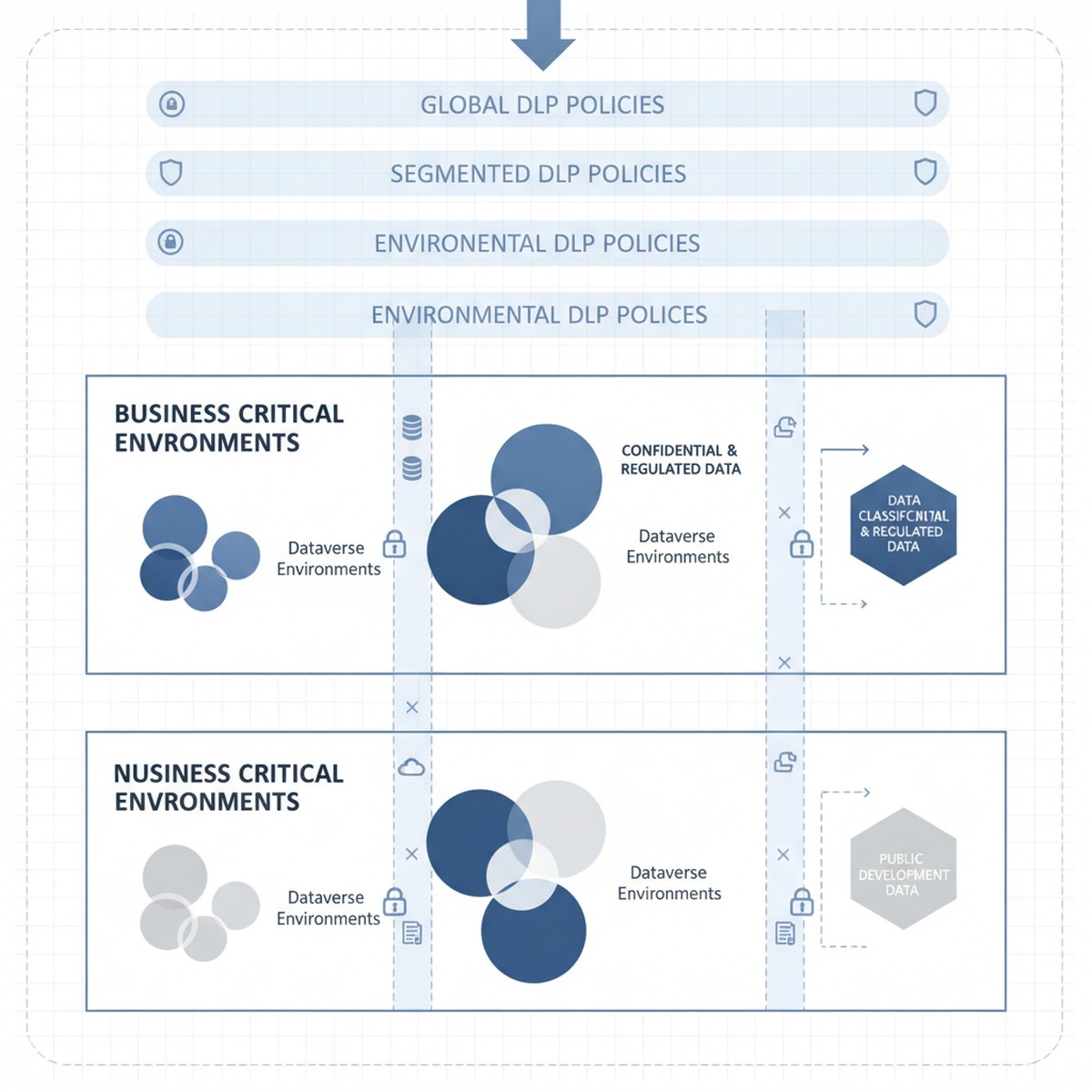
Microsoft cloud security architecture showing Dataverse environments with DLP policy layers and data classification zones

The tension is real: organizations need DLP policies that reduce breach risk and meet compliance requirements without triggering business user revolt. That balance comes from a three-layer approach starting with clear data classification, moving to segmented policy enforcement by workload, and ending with monitoring and exception workflows that catch real breaches without generating approval fatigue.

Understanding Microsoft Dataverse and Power Platform Data Classification

DLP in Microsoft Power Platform starts with a deceptively simple question: what data sensitivity level is stored in this Dataverse environment, and what external services should or should not have access to it?

Every Dataverse environment has an assigned DLP classification set by administrators. Out of the box, the options are “Business” (default), “Non-Business,” and “Unclassified,” each restricting which connectors can be used. An environment marked “Business” cannot call consumer-grade cloud services or public APIs by default. This classification system is the foundation of Power Platform DLP, and many organizations accept it unchanged. That is a mistake.

The actual tension surfaces immediately: a “Business” environment using default DLP classification prevents organizations from using essential connectors. A finance team might need to integrate Power Apps with Stripe for payment processing. A supply chain team needs logistics APIs to track shipments. A sales team needs to send customer records to third-party analytics services. These connectors fall outside default Business classification rules, but blocking them outright prevents legitimate business operations. Conversely, loosening policies to allow these services introduces real data exposure risk—customer payment details flowing to external processors without oversight.

Solving this tension requires abandoning the one-size-fits-all “Business” classification and instead segmenting Dataverse environments by actual data sensitivity and connector requirements. This segmentation becomes the policy framework that supports DLP without strangling innovation.

Segmenting Dataverse Environments by Sensitivity and Connector Requirement

Organizations that manage DLP effectively typically operate multiple Dataverse environments, each with a distinct DLP classification matched to the data sensitivity and connector requirements it actually holds.

Consider a typical enterprise structure: one environment holds Dynamics 365 Finance and Operations data (accounting records, GL accounts, intercompany transactions, supplier information). This is genuinely sensitive data subject to audit requirements and regulatory controls. This environment should be classified as “Business” under a restrictive DLP policy that prevents connectors to external consumer services, cloud file storage, or public APIs. Finance teams access this data through specifically designed Power Apps and Power Automate workflows within DLP constraints.

A second environment holds Power Apps and Power Automate flows that integrate Power Platform with external partner systems—logistics APIs, payment processors, analytics services, and public cloud connectors. This environment accepts connectors to these external services because data sensitivity and use case require it. However, no direct connection to the sensitive Finance and Operations environment is allowed. This environment operates under less restrictive DLP classification because data flowing through it is either lower sensitivity (customer feedback, survey responses, transaction history) or appropriately scoped to external partners.

A third environment is explicitly designated for proof-of-concept work and rapid prototyping. DLP is minimal here because solutions graduate to production environments with full governance only after validation and security review.

This segmentation approach solves the core tension: business users get connector freedom they need, but that freedom is appropriately scoped to environments holding data at the sensitivity level those connectors can safely access. A payment processor connector in the production environment holding Finance data would be irresponsible. The same connector in an e-commerce environment is reasonable.

Implementing Segmented DLP Without Over-provisioning

Segmentation only works when combined with clear governance over which data moves between environments and under what conditions. An organization running multiple Dataverse environments without data movement controls creates the worst outcome: complex DLP policies that block internal workflows and fail to prevent the very data exposure they were meant to restrict.

Governance begins with explicit data classification at the Dataverse table level. Every table in Finance and Operations environments should be tagged as “Highly Sensitive” (GL accounts, supplier data, payroll), “Internal” (historical transactions, internal metadata), or “Public” (product catalogs, customer-facing data). That classification becomes enforceable through data loss prevention rules: a table tagged “Highly Sensitive” cannot be queried by Power Automate flows in non-Business environments. This discipline prevents accidental sensitive data exposure through incorrectly scoped flows.

Second, organizations need exception workflows that actually work. Some business processes require sensitive data to flow to external systems. A customer requesting data export needs records to move outside the enterprise. A third-party audit requires financial table access. Building manual exception workflows—where business stakeholders request exceptions and security reviews them—turns DLP into a shared responsibility. Exception tracking also provides visibility into actual risk: organizations seeing hundreds of requests for sensitive data access learn something valuable about their risk profile.

Monitoring, Alerts, and Real-Time Response

DLP policy design matters, but enforcement and monitoring matter more. An organization with well-designed DLP policies but no monitoring ends up with policies that are either unenforced or inconsistently applied.

Microsoft Dataverse and Power Platform generate audit logs of DLP violations, but by default those logs are difficult to access in real time. Organizations that manage DLP effectively set up automated monitoring through Azure Monitor or Microsoft Sentinel, translating Dataverse audit logs into actionable alerts. A spike in violations from a specific user, a flow attempting repeated queries of sensitive tables, or patterns suggesting data exfiltration should generate alerts that security teams investigate within hours.

Real-time response capability is the difference between DLP as theoretical control and actual protection. When monitoring detects suspicious patterns, the ability to immediately disable Power Automate flows, revoke access to specific environments, or restrict Dataverse tables can interrupt a breach in progress. Without response capability, DLP monitoring is largely forensic—useful for understanding what happened after detection, not for preventing breaches.

Moving Forward: From DLP Compliance Theater to Actual Data Protection

DLP policy implementation is not a one-time project. Organizations that maintain effective data protection continuously adjust policies based on new business processes, security incidents that expose gaps, and platform evolution.

The organizations that manage this effectively treat DLP policy design as a shared responsibility across security, compliance, and business leadership. Policies are transparent—business stakeholders understand constraints and when exceptions can be requested. Exceptions are tracked regularly, signaling whether policies are appropriately calibrated. Monitoring is continuous and actionable, giving security teams real-time visibility into whether DLP policies actually protect data or just generate friction.

When these elements align, DLP stops being a security checkbox and becomes a capability that genuinely reduces sensitive data exposure risk without strangling business operations that depend on data movement and integration.

At Routeget Technologies, we have implemented data loss prevention governance across Dynamics 365 and Power Platform deployments in organizations ranging from mid-market to enterprise. Our approach begins with your current data sensitivity landscape and connector requirements, then builds segmented DLP policies and monitoring infrastructure that protect what matters most while enabling the business agility your teams need.

#DLPGovernance #DataLossPrevention #CloudSecurity #DynamicsCloudArchitecture #PowerPlatformGovernance #DataProtection #ComplianceAutomation #Dynamics365Security #MicrosoftDataverse #EnterpriseCloudGovernance


Dataverse Data Residency and Compliance: The Multi-Region Strategy Most CIOs Miss

Enterprise multi-region Dataverse architecture across geographic zones

Your organization operates in three countries. Your finance team demands European data stays in Europe. Your CFO asks how much you’re paying for redundancy across regions. Your compliance officer flags that your current architecture doesn’t align with the new data sovereignty requirements coming in Q4. And meanwhile, everyone assumes Dataverse handles this automatically because it’s Microsoft cloud.

It doesn’t. And most CIOs don’t realize the gap until they’re months into a Power Platform rollout.

Microsoft Dataverse pricing, architecture, and residency behavior are frequently misunderstood, partly because the documentation focuses on technical capacity and partly because the commercial implications only become visible at scale. Understanding Dataverse data residency is not a technical detail for your architects to worry about. It’s a strategic decision that affects compliance posture, operational cost, licensing efficiency, and your ability to support global operations within existing governance frameworks. Getting it wrong creates cascading problems: expensive data migration projects, compliance violations, or multi-region deployment architectures that cost far more than a thoughtful early strategy would have.

Enterprise multi-region Dataverse architecture across geographic zones

What Dataverse Data Residency Actually Means

Dataverse databases reside in a specific geographic region determined at provisioning time. This region assignment is permanent and cannot be changed after a database is created. Once you provision a Dataverse environment in West Europe, your customer records, inventory ledgers, and sales transactions remain in that region’s data centers indefinitely. Moving data between regions requires export-and-reimport workflows, which means downtime, validation effort, and business disruption.

The region you select during environment provisioning is not the same as the region where your application servers run or where your users are located. A Power App built on a West Europe Dataverse instance can be accessed and used from any geography, and the performance impact of geographic distance is usually negligible for most business applications. But the data itself stays where you provisioned it.

This distinction matters because many organizations assume they can simply create a Dataverse environment and let Microsoft handle residency automatically. They cannot. Residency is a conscious architectural choice made at provisioning time. If you have subsidiary operations in Canada, Australia, and Japan, you need separate Dataverse environments for each, each provisioned in its corresponding region, unless you have an explicit business case for centralizing data in a single region and accepting the compliance and latency trade-offs.

The Multi-Region Strategy: Options and Trade-Offs

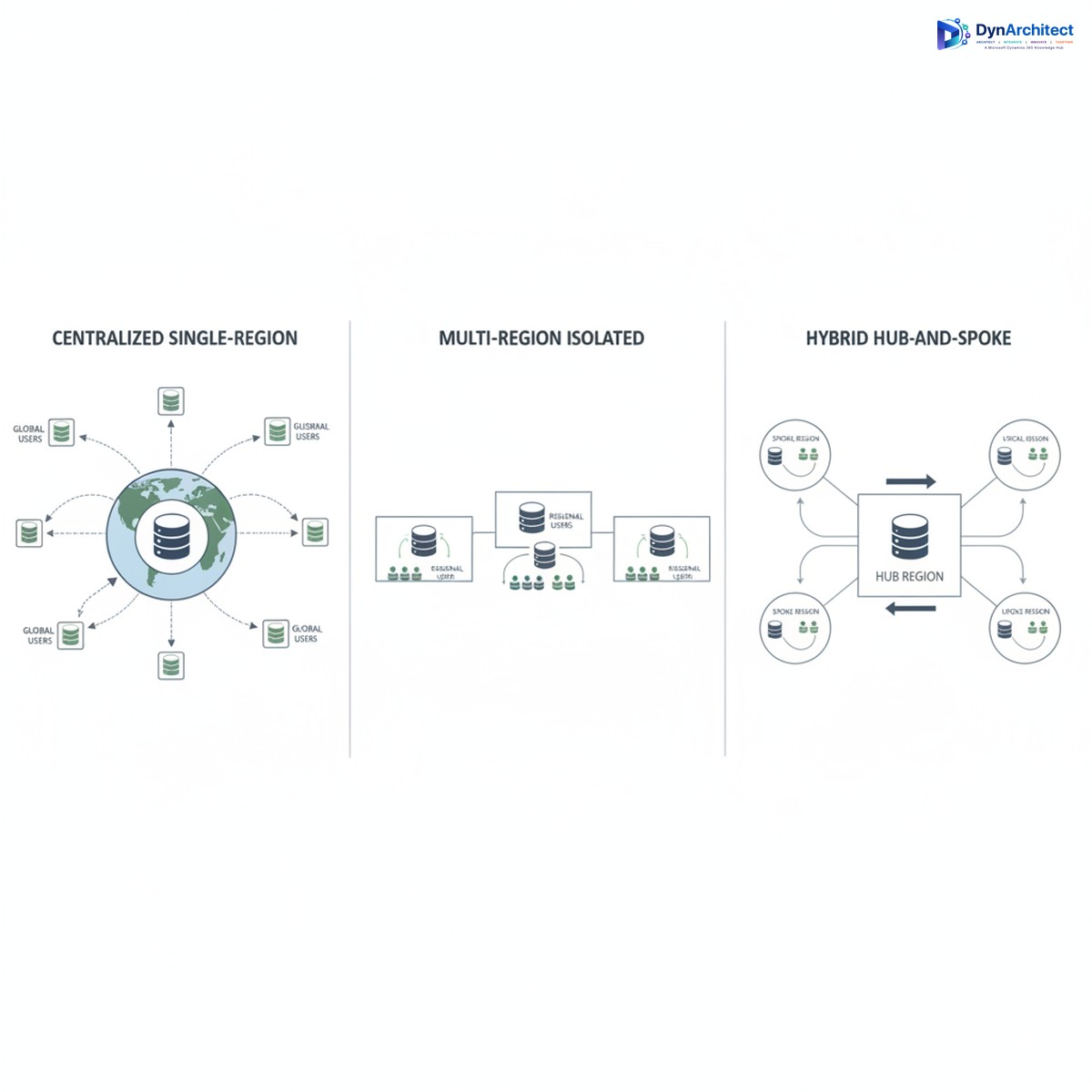
Most enterprises adopt one of three approaches to Dataverse deployments across multiple geographies.

Centralized Single-Region Strategy means all subsidiaries and operations worldwide connect to a single Dataverse environment, usually provisioned in your headquarters region or your primary cloud region. This is the simplest from an architectural standpoint: one environment, one set of security policies, one licensing footprint. All operations use the same datasets, which eliminates data synchronization challenges and keeps organizational data unified. The trade-off is data residency compliance. If you operate in the European Union, storing EU customer data in a US-provisioned Dataverse does not comply with GDPR data residency expectations. Similarly, operations in Australia, Canada, or other regulated jurisdictions may violate local data governance requirements. You also incur network latency for users accessing Dataverse from distant regions, though this is typically 50-200ms and is not a business-critical problem for most transactional applications.

Multi-Region Isolated Environments means provisioning separate Dataverse environments in each major geography, with each environment containing only the data relevant to that region. A subsidiary in Germany operates its own Dataverse instance in West Europe. The Australian operations run their own instance in Australia Southeast. This approach satisfies data residency requirements and places data geographically close to users. The cost and complexity trade-off is significant. You now maintain multiple Dataverse environments, each with its own licensing, security configurations, and data models. Data integration between regions becomes a managed-sync problem: changes to a customer record in the European environment must be synchronized or reconciled with the global master record in the headquarters system, creating operational overhead and potential data quality risks if synchronization logic is not carefully designed.

Hybrid Hub-and-Spoke Strategy means maintaining a primary Dataverse for strategic or shared data (customers, products, organizational hierarchies) in one central region, with subsidiary Dataverse instances handling transactional and regional data separately. Each subsidiary has its own Dataverse for local customer records and operational data, while a central hub maintains the master customer list and product catalogs. This is architecturally sophisticated and requires disciplined data governance, but it balances compliance requirements with operational simplicity. Regional teams operate within their own data residency boundaries, while strategic dashboards and reporting pull from the hub using Power BI or other integration layers.

Comparison of three Dataverse deployment strategies: centralized, isolated, and hub-and-spoke

Licensing and Cost Implications

Many CIOs approach Dataverse licensing by counting total users and calculating a single per-user cost. This misses the actual cost structure. Dataverse licensing includes both user licenses (which grant access rights) and database storage licensing (which charges for actual data volume and database capacity). If you deploy isolated environments per region, you pay licensing for each separate environment. Ten gigabytes of data in a West Europe Dataverse plus ten gigabytes in an Australia Southeast Dataverse means licensing costs for twenty gigabytes of Dataverse storage, not ten.

This becomes material at scale. An organization with one hundred thousand customer records currently stored in a single Dataverse may not realize that splitting this data across three regional environments triples the Dataverse storage licensing footprint if done naively. If that organization also stores copies of data in on-premises systems or other cloud platforms for compliance reasons, the total cost of multi-region strategy can surprise finance teams who expected cloud consolidation to reduce overall data infrastructure spending.

Cost optimization strategies include careful database maintenance (removing obsolete records, archiving historical data), tiered storage architecture (hot data in Dataverse for operational use, cold data in Azure Blob Storage for compliance retention), and thoughtful environment consolidation where data residency requirements genuinely allow it.

Common Implementation Mistakes

Organizations frequently begin Power Platform rollouts with a single Dataverse environment in their primary region, assuming they can add residency strategy later. Months into deployment, when subsidiary operations are using Power Apps tied to that central environment, adding a separate regional environment requires data extraction and rearchitecting application logic to route data to the correct environment. This is expensive and disruptive.

A second common mistake is underestimating data residency requirements. Executives believe “it’s in Azure, so it’s compliant” without investigating whether the specific Azure region and data residency configuration actually satisfy regulatory obligations. GDPR, CCPA, data sovereignty laws, and industry-specific regulations (financial services, healthcare) all have different residency expectations, and “cloud” is not a compliance checkbox.

A third mistake is failing to track data ownership and sovereignty boundaries within a single environment. If you keep all data in a central US region, you still need clear governance about which records belong to which region and why they’re retained in a non-resident location. This is an audit finding waiting to happen if it’s not explicitly documented and justified.

Getting Started with a Residency-First Architecture

Before provisioning your first Dataverse environment, map your organization’s regulatory footprint and data residency requirements by region. Consult legal and compliance teams to understand which data categories are subject to residency mandates and which are not. Typically, customer records and certain operational data carry residency requirements, while master data like product catalogs and organizational hierarchies may not.

Sketch an environment strategy that assigns regions to Dataverse provisioning regions. For most multinational enterprises, this means at least one environment per major regulated geography. Document the business rationale for any exceptions (data categories that deviate from residency boundaries) so you have a defensible compliance position.

Engage your Microsoft partner and licensing team early to calculate the full licensing footprint of multi-environment strategy, including user licenses, database storage, and any advanced feature licensing. Compare this to your centralized baseline so leadership understands the trade-off.

Design your integration layer upfront. If you adopt hub-and-spoke, clarify which systems own each data domain and how synchronization will work. If you use isolated environments, specify how regional teams will access strategic data. This architecture conversation now, before systems are live, prevents expensive rearchitecting later.

Routeget Technologies has guided dozens of organizations through this planning process, helping them balance residency compliance with cost and operational efficiency. What often emerged was that thoughtful architecture early prevented millions in remediation costs later.

Data residency and Dataverse multi-region strategy is fundamentally a business decision, not a technology implementation. The CIO who makes this choice deliberately, in consultation with compliance, finance, and operations leadership, sets up a Power Platform footprint that scales confidently across geographies. The CIO who defers the decision and hopes it works out on its own tends to discover the problem after systems are live and users expect them to keep working.


#DataverseMultiRegion #CloudArchitecture #DataResidency #ComplianceStrategy #CIOGuidance #MicrosoftCloud #DataGovernance

Preventing Unintended Blocks: Implementing Data Loss Prevention Policies Without Paralyzing Your Power Platform

Data Loss Prevention governance dashboard with security controls and policy checkpoints

Data Loss Prevention (DLP) policies in Power Platform sit at an uncomfortable intersection: they’re necessary for governance, but they’re easy to misconfigure so that your first draft breaks legitimate business workflows. Most organizations learn this the hard way, after a DLP policy ships and silently blocks connector calls in production automations. A finance team’s approval workflow mysteriously stops routing to Slack. A sales process can’t write leads to an external data warehouse. Nobody notices until something breaks on a Tuesday afternoon.

The challenge is structural. DLP policies operate at the connector level, not at the individual action level, so a single overly restrictive rule can disable entire classes of integrations across your tenant. The organizations that avoid catastrophic blocks are not the ones that build the most restrictive policies first. They’re the ones that start with a clear map of what data actually needs protection, then craft policies targeting that specific risk rather than trying to lock down anything that looks suspicious.


Understanding DLP in Practice

A Data Loss Prevention policy defines which connectors can share data with each other. You classify connectors as Restricted Data (like SQL Server, Dataverse, SharePoint), Limited Business Use (like Slack, Teams), or General. The policy enforces rules like “data from Restricted connectors cannot flow to Limited Business Use connectors.”

The critical point most organizations miss: these classifications are tenant-wide and apply to all environments unless you create specific overrides. A policy blocking Slack from receiving SQL Server data blocks it everywhere, for everyone. That sounds straightforward on paper, but most organizations have at least a dozen legitimate integrations that move data between categories that look “risky” in isolation. A financial reporting automation sending a Slack summary of daily sales. A customer service workflow pulling account data from Dataverse to an external ticketing system. A sales tool reading opportunities from Dynamics 365 for pipeline visibility.

None of these are data leaks. All would be blocked by an overly broad DLP policy.


Common DLP Mistakes

The first mistake is auditing too aggressively. Many organizations activate DLP in Audit mode to collect data on actual usage patterns without blocking anything. The theory is sound. The practice is crushing volumes of alerts, most false positives or unavoidable business integrations. Teams see 10,000 violations in a month with no systematic way to separate real concerns from critical workflows. They either give up on enforcement or ship a policy based on highest-volume alerts, which usually fails.

The second mistake is confusing audit alerts with actual risks. Not every data flow represents a security problem. A sales team’s external deal tracker is not a breach waiting to happen just because it reads from Dataverse. An approval workflow sending Teams notifications is not exposing proprietary information just because Teams is classified as Limited Business Use. Organizations conflate appearance of complexity with presence of risk, then tighten policies to zero out complexity. This transfers risk to shadow IT. People still move the data they need. If official integrations are blocked, they’ll build their own via Excel and manual uploads.

The third mistake is shipping policies without environment-level testing. DLP policies are tenant-scoped by default, so a broad policy breaks production systems across business units before validation in staging. The correct pattern is testing in specific environments, monitoring real workflow impact, then rolling out to the entire tenant. Executives want company-wide governance immediately, but breaking multiple workflows costs more than a phased rollout.


Building a Working DLP Policy

Enterprise security infrastructure showing data governance and compliance controls

Start with an actual inventory of your integrations, not a theoretical one. Go through your most business-critical Power Automate flows (approval automations, financial data movements, sales processes) and document which connectors they use and what data moves between them. Don’t ask business owners what they think is critical. Inspect the flows. You’ll find integrations that look risky but are actually essential. A manufacturing team’s work order system pulling from Dataverse and posting to an external MES system. A finance team’s journal import flow reading CSV from a web service and loading into Dynamics 365. These would fail under restrictive DLP, and stakeholders will fight when they break.

Second, classify connectors based on actual data sensitivity, not theoretical risk. Dataverse and SQL Server carry genuinely sensitive data and warrant strong controls. SharePoint carries mixed content and needs nuance. Slack and Teams are low-sensitivity by themselves but become sensitive only when receiving restricted data. The mistake is classifying Slack as Limited Business Use, then treating any flow from SQL Server to Slack as violation. That blocks the finance team’s daily sales summary, sales team’s pipeline snapshot, and customer service team’s alert automation. These aren’t leaks, they’re operations.

A better approach is classifying Slack as General for normal use, then building specific policy exceptions for flows that legitimately move summarized data from restricted systems. This requires identifying those flows in advance.

Third, build your initial policy at the environment level, not tenant-wide. Create a restrictive policy for sandbox and development environments. Test your business-critical flows in staging with your proposed tenant-level DLP policy before shipping. You will find your policy breaks something unexpected. Refine the policy, create flow-specific exceptions, or move that flow to a dedicated environment with looser rules. All beat discovering your policy broke production automations.

Fourth, document every policy exception and why. When carving out exceptions for flows moving data between connector categories, write down the business reason, data classification, and approval stakeholder. This prevents exceptions from becoming a free-for-all over time. Each exception should have a clear owner and documented security rationale. Quarterly audits will make sense of your policy instead of inheriting blackbox carve-outs.


Monitoring and Maintenance

Finally, review your DLP policy every quarter. Power Platform gets new connectors regularly. Integration patterns change as teams adopt new tools. A policy from Q1 might be outdated by Q3. Quarterly review catches new patterns, adjusts classifications as you learn more about actual data flow, and retires unnecessary exceptions. Organizations that ship a policy and never touch it end up either too restrictive (silently blocking workflows) or too permissive (defeating the point).

Set up Power BI reporting against Power Platform audit logs. Create dashboards showing DLP violations over time by connector pair, environment, and flow. Most organizations find 80 percent of violations come from a handful of flows or connector combinations. For each, decide: Is this legitimate and needs exception? Is it shadow IT to replace? Or is it misconfigured? Document the decision.

Engage with solution architects and flow owners before violations happen. After quarterly reviews, share audit logs with teams owning business-critical integrations. This conversation prevents surprises and keeps teams aligned rather than feeling DLP is something done to them.


DLP policies are not set-and-forget security controls. They’re part of ongoing governance between your security team, platform team, and business stakeholders. Organizations implementing DLP successfully are not enforcing maximum-security policies. They start with a clear picture of what they’re protecting, build policies addressing that specific risk, and refine them as their integration landscape evolves. That approach is slower than dropping maximum-security on the entire tenant, but it’s the only approach that works in organizations where Power Platform ties directly to business operations.


#PowerPlatformGovernance #DataLossPrevention #DLPPolicy #PowerAutomateIntegration #MicrosoftCloudSecurity #EnterpriseGovernance