Business Central’s Multi-Entity Consolidation: Automating Intercompany Eliminations and Accelerating Month-End Close Cycles

For finance leaders managing consolidated operations across multiple subsidiaries or business units, month-end close becomes exponentially more complex. Intercompany transactions multiply, elimination entries compound, and the coordination overhead among regional accounting teams can extend close cycles by days or even weeks. Business Central’s consolidation capabilities address this directly, turning what is traditionally a manual, error-prone process into a structured, repeatable workflow that reduces timeline pressure and audit risk.

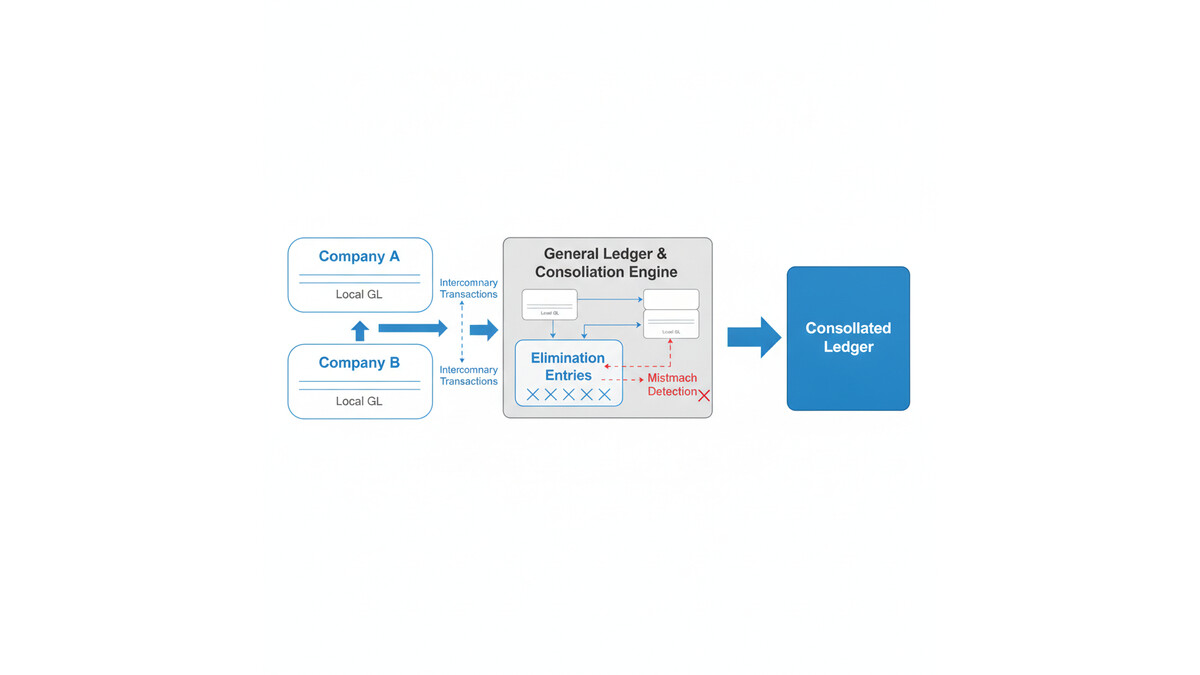
The consolidation challenge in multi-entity environments stems from a fundamental accounting requirement: intercompany transactions must be eliminated from consolidated financial statements to avoid double-counting revenue, expenses, and balances. When subsidiary companies sell to each other, make loans, or share service costs, those internal transfers appear in each entity’s books but must net to zero at the consolidated level. Organizations relying on spreadsheets or manual journal entry processes spend days tracking down which transactions crossed between entities, calculating elimination amounts, and coordinating with multiple accounting teams to ensure each entity’s close is complete before consolidation can begin.

Business Central’s built-in consolidation engine simplifies this by allowing organizations to define intercompany relationships and elimination rules once, then apply them systematically across all monthly close cycles. The result is not just faster close timelines, but higher accuracy and auditability, since every elimination step is documented within the system rather than buried in email chains or spreadsheets.

Setting Up Multi-Entity Relationships

The foundation of Business Central consolidation is the ability to identify which company units participate in consolidation and how they relate to each other. In Business Central, each entity is typically a separate company database, though some organizations implement consolidation across multiple business units within a single company using dimension-based structures. The consolidation process begins by designating one company as the parent and establishing relationships with subsidiaries or operating units. This relationship structure becomes the roadmap for both data collection and elimination logic.

Business Central allows you to define these relationships through the Consolidation Setup and Elimination Rules interfaces. You specify which companies feed data into the consolidated view, whether transactions between those entities should be fully or proportionally eliminated, and what account mappings apply. For organizations with joint ventures or partially-owned entities, this flexibility matters: you can configure proportional consolidation so that an 80 percent-owned subsidiary contributes only its 80 percent portion of assets and liabilities to the consolidated balance sheet, while the minority interest appears as a separate line item.

The account mapping layer is critical because consolidated financial statements often require accounts from subsidiary companies to be remapped or reclassified before they roll up to the parent consolidated general ledger. Business Central’s mapping rules allow you to specify that subsidiary Account 1234 (Local Intercompany Revenue) should consolidate as Account 5001 (Consolidated Service Revenue) in the parent, which streamlines both data integrity and reporting consistency. Many organizations spend weeks manually reformatting subsidiary trial balances to fit corporate reporting structures, but Business Central eliminates that step by automating the mapping during consolidation.

Automating Intercompany Elimination Entries

The heart of the consolidation process is the elimination of intercompany balances. When subsidiary A sells goods to subsidiary B, both companies record transactions: subsidiary A books revenue and receivables; subsidiary B books an expense and payables. At consolidation, these must be eliminated so the consolidated income statement doesn’t overstate revenue or expenses, and so the consolidated balance sheet doesn’t carry duplicate receivables and payables for the same transaction.

Business Central automates this by allowing you to define elimination rules based on account pairs and dimensions. You can specify, for example, that any balance in Account 1200 (Intercompany Receivables) in the subsidiary should be eliminated against a matching balance in Account 2200 (Intercompany Payables) in the parent, or vice versa. The system can also handle more complex scenarios: if subsidiaries buy and sell from each other in a triangular relationship, you define rules that capture each pair of transactions and eliminate them systematically.

The elimination engine runs during the consolidation process, creating elimination entries that net intercompany balances. These entries are recorded within Business Central itself rather than exported to Excel or a separate consolidation tool, which means finance leaders can trace the elimination history, adjust individual eliminations if needed, and generate audit reports showing exactly which transactions were eliminated and why. For organizations that previously managed eliminations through manual spreadsheet reconciliation, this shift to system-based tracking eliminates one of the largest sources of month-end errors and audit concerns.

Consolidation Workflows and Timeline Acceleration

One of the most tangible benefits of Business Central consolidation is the ability to run a structured, repeatable close workflow. Instead of waiting for all subsidiaries to report their closes before beginning manual elimination work, the consolidation process can begin as soon as preliminary subsidiary data is available. Many organizations configure a two-phase close: in Phase One, subsidiaries submit preliminary closes and Business Central generates initial consolidation numbers and preliminary elimination reports. Finance teams review these and request adjustments if needed. In Phase Two, after final subsidiary closes are confirmed, the consolidation is rerun, and the consolidated financials are locked.

This two-phase approach compresses the overall timeline because you identify and resolve intercompany issues earlier rather than discovering them only after the subsidiary closes are supposedly final. It also gives finance leaders visibility into consolidated results days earlier, allowing them to brief the CFO or investor relations team on preliminary numbers while detailed reconciliation continues in the background. Organizations with complex consolidations frequently report that this visibility window alone justifies the consolidation system investment, as it reduces the stress of final-day scrambles to complete consolidated reporting.

Data Integrity and Audit Trail

A secondary but equally important benefit is the audit trail. Regulatory bodies and auditors expect to see documented evidence of how intercompany transactions were identified and eliminated. Spreadsheet-based consolidation processes generate no audit trail; changes are invisible, and it’s difficult to prove that eliminations were appropriate and complete. Business Central’s consolidation functionality records each elimination entry, the rule that triggered it, and the date and user who approved the consolidation run. This documentation directly supports financial audits and regulatory compliance, and it eliminates the common scenario where auditors request detail on a consolidation elimination, and the finance team must scramble to reconstruct the logic from scattered emails or deleted spreadsheet versions.

Implementation Considerations and Best Practices

Organizations moving to Business Central consolidation should anticipate a few practical decisions. First, does your consolidation structure map neatly to Business Central’s company model, or will you need to use dimensions or manual adjustments to capture some relationships? Second, do you have intercompany pricing disputes or approval workflows that must occur before eliminations are finalized? Third, what reporting format do regulators or corporate require, and does Business Central’s consolidation output generate the required schedules natively or with manual tailoring?

Most organizations find that consolidation savings justify a focused implementation effort. A three-subsidiary consolidation that previously took 8 to 10 days typically compresses to 4 to 5 days; larger multi-subsidiary operations see proportionally larger gains, especially as the consolidation becomes routine and refinements are made over the first two to three cycles. Performance improves even further when you build business logic that prevents intercompany transactions from being recorded incorrectly in the first place, such as using intercompany purchase/sales order workflows with built-in validation that ensures subsidiary A’s order to subsidiary B matches subsidiary B’s receipt and supplier invoice.

Practical Path Forward

For finance leaders evaluating Business Central or preparing for a consolidation implementation, the starting point is a clear map of your intercompany relationships and current elimination volumes. Work with your implementation partner to quantify the current cost of manual consolidation: time spent, error correction, audit workload, and management time resolving reconciliation issues. Model how Business Central’s consolidation features reduce that cost. Most implementations recover their investment within the first year through close timeline reduction and reduced month-end overtime. Beyond the first year, the ongoing benefit is consistent month-end cycles and improved visibility to consolidated results early in the close window, enabling faster strategic decision-making at the board and investor-communication level.


About Routeget Technologies: Routeget Technologies specializes in Dynamics 365 and Microsoft Power Platform implementations for mid-market and enterprise organizations. Our finance operations consultants have guided multi-subsidiary consolidation implementations across diverse industries, and we understand both the technical configuration and the change management required to shift from manual to system-driven month-end close processes.

#BusinessCentralConsolidation #MonthEndClose #IntercompanyElimination #FinanceOperations #MultiEntityAccounting #FinancialConsolidation


Multi-Currency Operations and Exchange Rate Management in Business Central: Navigating Global Transactions with Confidence

Business Central multi-currency operations interface

Multi-Currency Operations and Exchange Rate Management in Business Central: Navigating Global Transactions with Confidence

Organizations operating across multiple geographies face a persistent challenge: managing transactions in foreign currencies while maintaining accurate financial reporting in their home currency. For midmarket companies expanding internationally, this challenge intensifies as foreign sales and sourcing become central to revenue and profitability. The cost of financial inaccuracy compounds across months of trading, creating either unexpected write-downs or inflated asset values that misrepresent organizational health to stakeholders and auditors alike.

Business Central addresses this directly through a built-in multi-currency framework that automates both conversions and accounting treatment of exchange rate fluctuations. Unlike manual spreadsheet-based approaches or systems that force workarounds, Business Central integrates currency management with general ledger posting, bank reconciliation, and financial reporting. This keeps your books accurate without requiring manual intervention after each transaction closes or demanding error-prone spreadsheet work during month-end.

Business Central multi-currency operations interface

The Problem With Currency Conversion At Scale

Most organizations begin handling foreign currency informally: receiving invoices in EUR or GBP, converting at the spot rate of the transaction day, and recording the home-currency amount manually. As transaction volume grows, this approach breaks down. Spot rates move daily. Which rate should you use for a purchase order placed Monday but invoiced Friday? When payment occurs three weeks later, the rate has shifted again. By year-end reconciliation, you have multiple rates applied to transactions in the same account with no clear audit trail of which rate was used when or why.

The financial statement impact is equally murky. Unpaid invoices in foreign currency represent unrealized gains or losses as rates fluctuate between transaction date and payment date. Without systematic adjustment, these gains and losses either go unrecorded until payment occurs or are manually estimated in spreadsheets, creating reconciliation risks and audit complications. For auditors and stakeholders reviewing financial statements, the inability to explain the currency position reliably signals weak financial controls over a core operational area.

Finance professional reviewing global transactions

Business Central solves this by enforcing a structured approach: every transaction in a foreign currency is recorded using a defined exchange rate, gains and losses are calculated algorithmically and posted to designated accounts in real time, and the entire history remains queryable and auditable.

How Business Central Structures Multi-Currency Operations

At its foundation, Business Central maintains a currency master file where each foreign currency you transact in is defined with an ISO code and associated exchange rates. You can enter rates manually through its Currency Exchange Rates interface, or configure external feeds to push rates automatically on a schedule you define. This choice affects both the frequency with which rates are updated and the operational overhead involved in maintaining current rates.

When you create a purchase or sales transaction in a foreign currency, Business Central records it using the exchange rate valid on the posting date. The system maintains this rate on the transaction itself, creating an immutable record of which rate was used for which transaction. This becomes critical when adjustments happen, because you can trace every change back to the posting date and its associated rate.

The exchange rate adjustment process, which Business Central runs via a batch job you schedule periodically (monthly is standard practice, though you can run it weekly or more frequently), is where the real financial control emerges. When exchange rates fluctuate between the posting date and payment date (or between posting date and month-end), Business Central calculates the unrealized gain or loss and posts it automatically. These adjustments hit designated accounts in your chart of accounts, which means they flow into financial reporting without manual journal entry and without the risk of being omitted.

For example, consider a 1,000 EUR invoice posted on January 1 at a rate of 1.12, creating a 1,120 home-currency liability. By month-end, the EUR strengthens to 1.125, and you run exchange rate adjustment. Business Central recalculates the liability to 1,125 and posts the 5-unit unrealized gain to your unrealized gains account. Three weeks later, when you actually pay the invoice and the rate is 1.12, the system reverses the unrealized gain and posts the realized loss, so your final cash outflow and gain/loss reflect the actual payment rate. This automation eliminates the reconciliation headache of manual currency adjustments and reduces the risk that period-end close occurs with outdated FX positions still in the books.

Implementation Considerations and Configuration Choices

Implementing multi-currency in Business Central requires deliberate choices about how rates are sourced and how gains and losses are distributed across your organization. The first decision is rate maintenance: will you update exchange rates manually through Business Central’s interface, or will you connect an external service to push rates automatically? For organizations with active trading in more than three or four currencies, automatic feeds significantly reduce operational overhead and eliminate the risk of a forgotten rate update that invalidates weeks of transactions. Business Central supports integration with common data services, and many organizations use this as part of a broader data automation strategy.

The second decision concerns the treatment of exchange rate adjustments across your chart of accounts. Business Central allows you to designate separate accounts for unrealized gains versus realized gains, and to choose whether those accounts roll up by currency, by customer/vendor group, or at the enterprise level. This choice affects how granular your FX reporting can be and what insights finance leaders can extract from the system.

A third consideration is the frequency of adjustment runs. Running exchange rate adjustment monthly is standard and aligns with close cycles, but some organizations run weekly, particularly if they have significant open positions in high-volatility currencies. Each adjustment run is reversible and can be previewed before posting, so running it more frequently carries minimal risk but does create more ledger entries.

For organizations with multiple legal entities, Business Central’s dimension functionality lets you attach currency exposure to any dimensional breakout you define. This means your FX reporting can follow your organizational structure.

Practical Benefits and Financial Outcomes

The operational benefit of Business Central’s multi-currency system is straightforward: it reduces the time and error risk in period-end close. Instead of manually identifying open foreign-currency items, looking up rates, calculating adjustments, and posting them as journal entries, the system does this automatically. For most organizations, this saves 2-5 hours of close time per month and eliminates one of the most error-prone manual steps.

The financial control benefit is more significant. Because all currency gains and losses are posted to the general ledger automatically, they cannot be overlooked. Every financial statement shows currency impacts accurately. For organizations evaluating Business Central against legacy systems, this multi-currency functionality is often a deciding factor, removing a category of financial risk that many organizations accept begrudgingly under their current systems.

Moving Forward

Organizations realizing the most value treat multi-currency not as compliance requirement, but as strategic capability. By maintaining clear system-based visibility into currency impacts, your finance team makes better decisions about hedging, payment timing, and currency-specific pricing strategies. This shifts currency management from necessary accounting chore to competitive tool.

Routeget Technologies helps organizations configure and optimize multi-currency operations in Business Central during ERP implementations and upgrades. If your finance team manages exposures through disconnected tools, or if you’re evaluating Business Central for your specific currency scenarios, we can walk through your environment and demonstrate how the system simplifies this complex area of financial operations.

#BusinessCentral #MultiCurrencyERP #ExchangeRateManagement #FinanceOperations #ERPImplementation #GlobalFinance

Global Payroll Consolidation in Dynamics 365 F&O: When Mandatory Upgrade Meets Your Legacy Salary System

CFOs and Finance Operations leaders managing global enterprises with Dynamics 365 Finance and Operations often inherit complex, multi-country payroll systems built over years of acquisition and consolidation. When Microsoft announces mandatory payroll module upgrades, the panic is real. Your current system handles salary processing across 12 countries in 9 currencies with legally binding tax rules in each jurisdiction. A forced upgrade risks disrupting payroll runs and triggering compliance violations that no CFO wants on their record.

The Payroll Module Upgrade Dilemma

Dynamics 365 F&O payroll has evolved significantly since its introduction. Earlier versions of the payroll module, built on older technology stacks, are being deprecated in favor of a modernized architecture that integrates more tightly with current Human Resources, General Ledger, and Tax Calculation Services. The upgrade is not optional. Microsoft has published end-of-support dates, and after those dates, support contracts expire, patches stop arriving, and your system becomes an orphan.

For most organizations, this timeline feels compressed. The payroll system is not something you can take offline for a two-week migration. Employees must be paid on schedule, tax filings must meet jurisdictional deadlines, and auditors expect clean transaction trails. A payroll upgrade failure doesn’t just hurt IT morale; it creates payroll delays, tax exposure, and employee relations issues that escalate to the CFO’s desk very quickly.

Where Consolidation Starts Making Financial Sense

Many organizations discover during upgrade planning that they have more payroll complexity than necessary. Legacy systems from acquired subsidiaries still run parallel payroll processes. Some countries process payroll in the legacy system and then manually reconcile into F&O. Others have built custom calculation engines in Excel or external tools because the standard payroll module didn’t handle local requirements at the time.

This redundancy is expensive. Each parallel system requires dedicated support, training, reconciliation labor, and audit oversight. When the F&O payroll upgrade forces a modernization moment, many CFOs find that consolidation becomes not just feasible but economical. Instead of re-implementing the old approach in the new payroll module, you can redesign payroll processing around what the modernized module actually does well, eliminate legacy workarounds, and reduce operational complexity in the process.

The question is not just “Can we upgrade?” but “Should we consolidate while we upgrade?”

Technical and Compliance Constraints

The payroll module redesign in Dynamics 365 F&O is substantial. The new architecture integrates more tightly with the Tax Calculation Service, allowing organizations to stay current with tax rule changes across jurisdictions without manual updates. It also supports real-time General Ledger posting, which means payroll accruals reflect in your books immediately rather than waiting for a month-end batch. These are genuine improvements, but they require careful mapping during migration.

Compliance constraints are real. Each country where you process payroll has specific requirements: statutory deductions must be calculated by law, tax filings must use government-mandated formats, and records must be preserved for audit. The payroll module upgrade must maintain compliance across every jurisdiction you operate in. Some countries have limited payroll capabilities even in the modernized module. If you rely on those capabilities, you cannot simply consolidate everything into F&O; you must maintain targeted parallel systems for those jurisdictions and carefully reconcile with F&O.

Currency conversion rules, withholding tax calculations, and pension contribution formulas all vary by country. The new payroll module handles this variability, but configuration is complex and requires deep knowledge of local requirements. Many organizations underestimate the effort needed to get country-specific payroll configurations right during upgrade, leading to post-go-live adjustments that cost more than front-loaded planning would have.

Planning the Consolidation Alongside Upgrade

A successful approach treats the payroll upgrade and consolidation as a single program, not as separate initiatives. Start by mapping every current payroll process: which countries are in F&O today, which are in legacy systems, which are in Excel or external vendors. For each, document the business rules (tax treatment, deductions, gross-to-net calculations), the data sources (HR system, time tracking, benefits), and the downstream processes (GL posting, tax filing, employee reports).

Then evaluate consolidation options. Full consolidation into the upgraded F&O payroll module is ideal from a system management standpoint but may not be feasible for all countries. Selective consolidation where F&O handles core operations and legacy systems remain for countries with limited module support is often more realistic. Some organizations design a hybrid model: F&O runs payroll in supported countries and serves as a hub that reconciles with legacy systems in other jurisdictions.

Build a detailed integration plan. The Tax Calculation Service in Dynamics 365 can handle many jurisdictions natively, but configuration effort is significant. Plan for tax configuration as part of the overall upgrade timeline, not as an afterthought. If you are consolidating from multiple legacy systems, plan for data reconciliation: will prior-year data come into F&O, or will legacy systems remain as historical record? What is the cutover date?

Avoiding Common Pitfalls

Many organizations make predictable mistakes during payroll upgrade and consolidation. First, underestimating configuration complexity. Payroll module configuration for even a single country requires weeks of effort. Global payroll with multiple countries and currencies requires months. Adding consolidation demands on top of upgrade demands extends the timeline further. Plan accordingly and resource adequately. Second, neglecting change management. Payroll teams, HR teams, finance teams, and employees all experience change when payroll migrates. Users accustomed to legacy system workflows will find F&O workflows different. Training and communication matter more than they seem to.

Third, skipping the parallel run. Running old and new payroll systems in parallel for at least one full cycle (monthly for most organizations) allows you to validate that the new system calculates payroll correctly and produces results that match the legacy system (or justify differences). Skipping this step and going live immediately risks discovering critical calculation errors after employees have been paid incorrectly, which creates compliance and employee relations damage.

Fourth, treating consolidation as a technical project rather than a business decision. Whether to consolidate particular countries is a business choice: it trades operational simplification against some loss of local autonomy. This decision should involve Finance Operations leadership and regional business leaders, not just the technical team. Without business buy-in, post-go-live support and change management will be harder.

Beyond the Upgrade: Continuous Improvement

After successful upgrade and consolidation, the payroll system is positioned for easier maintenance and evolution. The modernized module receives quarterly updates from Microsoft that include new tax rules, currency changes, and feature improvements. Organizations can adopt these updates more readily than they could with legacy systems, because the new architecture is designed for continuous change.

From a finance perspective, consolidated payroll also opens opportunity for better analytics. When all payroll runs through a single system and posts to the General Ledger in real-time, Finance teams can analyze labor costs, accruals, and headcount trends more easily and accurately. Payroll becomes less of a back-office compliance function and more of a finance analytics asset.

Next Steps for Finance Leaders

If your organization faces a mandatory F&O payroll module upgrade, the time to plan is now. Engage your Dynamics 365 technical partners early. Perform a comprehensive audit of your current payroll landscape: what systems do you have, what are the compliance and business requirements for each, and where is consolidation feasible? Build a realistic timeline and resource plan. Brief your CFO and business leaders on consolidation opportunities and trade-offs. And plan for adequate parallel-run validation before cutover, no matter how eager you are to decommission legacy systems.

The upgrade is mandatory, but consolidation is strategic. Making the right choice at this inflection point can simplify your finance operations for years to come.


Routeget Technologies helps finance-driven enterprises navigate Dynamics 365 F&O implementations, including payroll consolidation, global tax configuration, and upgrade program management. If your organization is planning a payroll module upgrade, our consulting team can help assess consolidation opportunities and design migration strategies that reduce risk and operational complexity.

#DynamicsFinanceOps #GlobalPayroll #PayrollIntegration #ERPModernization #FinanceOperations #MultiCountryPayroll #PayrollModuleUpgrade

Business Central Multi-Company Consolidation: The Feature Gap Finance Leaders Don’t See Coming

Every CFO implementing Business Central for a multi-entity organization asks the same question within weeks: “Where is the consolidation module?” The answer exposes a gap that often catches finance leadership off guard. Unlike Dynamics 365 Finance & Operations, Business Central has no native intercompany consolidation engine. That feature absence is not a bug or a temporary roadmap item; it is a deliberate design choice rooted in BC’s architecture and target market. Understanding why matters because misreading this reality creates expensive downstream problems that finance teams discover months into a rollout.

Microsoft designed Business Central for the midmarket: primarily single-entity or loosely-coupled organizations. The platform assumes most BC customers either operate a single legal entity or maintain separate database instances per company, with consolidation handled outside the system via Excel, Power BI, or external tools. This works perfectly for a manufacturer with one operating company and a few regional sales offices that don’t require true intercompany transactions. It breaks down immediately when a customer has acquired three subsidiaries, each on their own BC instance, and the CFO’s finance team needs consolidated group financial statements by the first of the month.

The confusion stems partly from BC’s multi-company user interface. Users can navigate between separate companies within a single BC tenant, giving the appearance of a unified system. The reality is different: each company is a separate database schema. Transactions post to separate general ledgers. The multi-company feature is a navigation and reporting convenience, not a consolidation backbone. Finance teams often believe consolidated reporting is one Power BI dashboard away from a solution, only to learn that the data model required for accurate consolidation—elimination entries for intercompany transactions, equity rollforward, minority interests, revaluation adjustments—exists nowhere in BC’s native feature set.

This creates three categories of actual problems that surface during the consolidation planning phase.

The first problem is intercompany transaction elimination. Suppose you have a parent company and two subsidiaries, all on BC. The parent company invoices subsidiary A for management services; subsidiary A invoices subsidiary B for purchased goods. Without a native consolidation module, each invoice posts as a real customer or vendor transaction in the receiving company’s books. During month-end, finance must manually identify these intercompany flows, create reversing entries, and ensure the elimination amounts match across companies. A single unmatched penny means the consolidated balance sheet won’t balance. In organizations with hundreds of intercompany transactions monthly, this becomes a bottleneck that often forces consolidation closes to slip by five to ten days, and the effort eventually drives demand for a dedicated consolidation software license on top of BC.

The second problem is equity and capital structure. BC tracks retained earnings and equity per company, but consolidation requires rolling forward opening equity at the subsidiary level, eliminating the subsidiary’s equity against the parent’s investment in subsidiary account, and calculating minority interests if the parent doesn’t own 100 percent. These calculations are external to BC’s financial reporting model. The CFO’s team either builds them in a separate tool—Power BI, Excel with Power Query, Anaplan, or similar—or manages them manually by GL account. The risk is high: a missed rollforward or incorrect elimination can distort group equity and overstate or understate the parent’s ownership claim, triggering downstream issues in audit, regulatory reporting, and capital plan discussions.

The third problem is revaluation and adjustment transactions. Many multi-entity organizations consolidate in a reporting currency different from local currencies, requiring foreign exchange revaluation adjustments. Some organizations consolidate at a higher price point than operational books, requiring allocation or writeup entries. Some pursue purchase accounting adjustments for recently acquired entities. All of these must be managed outside BC. The more adjustments required, the more likely a consolidation team will abandon BC as the source and instead build a separate consolidation layer in dedicated software, accepting BC as a operational ledger system only.

For organizations that absolutely require native consolidation, the paths are limited. Some choose to consolidate via Power BI Desktop, building the elimination logic in DAX measures and the data model, then publishing consolidated statements to a workspace. This works for companies willing to accept Power BI’s design constraints: limited support for large intercompany matrices, long refresh times if transaction volumes are high, and a reporting-only layer that does not feed back into GL for audit trail purposes. Others select a dedicated consolidation tool such as OneStream, Certent, Tableau, or Microsoft’s own Anaplan. The consolidation software becomes the single source of truth for group reporting, pulling operational data from BC instances and producing the consolidated financial statement. This creates a license cost external to BC, a separate user community, and a need to manage data integration and reconciliation between BC and the consolidation platform.

A third path, less common but increasingly pragmatic, is to implement BC only at the consolidated level and keep subsidiary ledgers in their existing systems. The parent company runs BC and reconciles to the subsidiary ledgers via month-end intercompany settlements rather than consolidating underlying GL detail. This works well for organizations that acquire mature, stable subsidiaries and want a clean integration without forcing migration. It requires a more complex intercompany/intersegment accounting setup in BC but avoids the consolidation feature gap entirely. The parent GL becomes the group GL, and subsidiaries report upward rather than consolidating downward.

The best practice for any organization evaluating BC for a multi-entity structure is to answer the consolidation question before implementation, not during. The CFO’s finance team should clearly define what consolidation means for their organization: Do they need elimination of intercompany transactions? Do they need IFRS 10 consolidation with minority interests? Will they require foreign exchange revaluation? Will they consolidate monthly, quarterly, or annually? Once the scope is clear, BC’s ability to support it is measurable. For organizations needing full consolidation with elimination logic and frequent reporting cycles, a dedicated tool is the right choice. For organizations needing rolled-up reporting from operationally separate entities with limited intercompany transactions, BC plus Power BI often suffices. For organizations running subsidiary ledgers as operational feeds to a parent BC company, BC alone works well. The critical mistake is assuming BC includes consolidation as a standard feature and discovering the gap after implementation begins.

Routeget Technologies regularly advises finance organizations on this trade-off. The organizations that achieve the smoothest multi-entity BC implementations are the ones that separate the operational ledger expectation from the consolidation expectation during vendor selection and architecture planning, rather than treating consolidation as a feature that should simply be there because D365 F&O includes it. BC’s architectural simplicity—what makes it fast and cost-effective for single-entity and straightforward multi-entity scenarios—is also what creates the consolidation feature boundary. Organizations that acknowledge and plan for that boundary find BC delivers real value; those that don’t often end up paying for a consolidation layer they didn’t budget for, installed alongside BC rather than within it.


Hashtags: #BusinessCentralConsolidation #MultiCompanyFinance #ConsolidationStrategy #FinanceOperations #ImplementationPlanning #CorporateFinance #AccountingAutomation

Intercompany Accounting in Dynamics 365 Finance: Why Consolidated Ledger Elimination Entries Don’t Match Subledger Details

Your company’s intercompany transactions balance perfectly within each legal entity. General ledger accounts zero out to the cent when you print a subledger report. But when you run the consolidated ledger elimination process in Dynamics 365 Finance, the elimination entries don’t match the detail you’re looking at, the reports don’t tie back, and your financial close process stalls while the accounting team investigates discrepancies that shouldn’t exist.

This isn’t a rounding error or a posting issue. Intercompany accounting in Dynamics 365 Finance operates on assumptions about how intercompany transactions flow through the chart of accounts, how elimination entries get created, and how consolidated reporting aggregates data across legal entities. When those assumptions don’t align with your actual business structure, transactions don’t eliminate cleanly, reconciliation becomes manual, and the close process loses the automation benefit that makes consolidation work.

How Intercompany Accounting Is Supposed to Work

Dynamics 365 Finance treats intercompany transactions as a special case within the general ledger. When one legal entity (the originating company) records a transaction with another legal entity (the counterparty), both sides record the transaction independently. The originating company records the full transaction amount and an intercompany payable or receivable. The counterparty records the mirror transaction and an intercompany receivable or payable. These two sides are supposed to eliminate when you consolidate.

The elimination process is straightforward conceptually: find all intercompany balances, create offsetting entries to zero them out at the consolidation level, and produce a consolidated financial statement that shows only external transactions. In practice, Finance requires you to identify which accounts are intercompany balances, set up elimination rules, and ensure that the consolidation process knows how to match and eliminate transactions.

Where things diverge from this ideal is in the details of how intercompany transactions actually map to accounts. Finance assumes intercompany receivables and payables flow through specific account structures. If your chart of accounts doesn’t follow that structure, or if your intercompany transactions post to unexpected account combinations, the elimination logic can’t find matching pairs to eliminate.

Consolidated financial reporting process showing intercompany transaction flows and elimination logic

Why Elimination Entries Don’t Match Your Subledger

The root cause usually sits in one of three places: account mapping, transaction routing, or elimination rule configuration.

Account mapping issues: Intercompany receivables and payables need to map to specific accounts that the elimination process recognizes. If your chart of accounts assigns different accounts for intercompany activity than the elimination rules expect, transactions won’t match. For example, if you have intercompany sales recorded against one receivable account but intercompany service fees recorded against another, and your elimination rules only target the first account, service fee intercompany balances persist in the consolidated ledger.

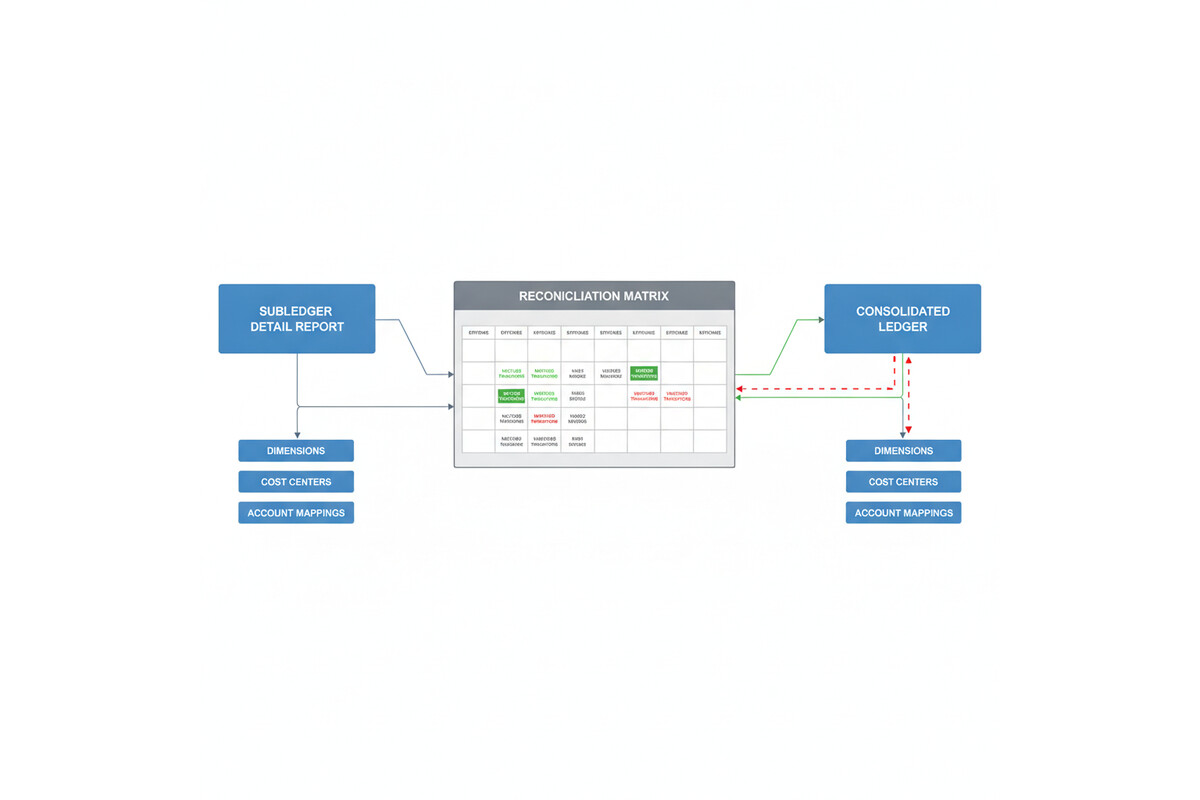
Dimensional mismatch: Dimensions are where intercompany accounting often breaks down in practice. If your originating company records an intercompany transaction tagged with a specific cost center or business unit dimension, but the counterparty company records the mirror transaction without that same dimension combination, the two entries won’t find each other during elimination. The consolidation engine can’t match and eliminate transactions that have different dimension combinations, even if the account numbers and amounts are identical.

Timing and period mismatch: Intercompany transactions posted in one period in the originating company may not be received and matched in the counterparty company until the next period. If you try to run elimination at period-end before the counterparty company has received and recorded the transaction, the elimination process will create a temporary imbalance. This is especially common in month-end closes when one entity’s period ends before another’s, or when intercompany invoices are issued late in the month.

Control account vs. detail account confusion: Many implementations assign intercompany transactions to control accounts in the general ledger but then try to reconcile using subledger detail accounts. Finance’s elimination engine works at the general ledger level, not the subledger level. If the control account total is correct but the subledger detail account distribution doesn’t match what elimination expects, you’ll see reconciliation mismatches.

How to Diagnose the Problem

Start with a simple reconciliation: for each intercompany payable and receivable account, calculate the balance in the originating company’s general ledger, then calculate the mirror balance in the counterparty company’s general ledger. These two numbers should be equal and opposite. If they’re not, the problem is upstream of the elimination process.

If the balances match, the issue is in how the consolidation process is configured. Navigate to the consolidation elimination rules in Finance and verify that the account mappings and dimension rules are set up to match your actual posting. The elimination rules should specify which accounts contain intercompany balances, how they map between legal entities, and which dimension combinations are included in the elimination logic.

A common troubleshooting technique is to export the elimination entries that Finance generated, then manually reconcile them back to the intercompany transactions in your subledger. If the elimination entries don’t match specific subledger transactions, you’ve found the problem: either a transaction posted to an account the elimination rules don’t cover, or a dimension combination that doesn’t align between the two companies.

Intercompany reconciliation matrix showing matched and unmatched transaction entries

Designing Intercompany Accounting That Actually Eliminates

The cleanest approach is to standardize how intercompany transactions post across all legal entities. Define a consistent chart of accounts for intercompany receivables and payables, with the same account numbers used in every legal entity. If you use dimensions to tag transactions, establish a rule that intercompany transactions must be tagged with identical dimension combinations in both the originating and counterparty companies.

Consider whether you truly need dimensional detail on intercompany balances. Many implementations create dimensional complexity that adds no value to the intercompany reconciliation. If cost center assignment doesn’t affect how you manage intercompany payables, don’t require a cost center dimension on those transactions. Simpler account structures mean cleaner eliminations.

Set up a pre-consolidation reconciliation process in Finance. Before running elimination, generate a report of all intercompany balances, grouped by company pair, account, and dimension. Reconcile this to your subledger detail. If discrepancies appear, resolve them before you run the consolidation. This prevents the elimination engine from encountering unmatched transactions.

If you’re running multiple consolidation entities with nested parent-subsidiary relationships, test your elimination logic at each level. A common failure mode is that consolidation works correctly at the first level (subsidiary to intermediate parent) but breaks at the second level (intermediate parent to ultimate parent) because dimension combinations or account assignments drift as you go up the hierarchy.

When to Use External vs. Internal Elimination

Finance supports two elimination approaches: internal elimination (within Finance, using the consolidation module) and external elimination (in a separate consolidation tool or process). Internal elimination is simpler if your intercompany transactions follow a clean, standardized structure. External elimination is more flexible if your transactions are complex or your intercompany relationships don’t fit Finance’s default assumptions.

If you’ve been troubleshooting intercompany eliminations for months and the mismatches persist, it may be worth evaluating whether an external consolidation engine better serves your structure. Some organizations find that moving complex intercompany and consolidation logic to a dedicated consolidation tool reduces the burden on the Finance general ledger and makes the close process more transparent.

Preparation for Implementation

If you’re building an intercompany accounting structure from scratch, start by documenting your actual intercompany flow: which companies transact with each other, what types of transactions (sales, services, loans, expense allocations), and whether dimensional detail is needed on each type. Then design your chart of accounts and elimination rules to match that flow exactly.

Before you go live, run a full consolidation cycle with representative historical data. Create test transactions that cover every intercompany transaction type, post them in both the originating and counterparty companies, and run elimination. Verify that the elimination entries match the transactions you created, and that the consolidated ledger balances correctly. If you find mismatches at this point, you’re catching them before real transactions are in the system.

Assign one person ownership of the intercompany reconciliation and elimination process. That person should understand how the system is configured, have access to the elimination rules and the subledger detail, and be responsible for ensuring the process runs correctly every month. Intercompany accounting has a way of drifting if no one is explicitly in charge of keeping it clean.

Intercompany accounting is one of the places where small configuration oversights create large reconciliation problems. Taking time upfront to design and test your structure eliminates months of frustration during the close process.


Routeget Technologies: Our Finance & Operations consulting team helps enterprises design and implement intercompany accounting structures that consolidate cleanly and close on time, whether you’re building from scratch or fixing an existing implementation that’s struggling with elimination reconciliation.

#IntercompanyAccounting #Dynamics365Finance #FinanceImplementation #ConsolidatedReporting #ERPGovernance #AccountingAutomation #FinanceOperations #Dynamics365Implementation

Project Profitability in Dynamics 365 Project Operations: Why Your Project Margins Fail Without Proper Accounting Setup

Dynamics 365 Project Operations financial dashboard showing project profitability metrics

A professional services firm running Dynamics 365 Project Operations pulls its monthly margin report and finds something that doesn’t match reality on the ground. One fixed-price engagement shows a 60 percent margin despite the delivery team saying they’ve been slammed for weeks. Another time-and-materials project shows a loss even though every hour logged was billed. Nobody misused the system. Nobody entered a wrong number. The transactions are all correct, and the margins are still wrong, because project profitability in Dynamics 365 Project Operations is decided by the accounting setup behind those transactions, not by the transactions themselves.

Dynamics 365 Project Operations financial dashboard showing project profitability metrics

Two Price Lists, One Easy Mix-Up

Project Operations resolves cost and revenue through separate price lists, and the distinction matters more than the name suggests. A cost price list resolves the rates used on cost-type estimate and actual transactions, essentially what a resource actually costs the business. A sales price list resolves the rates used on the billed and unbilled sales side, essentially what gets charged to the customer. Each is set to a context, Cost or Sales, and that context governs how the system looks the record up. Set a list to the wrong context and price resolution simply fails to find a rate where one should exist.

Sales price lists carry another constraint cost lists don’t: they’re locked to the currency defined on the list header, while cost price lists can hold role prices in other currencies through user setup overrides. That asymmetry catches multinational firms more often than it should, particularly when a role price gets added to a sales list in the wrong currency and the transaction silently falls back to a default rate instead of erroring out. Sales price lists also have to be explicitly attached, to a customer’s project price list, a project quote, or a project contract, before they apply to anything; a rate sitting correctly configured but never attached to the contract in play won’t be used. Add date ranges into the mix, since price lists apply based on start and end dates, and a gap between two lists means a stretch of transactions with no applicable rate at all.

Where Margin Actually Gets Decided

Price lists set the numbers going into a transaction. What happens to those numbers on the ledger, which is what actually produces a margin figure, is governed by a separate configuration object: the project cost and revenue profile, found under Project management and accounting, Setup, Posting. This is the part of the setup that gets underinvested in relative to how much leverage it has over reported profitability.

The ledger settings on a profile decide, transaction type by transaction type, hour, expense, item, whether costs post straight to the profit and loss statement or sit on the balance sheet as work in progress until someone runs a separate posting step. They also decide whether on-account, milestone-based invoicing lands in a balance account or a P&L account, and whether unbilled revenue gets accrued to the general ledger at all. None of these settings are visible on the transaction itself. A time entry looks identical whether its hours are configured to post immediately or to wait in WIP, which is exactly why a wrong setting here doesn’t throw an error. It just quietly changes what shows up as margin.

Finance professional reviewing project accounting and cost allocation data

Fixed-Price Work Needs Its Own Logic

Time-and-materials projects recognize revenue roughly as work happens, so the profile settings above cover most of what matters. Fixed-price projects need an additional layer, because the billing schedule and the actual delivery pace are two different things, and the whole point of the accounting setup is to keep them from contaminating each other. Project Operations offers three methods here. Completed contract holds all revenue and cost recognition until the project finishes, carrying everything as WIP in the meantime. Completed percentage accrues revenue periodically based on how much of the project is actually done, using cost templates to group transactions for the percentage-complete calculation and period codes to set how often that calculation runs. No WIP skips the deferral entirely and is meant for short engagements where invoicing and cost recognition happen close enough together that deferral adds nothing but complexity.

A firm running long, milestone-heavy fixed-price engagements under a “no WIP” setup, because that was the default nobody revisited, will see revenue and cost recognized in whatever period the invoice happens to fall in rather than the period the work actually happened in. Margins swing from project to project not because delivery efficiency is inconsistent, but because the accounting method assumes short-cycle work being applied to long-cycle contracts.

Five Specific Ways This Goes Wrong

A handful of misconfiguration patterns show up repeatedly enough to be worth naming directly. A billing method mismatch, where time is set to fixed-price logic on what’s actually a time-and-materials engagement, or the reverse, throws off exactly when hours or expenses hit revenue relative to when they’re billed. A missed manual step is just as damaging: when hour or expense costs are set to post to a balance account rather than profit and loss, someone has to run the “post costs” function to move them into P&L, and if that step is skipped, costs simply never show up against revenue, producing a margin that looks better than it is. A mismatched revenue recognition method does similar damage from the other direction, completed contract selected on the profile while revenue is somehow still being accrued on a monthly cadence, which mismatches costs and revenue by period and makes margins swing without any real change in delivery.

The accrual settings create a subtler trap. Revenue accrual turned on for a time-and-materials engagement whose cost posting is set to “no ledger” produces transactions where revenue is recognized but the matching cost is never posted anywhere, which can show as a margin approaching 100 percent on paper. And on-account invoicing routed to a profit and loss account instead of a balance account recognizes milestone billings as revenue immediately, ahead of the delivery they’re meant to represent, front-loading margin into whichever period the invoice happens to land in.

Getting Project Profitability Right Before the Numbers Matter

None of this is complicated once it’s named, but it has to be checked deliberately rather than assumed. Start by confirming which billing method, time-and-materials or fixed-price, is actually assigned to each active profile, and cross-check that against how the contracts using that profile are actually structured. Walk the ledger settings for each transaction type and confirm someone owns the recurring job of running the “post costs” function if any type is set to balance posting, since that step doesn’t run itself. For fixed-price work, match the recognition method to the actual shape of the engagement rather than the platform default, short and simple work can reasonably use no WIP, but anything spanning multiple billing cycles needs completed percentage with cost templates that actually reflect how the project’s cost mix is structured. Finally, verify that profile assignment rules, by contract, project group, or individual project, are actually routing each engagement to the profile that matches how it’s billed, since a firm running several contract types often has profiles that were configured correctly once and then silently misapplied as the portfolio grew.

Routeget Technologies has walked in behind project-based businesses whose delivery teams were being blamed for margin problems that turned out to live entirely in the posting configuration, not the work. Reconciling that gap usually takes a focused audit of the profile settings against a sample of actual contracts, not a re-implementation, and it tends to be one of the highest-leverage half-days a Project Operations environment can spend.


#ProjectProfitability #ProjectAccounting #ProjectOperations #RevenueRecognition #WIPAccounting #CFOStrategy

Dynamics 365 Finance Month-End Close: Why Manual Review Processes Eat Three Weeks of Your Finance Team’s Time

Dynamics 365 Finance month-end close dashboard with reconciliation and approval workflows

Your CFO expects the month-end close to take five business days. Your finance team knows it will take at least three weeks, if nothing breaks. Neither estimate is wrong, but the gap between them exposes a concrete operational problem that Dynamics 365 Finance can address—if you design the close process deliberately rather than simply importing Excel workflows into a new system.

The root cause isn’t Dynamics 365 Finance’s fault. It’s that most organizations have never mapped the actual work their finance team performs during month-end close, and they transfer that unmapped work directly into D365 Finance, where the same manual reviews and exception-handling steps consume the same time, just now in a new interface. This article walks through the hidden work that extends close cycles and the specific D365 Finance capabilities that can compress it without sacrificing control.

The Hidden Work in Month-End Close

Finance teams perform three categories of work during month-end close: transactional, reconciliation, and review and approval. The first category moves quickly in Dynamics 365 Finance because transactional posting, reversal, and period closing are automated. The second category, reconciliation, is where most organizations find that D365 Finance has given them new tools but not a fundamentally different process. The third category, review and approval, is where the real bottleneck sits.

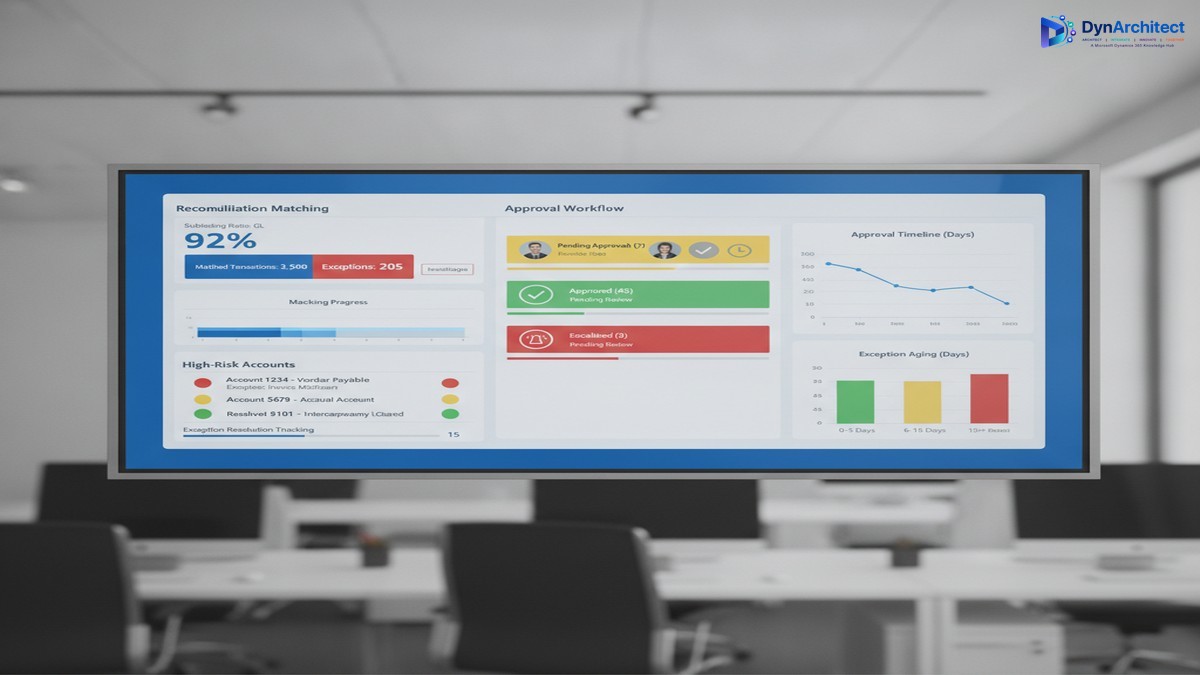
Reconciliation requires matching subledger balances to the general ledger and resolving differences. In Excel, this meant exporting general ledger data to a spreadsheet, exporting subledger data to another spreadsheet, and then manually or with crude formulas, finding and categorizing exceptions. In Dynamics 365 Finance, you have automated reconciliation matching, but it still requires manual exception review if a transaction doesn’t auto-match due to timing, rounding, or data misalignment. Many organizations don’t implement the reconciliation matching engine at all, and instead build custom reconciliation reports that they then export and manually review in Excel. That defeats the purpose. Organizations that do implement reconciliation matching still need a process to review and approve the remaining exceptions. If your exception resolution process is ad-hoc (email threads, informal approvals, updates made directly to the database by whoever has time), month-end close becomes a game of whack-a-mole where resolving one exception creates new work elsewhere.

The review and approval stage is where time collapses. At this stage, the close is technically complete from a system perspective—all journal entries have posted, all subledgers have been reconciled, and all accounts have been reviewed—but finance leadership has not yet signed off. This is where your CFO’s five-day close hits the wall. The approval process usually means compiling reports, distributing them via email, waiting for responses, and manually tracking who has signed off and who is still reviewing. If a reviewer finds an error, the journal entry gets reversed, the approver list gets longer, and the cycle starts again. If multiple reviewers work simultaneously without a structured change-control process, they may unknowingly create conflicting updates.

Dynamics 365 Finance month-end close dashboard with reconciliation and approval workflows

Why Dynamics 365 Finance’s Tools Don’t Automatically Solve This

Dynamics 365 Finance has features that address each of these stages. It has reconciliation matching for subledger-to-GL matching. It has a journal approval workflow that routes entries to approvers. It has role-based security so that only authorized users can post to specific accounts or cost centers. But implementing these features doesn’t automatically translate to a faster close if the underlying process is not designed first.

The most common implementation pattern is this: the team implements D365 Finance features directly as they exist, with minimal process redesign. The reconciliation matching engine gets enabled but with no workflow for resolving exceptions. The journal approval workflow gets configured but with a long approval chain that mirrors the existing email-based approval process—five to ten approvers in sequence, each seeing the full entry list and taking days to respond. The role-based security gets configured but not used strategically to separate data entry from approval, so reviewers still spend time wading through draft entries they didn’t create.

The result is that Dynamics 365 Finance executes the existing process more efficiently at the transactional level but doesn’t reduce the actual elapsed time, because the transactional work was never the bottleneck. The bottleneck is the manual review and approval stage.

Structural Changes That Compress the Close Without Cutting Corners

Three structural changes to your close process, combined with deliberate use of D365 Finance features, can reduce elapsed close time from three weeks to ten to twelve business days while improving control and auditability.

The first change is to separate data entry from approval. Assign data entry (journal posting, subledger reconciliation, exception resolution) to one team and approval to another team that has not touched the data being approved. This isn’t a new idea, but Dynamics 365 Finance makes it operationally feasible. Your reconciliation team can mark exceptions as resolved in the reconciliation matching workspace, but the approval team (the controller, the finance director, or a designated approval group) can see which exceptions were resolved and review them before the general ledger is locked. By structuring permissions so that data entry users cannot post approved entries directly, and approval users see only high-level summaries plus exceptions, you cut the time approvers spend searching for relevant data. A 30-minute approval review of 500 transactions becomes a 10-minute review of 12 exceptions.

The second change is to compress the approval chain. Instead of sequential approval (entry review by the subledger owner, then the cost center manager, then the controller, then the finance director), design approval stages in parallel when possible and in short sequence when approval must be serial. Most organizations can reduce approval stages from five to three without sacrificing control. The subledger owner approves their subledger reconciliation in the reconciliation workspace. The controller approves all entries and reconciliation exceptions at once, using a dashboard that shows high-risk accounts and exceptions flagged by the reconciliation matching engine. The CFO reviews a summary and sign-off letter rather than individual entries. This parallel-where-possible, serial-only-where-necessary structure typically reduces approval cycle time from eight to ten days to two to four days.

The third change is to automate exception escalation. If an exception is not resolved within a specific time window (for example, three days after period end), Dynamics 365 Finance can send an automated alert to the responsible approver. This prevents exceptions from sitting in a queue and blocking closure. The escalation alert also creates an audit trail—it records when the exception was identified, when the alert was sent, and when it was finally resolved. This audit trail is exactly what your auditors want to see, and it removes the need for a manual exception log that has historically been built in Excel and updated sporadically.

The Realistic Implementation Timeline

These changes require careful process design before the configuration work begins. A typical implementation that adds close-process automation to an existing D365 Finance deployment takes three to four months. The first month is spent mapping current close processes, identifying where exceptions occur most often, and defining the data risk thresholds that trigger approval. The second month is spent building the reconciliation matching rules, configuring the approval workflow, and setting up the exception escalation alerts. The third month is spent running parallel close cycles (the old manual process running alongside the new D365 Finance process) so your finance team can validate that nothing is being missed. The month-end close itself becomes faster immediately, but the real efficiency gain comes in the fourth and fifth close cycles, after your team is comfortable with the new workflow.

The cost of this implementation is not primarily in configuration—it’s in the time your finance team spends away from month-end close activities while the process is being redesigned and validated. Expect to allocate one senior accountant and one finance operations person for two to three months. Expect also that your close process will feel slower for the first month or two after go-live, because your team is learning new workflows and validating that every exception has been captured and resolved. This is normal, and it is not a sign that the implementation has failed.

Making the Business Case to Leadership

The case for process redesign around month-end close is straightforward for a CFO: it frees up your most experienced team members from manual review work so they can focus on analysis, forecasting, and planning. It compresses the time it takes to close the books, which gives leadership three extra weeks per quarter to make decisions based on actual financial results rather than waiting for the close to complete. It creates an audit trail for month-end close activities, which strengthens your internal control environment and simplifies external audits. It reduces the error rate in close processes because exception resolution is now tracked and validated rather than handled ad-hoc.

The cost is three to four months of implementation effort plus the finance team’s time during the redesign phase. The benefit is a close process that runs three to four days faster and a finance team that spends ten to twelve fewer days per month on manual reconciliation and approval work. Over the course of a year, that’s enough time for your finance team to take on strategic work that they couldn’t fit before.

Month-end close doesn’t have to be a three-week sprint every month. It can be a structured, partially automated process that your finance team completes in two to three weeks while also having time to analyze variances and support the business. The tooling exists in Dynamics 365 Finance. The missing piece is usually a deliberate process design that aligns the close workflow with your organization’s risk tolerance and approval structure.


About Routeget Technologies: Routeget Technologies helps mid-market and enterprise organizations streamline financial operations with Dynamics 365 Finance. If your finance team’s close process is consistently running longer than expected, contact us for a process assessment that identifies where Dynamics 365 Finance can reduce manual work without cutting corners on control.

#DynamicsFinance #MonthEndClose #FinanceTransformation #FinanceOperations #CFOStrategy #DynamicsImplementation